


Minus Front
Known Participant
May 20, 2022

P: Photoshop consuming INSANE amounts of RAM when using Perspective Warp as Smart Filter

  • May 20, 2022
  • 19 replies
  • 3137 views

i have 16GB RAM on my PC + 8GB of GPU. Adobe is set to use 70% of that ~8.5GB. 


I have gone through their support page Optimize performance Photoshop (adobe.com) but nothing helps!


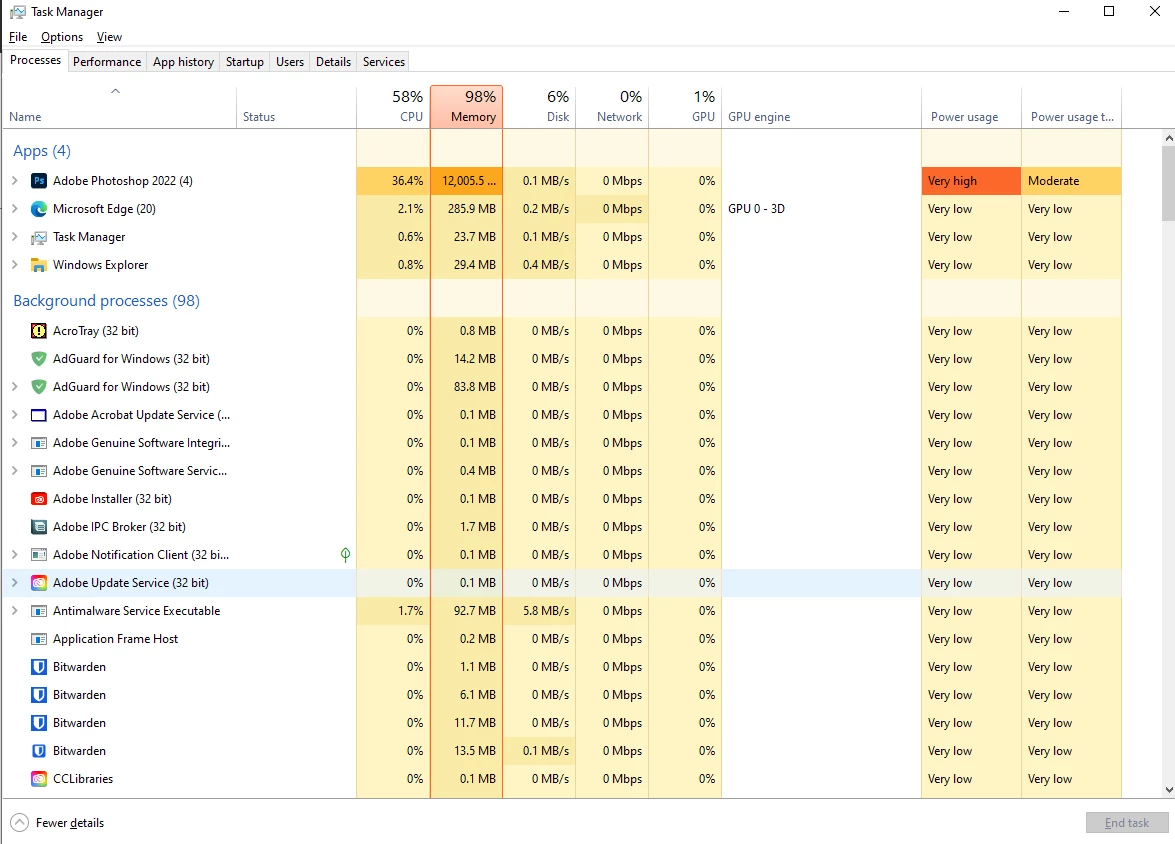
Photoshop used to work great until recently but I came back to it this week and using simple tools such as the Perspective Warp and others makes it use 12GB of RAM (see below) and freeze. My documents arent really all that big.


I have tried re-installing photoshop but it is not helping! I have the latest version 23.3.2


Help please I cannot use this programme as it is!


Thank you
 

This topic has been closed for replies.

19 replies

Legend
May 21, 2022

I can reproduce the issue using Perspective Warp as a SmartFilter using your file. Will ask engineering to take a look. 

Minus Front
Known Participant
May 20, 2022

hi jeffrey. 


its not just the perspective warp. random tools or actions will trigger this high RAM spike.


i am attaching the before and after, as well as a link to the file in question.


to replicate, just try and copy + paste in place the top layer. or create a new object and try to warp it into the box:


https://1drv.ms/u/s!Asxa4Bnb9TIJhsV9vjrZo2WXgY7F3A?e=hc8OYh


Legend
May 20, 2022

I'm not really sure why you're seeing such high RAM usage.


Could you share a PSD file, along with steps for which layer you are perspective warping? Take a snap shot of Task Manager right after you open the PSD and then after you do the perspective warp. I'll try the same steps here and we can compare results.

Minus Front
Known Participant
May 20, 2022

the question really is WHY photoshop needs 12GB of RAM to apply a simple perspective warp?? specially when it is supposed to be capped at 8.5GB


my system can run high end GAMES at a fraction of that RAM. 


there is something seriously wrong with this software. i am not trying to simulate nuclear explosions...


Minus Front
Known Participant
May 20, 2022

ok turns out that reverting the the previous version didnt work after all. 


it did alleviate the issues somewhat but it's unusable.


i have followed your advise and disabled those gpu settings but the problem persists. 

Minus Front
Known Participant
May 20, 2022

ok found how to disable automatic updates. will report if i still encounter issues. 

Minus Front
Known Participant
May 20, 2022

found the multithreaded setting. its enabled. 

Minus Front
Known Participant
May 20, 2022

Hi Jeffrey thank you for the reply. 


so i reverted back to the previous version 23.3.1 and it seems to be working well again!!


how can i disable automatic updates? 


i am sure the new version is to blame because i never messed with the default settings in the past and it always worked fine. came back to it this week and it's been a nightmare. 


i have opencl, antialias and gpu composting enabled right now. i cannot find the multithreded compositing setting though


thank you

Legend
May 20, 2022

Go to Preferences > Performance... and uncheck both Multithreaded Compositing  and GPU Compositing - then restart Photoshop. Does the problem still occur?