


Inspiring
April 28, 2022

P: Photoshop freezes when changing grid via action without setting subdivisions

  • April 28, 2022
  • 3 replies
  • 5487 views

I've got several actions that switch my grid parameters in Photoshop. I noticed with the latest Photoshop version, that running actions that do not contain an entry for subdivisions lead to Photoshop freezing. In the example in the screenshot, the actions GridSize 20 and GridSize 32 work fine, but running GridSize 64 leads to a freeze every time. I tried narrowing it down, and setting the grid color has no effect, but once you leave out the setting for subdivisions in the action, the crash occurs.
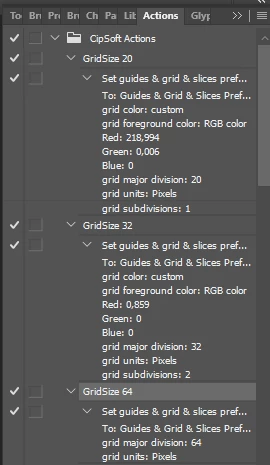
 

Using Photoshop 23.3.1 and Windows 10.

This topic has been closed for replies.

3 replies

Mohit Goyal
Community Manager
Community Manager
June 14, 2022

Hi all,


We're happy to announce the release of Photoshop 23.4. This update includes the fix for this issue. To see the list of all fixed issues, click here


To update Photoshop to 23.4, click "Update" in the Creative Cloud desktop app next to Photoshop. More detailed instructions for updating


Let us know if the update resolves the problem for those affected, and share your feedback.


Thanks,

Mohit

Legend
April 29, 2022

Thanks! I think I figured it out. Grids need to be visibile for it to fail. I've asked engineering to take a look. 

Legend
April 29, 2022

Could you share your ATN file that exhibits this behavior? Use CC files or dropbox to share a download link.