



vladinir37492500kny1
Participating Frequently
June 15, 2026

P: Photoshop object selection/deletion in Cloud stops finding objects on Windows

  • June 15, 2026
  • 5 replies
  • 91 views

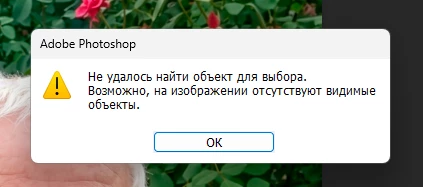
 selection and deletion of objects are done on the device or in the cloud, but the device has not been working for six months, so I use the cloud version. However, now the cloud version starts the search slider, and after a couple of seconds, it displays that no objects have been found
 

    5 replies

    vladinir37492500kny1
    Participating Frequently
    June 16, 2026

    It started working today

    defaultg586pio3zcmp
    Participant
    June 15, 2026

    Experiencing the same issue here.

    Srishti Bali
    Community Manager
    Community Manager
    June 15, 2026

    Hi ​@vladinir37492500kny1 ​@oliver1978 ​@enugandula 


    Sorry to hear you're experiencing this issue. To help us investigate further, could you please share the following details?

    • Photoshop System Info: In Photoshop, go to Help > System Info, click Copy, and paste the entire report here.
    • When did the issue start? Have there been any recent changes to your system, such as:
      • Operating system updates
      • Photoshop or Creative Cloud updates
      • Installation of antivirus software
      • New plugins, extensions, or other software changes
    • Is the issue specific to a particular file? If so, please share a sample file so we can test it on our end.
    • If the issue occurs across multiple files, I recommend resetting Photoshop preferences after creating a backup of your current settings. You can find the instructions here:. Manually reset preferences


    Looking forward to your response!

    Thanks, Srishti Bali | Community & Engagement Strategist, Digital Imaging | Adobe
    vladinir37492500kny1
    Participating Frequently
    June 15, 2026

    I didn't install anything, didn't update anything, and it doesn't work with all files

    System report: https://pastebin.com/E9GapuPM

    Srishti Bali
    Community Manager
    Community Manager
    June 15, 2026

    @vladinir37492500kny1 Thanks for sharing the details. I tested this on my end using a Windows 11 machine and was able to use Select Subject from the Contextual Task Bar without any issues.

    Could you please let me know if you're following a different workflow or using a different method when the issue occurs?

    In the meantime, I am raising this as a bug with the product team for further investigation, as multiple users have reported similar behavior. It would be very helpful if you could share a short screen recording demonstrating the issue.

    For your specific case, I noticed that you're using an older AMD graphics driver. Please update the driver to the latest version, as keeping GPU drivers up to date is important for optimal Photoshop performance and compatibility.

    Also, please let me know if resetting Photoshop preferences helps resolve the issue.

    Thanks, Srishti Bali | Community & Engagement Strategist, Digital Imaging | Adobe
    enugandula
    Participant
    June 15, 2026

    Couldn't find a subject to select.
    There might not be prominent objects in the
    image.
    OK

    vladinir37492500kny1
    Participating Frequently
    June 15, 2026

    what?

    oliver1978
    Participant
    June 15, 2026

    the same exactly… the subject selection doesn´t work now either. 😓