


Revenga
Known Participant
March 7, 2017

P: Photoshop unusable for 3 minutes after drag-drop layers from another document!

  • March 7, 2017
  • 7 replies
  • 298 views

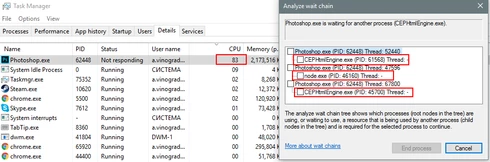
Photoshop CC 2017.0.1 20161130.r.29 unusable for 3 minutes after drag-drop layers from another document!


http://service.crazypanda.ru/v/clip2net/a/W/f5zW4FcfBf.png

This happens every time when you drap and drop layer into this document.

Here is the document itself:
https://dl.dropbox.com/s/ygmmatnr3g108c9/uikit_3.psd

This topic has been closed for replies.

7 replies

Legend
March 25, 2017

Fixed in 20.0 or later.

Revenga
RevengaAuthor
Known Participant
March 23, 2017
bump
Revenga
RevengaAuthor
Known Participant
March 21, 2017
As you see it's your node server is in a wait queue and CC Libraries frontend also. So it seems I have nothing to do with GPU drivers (also it's up to date)

Here is Drag&Dropped layers asset
https://adobe.ly/2nEW8c2

How to reproduce:
1) Ensure that File > Generate > Image Assets is active and assets are generating.

2) Choose any layer ant the bottom of Icons artboard.

3.a) Try to drag&drop a layer group that causes the regeneration of all assets in all artboards. I've figured out it's something with a color or pattern layer clipped by another layer. 


3.b) Try to Alt+drag&drop layer from CC Library panel with the same composition as mentioned above.

4) Then undo it or delete dropped piece.

5) After several times PS becomes irresponsive because of node.js processing. 
Legend
March 16, 2017
Hi Alexander, I'm not able to reproduce what you're seeing. Dragging and dropping a layer to this file is instantaneous. Is Photoshop, the CC app and your graphics driver up to date? https://helpx.adobe.com/photoshop/kb/basic-troubleshooting.html
Revenga
RevengaAuthor
Known Participant
March 16, 2017
bump
Revenga
RevengaAuthor
Known Participant
March 16, 2017
bump
Revenga
RevengaAuthor
Known Participant
March 9, 2017
bump