


Inspiring
December 2, 2015

P: Preview only toggles once during action

  • December 2, 2015
  • 15 replies
  • 455 views

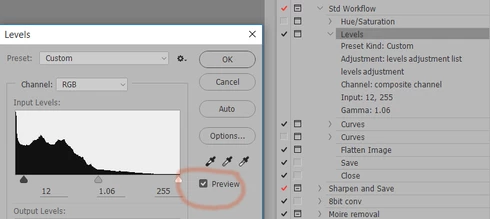
When using levels, curve etc within an action - the preview toggle only works once. The action has a pause so we can manually amend each adjustment. You are now unable to toggle preview on and off repeatedly. The only way to toggle between the two states is to change the settings within the control. It'll then toggle once again between states.
Photoshop 2015.1 (20151114.r.301 x64)
Brand new top spec PC i7, 32Gb ram, win10 et al
This topic has been closed for replies.

15 replies

Inspiring
January 29, 2016
the same issue occurs when using APPLY IMAGE during an action:
the preview toggle only works once!
So it's no more possible assessing the impact of the width of adjustments.
In fact: an action is no longer an option for this great feature APPY IMAGE.

24 years it has worked well, until now.
If this bug isn't gonna be fixed soon, I'll go back to an early 2015 CC Version. Actions for APPLY IMAGE are essential components of my workflow conception.
Inspiring
January 28, 2016
I've discovered the same issue since updating a few days ago. Makes the functionality useless if it's not a bug.
Inspiring
January 26, 2016
I am having a similar issue with the preview button not working for HDR Toning, as written up here: http://feedback.photoshop.com/photosh...

How do I get someone at Adobe to look at my bug and recreate it? Thanks
Inspiring
January 9, 2016


I run an action, where an Adjustment Layer > Levels is beeing executed with dialog turned on activated in actions panel.
The dialog box pops up.
I now click "Auto" and then turn off "Preview" to see the difference.
Now I see the original image without adjustment effect.
If I now try to turn on preview, nothing happens. I don't see the adjustmentlayer effect.
Bug?
Inspiring
December 28, 2015
I did not see this in 2015.1 but I sure am seeing this with any adjustment dialog in 2015.1.1. Luckly I still have 2014 on this machine so I can use that.

This bugs makes 2015.1.1 pretty near useless for image editing adjustements.