


otrokhim
Known Participant
March 27, 2020

P: Problem changing canvas size inside the smart object ruins the smart object

  • March 27, 2020
  • 29 replies
  • 2351 views

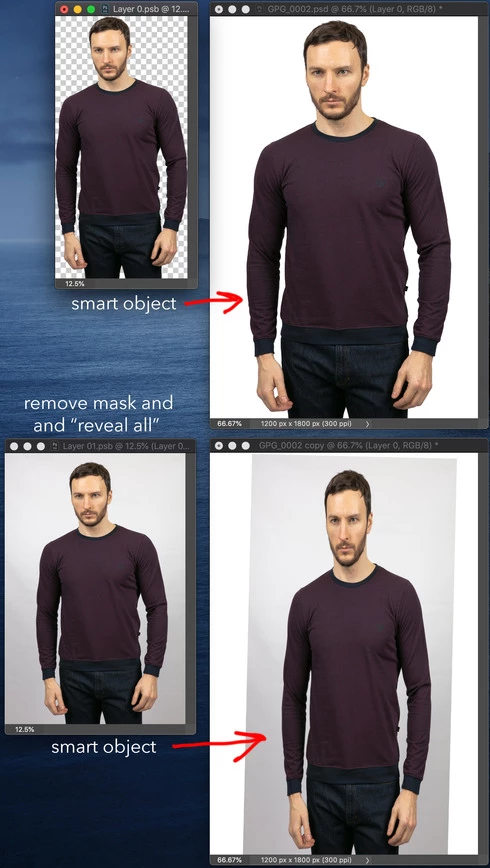
I keep all my objects as a smart objects in PSD files, and when I need to change something, I go inside smart object and make changes. After latest update to 21.1.1 I noticed that if I go inside smart object, remove mask and "Revel All" to have original image without mask, it changes the size of canvas and smart object image becomes bigger in canvas size, after saving smart object in my original image brake the aspect ratio, looks like instead of changing canvas size of smart object it fit the new image inside same size. I hope I explained clearly.

I attach an image to show what I mean:
This topic has been closed for replies.

29 replies

otrokhim
otrokhimAuthor
Known Participant
March 30, 2020
Hi,
I've posted PSD image below, you can try to "reveal all" opened smart object with disabled mask, to reveal whole image, and save it and at this point smart object on original image becomes distorted
otrokhim
otrokhimAuthor
Known Participant
March 30, 2020
Hi Jefferey,
posted below
thank you 
otrokhim
otrokhimAuthor
Known Participant
March 30, 2020
Yes, I have CC 2019 and no problem there, everything works fine.
otrokhim
otrokhimAuthor
Known Participant
March 30, 2020
Hello everyone, 

here I attach PSD so you could try to replicate my problem. Sorry, it's a bit weighty (130Mb)
https://www.dropbox.com/s/cbtzuqkzy660d32/GPG_0002.psd?dl=0
otrokhim
otrokhimAuthor
Known Participant
March 30, 2020
Hi David,
Yes, the smart object is rotated slightly to make a person look straight, but anyway it should not make this smart object loose aspect ratio after updating canvas size. In CC2019 version everything works fine. I'll attach this image in the reply below
Thanks
PECourtejoie
Community Expert
Community Expert
March 28, 2020
Oleksandr, do you also have CC 2019 installed? could you ty to open the SO in that version to see if you experience the same issue?
Legend
March 27, 2020
Can you post your PSD so we can try and troubleshoot it?
Earth Oliver
Legend
March 27, 2020
Hmm. I've tried every variation i can think of and i'm not seeing this issue. Can you list all the steps you take in the creation of the smart object? 
In your images, it looks like one of the layers was rotated at some point...
David Mohr
Participating Frequently
March 27, 2020
Howdy Oleksandr,
Are you sure that you didn't somehow rotate your underlying object?  In your screenshot it looks like it's been slightly rotate and this caused some sort of distortion.  Do you have a sample file I could play with? 

Thanks,David