



Bojan Živković11378569
Community Expert
Community Expert
June 24, 2020

P: Problem when recording Duplicate document in action

  • June 24, 2020
  • 8 replies
  • 532 views

Photoshop is recording Image > Duplicate as "Duplicate document xxx" step what makes action unusable when running it with some other document.
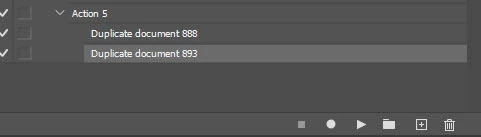

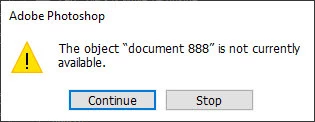
Error message:

The object "document xxx" is not currently available.
This topic has been closed for replies.

8 replies

Akash Sharma
Legend
July 21, 2020

We are happy to announce the release of Photoshop 21.2.1 that should resolve this issue.

This update includes fixes to some of the top customer reported issues among other bug fixes. See Bug fixes and security updates

To update Photoshop to 21.2.1, click "Update" in the Creative Cloud desktop app next to Photoshop. 

More detailed instructions for updating

Let us know how it goes.

Thanks,

Akash
Inspiring
July 13, 2020


Clicking Duplicate Ducument while recording an action results in the action recording the step as Duplicate Document XXXX where XXXX is a random number added as suffix. This then doesn't work when playing back the action as it searches for a document with this number attached instead of a document with the word copy as the suffix.
Inspiring
July 2, 2020
Struggling with this exact issue right now. "Insert menu item" sort of works. One drawback is that I cannot get it to play out without user interaction (asking to enter the name for the new document). "Toggle dialog on/off" cannot be changed.
I have actions I created long ago in another PS install. There it is different and simply creates the name automatically "xxxxx copy 1.psd" - without user interaction.
Earth Oliver
Legend
June 25, 2020
i seem to recall this being bugged a few weeks back...
Legend
June 25, 2020
Thanks. I'll ask engineering to take a look.
Participating Frequently
June 25, 2020
Bojan Živković11378569
Community Expert
Community Expert
June 25, 2020
I did, that was my suggestion on forums. Bug is initially discovered by someone else and reported on forums I am just passing it to closer developer attention.
c.pfaffenbichler
Community Expert
Community Expert
June 25, 2020
Have you tried using »Insert Menu Item« to insert the command? 
That will raise the dialog, though, apparently.