


_v__design
Known Participant
December 4, 2025

P: PS 26.11 & 27.1 - Shape Layer Fill color gets changed on selecting shape layers

  • December 4, 2025
  • 13 replies
  • 1600 views

After the latest update, Photoshop (27.1 /win 11) started showing a very unpleasant bug.
As soon as I open a PSD file, without doing anything (just by selecting a few layers), the fill content of several "fill layers" changes automatically.

This happens with simple "Shape layers", rectangles.
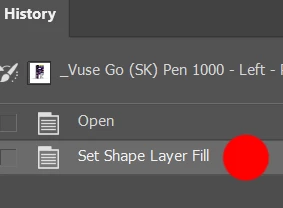
See my history state without doing anything elese but selecting a few layers in the freshly opened PSD:
_v__design_0-1765202885307.png


For example, a layer that originally had a black fill suddenly has a gradient applied. In another layer with a gradient, the orientation gets flipped by 180 degrees.

It may seem random, but I suspect the "shape layer fill" is automatically set according to the first selected layer in a row! In any case, it completely ruins the opened document. I can re‑set the layers, but the same thing happens again the next time I open it.


It’s extremely frustrating — basically, it makes the program unusable!

I might try downgrading to a lower version to see if that helps.

Please fix this serious issue ASAP.

13 replies

_v__design
Known Participant
July 2, 2026

ADOBE - do something!!!
This BUG has not been fixed for 6 long months.

A have already sent BAD data to my client because of this bug several times :(

People, DO NOT instal v.27 - it will corrupt your files!!!
Stay at v.26

Known Participant
July 2, 2026

Can confirm your test file has the issue with 27.7. The “Set Shape Layer Fill” shows up in the History but when it happens you cannot use command-z to undo the color change or step back previous to that, the history becomes locked until you manually click on the previous step.


Noticed it also happens just holding command key to individually add layers to a selection. It also happens simply opening the file and clicking on just the “Grad Black” or “Grad Red” layers, but it doesn’t change the fill to a different color. 


If I change the color fill type for those two Grad layers to solid instead of gradient then can’t get it to occur. If converted to CMYK, Lab or Greyscale it also doesn’t seem to trigger. So maybe this only affects shape layers with a gradient fill in RGB mode. Might explain why I’ve never come across it since I never use gradient fills for shapes (always forgetting you can do that...)

Jimmy.Byx
Participating Frequently
June 17, 2026

Has this issue been fixed? I am still on the old version and have not upgraded.

_v__design
Known Participant
July 2, 2026

No, this has not been fixed 😖
Even after 6 month!!

Inspiring
January 14, 2026

just wanted to boost this thread, I'm currently on version 27.2 and this issue began cropping up for me a few weeks ago and is still going. Hoping the devs are prioritizing this bug!

nikunj.m
Legend
January 15, 2026

Hi, the team is working on this issue. Please stay tuned! 


Thanks,
Nikunj

January 8, 2026

I've got tecnical issue about using Shape in Photoshop 27.0 on Windows. It's like a bug when I pressed Shift to select multiple shapes, it changed all shapes to be the same colour. Please fix this issue. Thanks.

January 8, 2026

And I cannot go back to the prior step in History panel. It keeps coming back to the latest step that the colour has already changed to all same colour. It's difficult to work now.

Jimmy.Byx
Participating Frequently
December 26, 2025

Same here — I'm seeing this in v27.2 on Windows 11. Hope it gets fixed soon.

just.emma
Inspiring
December 19, 2025

I'm experiencing the same issue in Photoshop 27 on my Mac. Extremely frustrating.

Known Participant
December 15, 2025

Just to say thanks @_v__design  for his post. It's really useful, I did test your PSD file and nothing change in 26.11.2.

I was thinking of installing 27.1, but will wait.....


benoit Kapture foto
Ged_Traynor
Community Expert
Community Expert
December 9, 2025

@_v__design I just tested with your PSD and can confirm the issue with Photoshop version 27.1

MassC
Legend
December 9, 2025

Hey @_v__design


Can you try the following: Navigate to Preferences>Technology Previews. Uncheck "Enable Modern User Interface" restart Photoshop and let us know if that helps. 


^CM

_v__design
Known Participant
December 8, 2025

Hello,

the preference reset hasn't helped, just as I expected...
Have you checked my file if you could replicate this bug?

Also I have downgraded and everything works just fine in 26.11.2.

jane-e
Community Expert
Community Expert
December 8, 2025

@_v__design 


Did you reset Preferences as suggested by Sameer on the thread you linked to? If you reset manually by renaming the file, then you can retrieve it if it doesn't help. Be sure to back up any customization first. Photoshop will create a new Preferences file on re-launch and will be restored to factory settings.

https://helpx.adobe.com/in/photoshop/desktop/get-started/settings-and-preferences/backup-and-restore-preferences.html


Jane