


Participant
January 7, 2025

P: PS 26.2 Font Selector window misplaced in a weird positions

  • January 7, 2025
  • 5 replies
  • 585 views

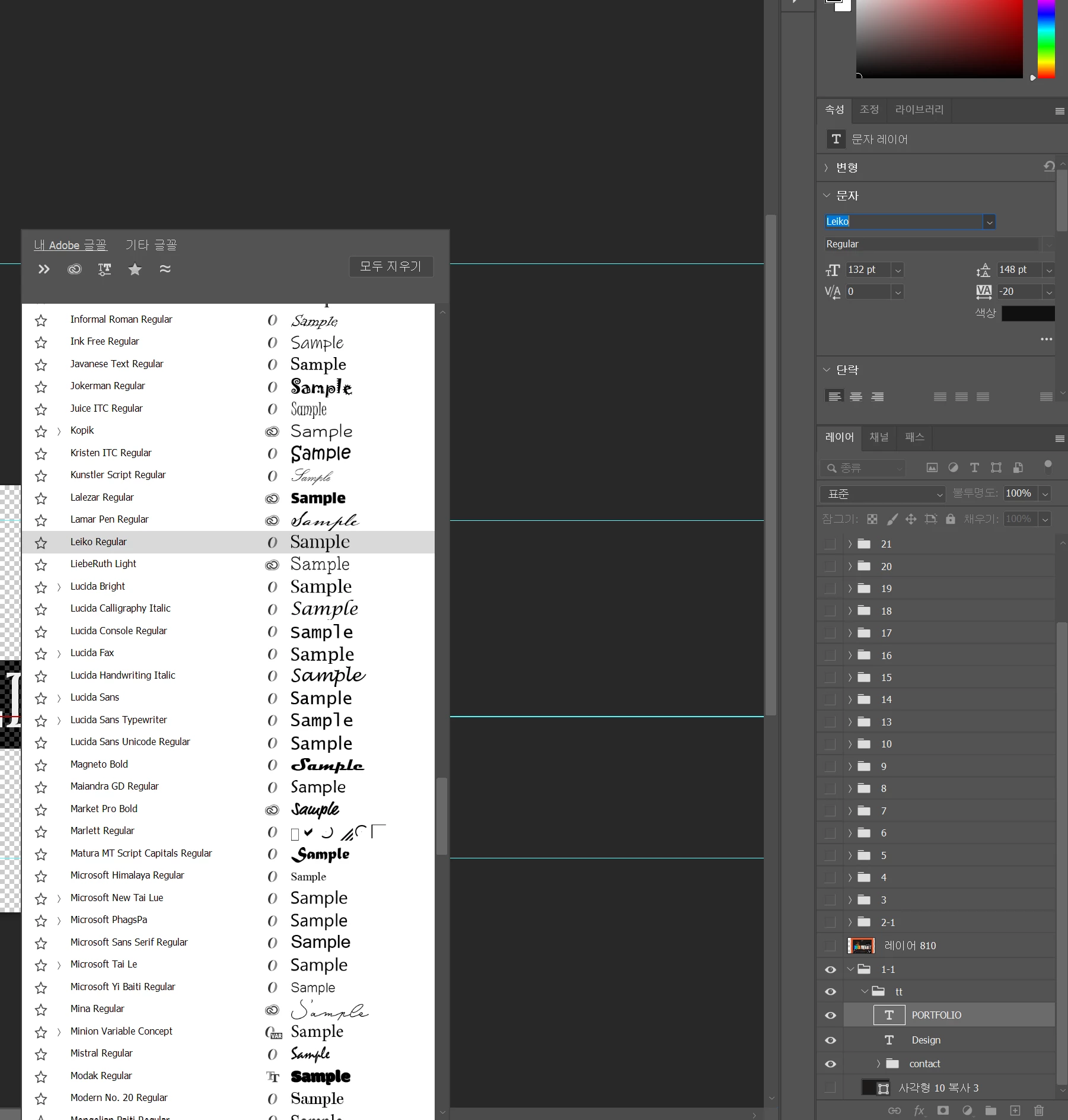
Hello, the font window doesn't come up in the original position, but it comes up in the weird middle position, how do I get the font window to float in the original position?


The version is the latest version.
 

5 replies

Booperdoo
Participant
March 19, 2025

After an update, now my font window drop down is much wider and shows a list of filters on the left which causese the font windows to take up WAY too much space and covers half of my canvas. I have to move my artwork canvas far to the right now so I can even see the font I am trying to change. 

I tried using the floating font change box insead that comes up, but it is even WORSE because the dropDOWN opens UP for some reason and again, covers my entire canvas. 


This is horrible user interface design. Please allow the dropdown to be simplified and slim again so I can see what I am working on and how the fonts actually look on my artwork. 


I looked in my settings and couldnt find a fix, if there is one already, please advise! 

davescm
Community Expert
Community Expert
March 19, 2025

@Booperdoo Your post has been merged with a similar thread, however your issue appears to be different in that your screenshot shows that you are missing an arrow to expand or collapse the Class and Tag list. This is v26.4.1 on Windows 11.

I would try a preference reset, saving your preferences first. Preferences contain a lot more than just the user set preferences, and are saved every time Photoshop closes. Any corruption can lead to strange issues.  https://helpx.adobe.com/uk/photoshop/using/preferences.html


Dave


Participant
January 8, 2025

After updating to Photoshop 2025, when I click the arrow next to the font, the list pops up down, but suddenly it pops up in a weird location.
Do you know why?


포토샵 2025로 업데이트 후에 폰트 옆 화살표를 누르면 목록이 아래로 떴는데 갑자기 이상한 위치로 뜹니다.
이유를 아시나요?

Jeff Arola
Community Expert
Community Expert
January 8, 2025
BrettN
Community Manager
Community Manager
January 7, 2025

This is a Windows only issue and resetting preferences will not address it.


The good news is that it is already fixed in the latest prerelease build, meaning this will be fixed in the next update. 

BrettN
Community Manager
Community Manager
January 7, 2025

I'm seeing the same thing on my end. I'll look into it

Ged_Traynor
Community Expert
Community Expert
January 7, 2025

@??_?7047 try manually resetting your Photoshop preferences
https://helpx.adobe.com/ie/photoshop/using/preferences.html#Manually
Remember to back up your settings before doing the preference reset
https://helpx.adobe.com/ie/photoshop/using/preset-migration.html