
Participant
November 10, 2025

P: PS 27.0 Brushes panel has flickering icons in the Recent Brushes list while using brushes

  • November 10, 2025
  • 1 reply
  • 106 views

OS: Windows 11

Versions: All version of PS after 2022 (as far as I cant tell).


While the drawing/painting with the Brushes panel open, it will sometimes flicker to a white image. The brushes disappear, and this image is seen:
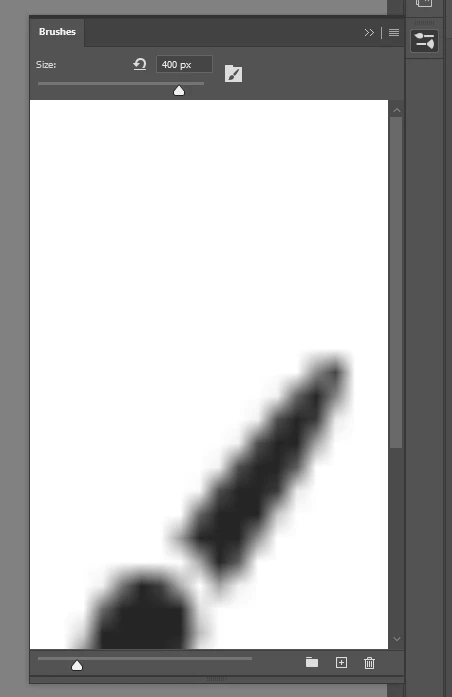
 

Reproduction:

Make strokes with various brushes. (I'm using a Wacom tablet.) This seems to occur most when switching to a new brush. However it is somewhat random. You may have to try mulitple brushes for 2-3 minutes before it appears.  Sometimes it happens right away, while sometimes it is less frequent. 

1 reply

Sameer K
Community Manager
Community Manager
November 11, 2025

Hey, @Lane339. Welcome to the Photoshop Community. I just wanted to let you know I'll move this to discussions for now. Please share the system information from Photoshop Help > System Info> Copy and paste it into a text document, then upload and attach it here.


Does this happen when you use any image? Could you try disabling GPU compositing? Here's how you can do it:

1 - Go to Photoshop in the top menu > Preferences, then Performance.
2 - Click on Advanced Settings.
3 - Uncheck the GPU Compositing option.
After making this change, restart Photoshop and check if the issue persists. If it doesn't help, try Photoshop (beta) from the Creative Cloud App > Apps tab > Beta apps.


Let me know how it goes. 

Thanks!

Sameer K

(Type '@' and type my name to mention me when you reply)

Lane339Author
Participant
November 11, 2025

Thanks Sameer!


I can confirm that the issue persist on and off of the Beta version. GPU Compositing has no effect.

To be clear, the bug appears in the Brushes window itself, so it's a UI issue, not an issue with the canvas image. 

The white image looks to me like a placeholder brush icon of some sort, which is being stretched to fill the entire window frame of the panel. It happens (randomly) while making a stroke, and only disappears at the end of the stroke (when the pen is lifted). So, if I hold down my pen, the white image remains visible. If I am making many quick brushstrokes, it appears to flash in and out.


I use the brushes for many hours every day, so this is very noticable to me, but it may not appear the average user. 


System settings attached.

Sameer K
Community Manager
Community Manager
November 12, 2025

Thanks for adding the video. I've had success in reproducing this issue, but its nature is intermittent, to some extent. I've recorded the workflow and shared it with the team for review. 


Thanks!
Sameer K
(Type '@' and type my name to mention me when you reply)