


Known Participant
July 1, 2026

P: PS 27.8 Live preview for Shadows/Highlights after PS 27.8

  • July 1, 2026
  • 8 replies
  • 95 views

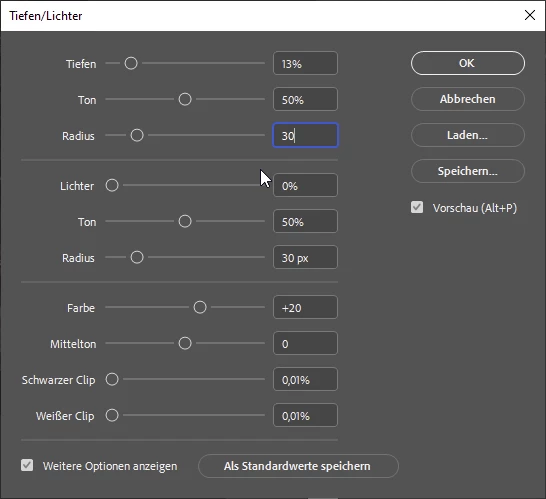
The system is running an up-to-date version of Windows 10 with the latest Nvidia Studio drivers. The Shadows/Highlights settings dialog has always provided a live preview while moving the sliders, provided the live preview option was enabled. Since the latest update to PS 27.8, however, the live preview no longer appears as soon as a slider is clicked or activated with the mouse. The preview remains hidden for as long as the slider is being moved or remains active; the preview only appears once the slider is released.


8 replies

Srishti Bali
Community Manager
Community Manager
September 7, 2026

Hi all,

We have made some changes to address this issue in our latest release. Please update Photoshop to version 27.10 and let us know if the issue is resolved for you.

If you are still experiencing the issue after updating, please reply to this thread with the details so we can continue investigating.

Thanks, Srishti Bali | Community & Engagement Strategist, Digital Imaging | Adobe
Participant
August 18, 2026

The preview is also not updating under the Image | Adjustments | Brightness/Contrast.

Participant
August 18, 2026

When using the Image/Adjustments/Vibrance of an image, the preview is not updating.  I’ve tried unchecking, and rechecking the preview toggle, but it doesn’t adjust.  This has been to case for the last two beta versions.    Currently running Photoshop Beta - 27.11.0 Release. 

Not a big deal, but wanted to let you know.
 

Image Preview is not updating.
This is the result I was expecting with the Preview.

Here is my system info: 
Windows Info:
Edition    Windows 11 Pro Insider Preview
Version    26H2
Installed on    ‎8/‎1/‎2026
Evaluation expires on    ‎10/‎31/‎2027 4:43 PM
OS build    26300.9032
Experience    Windows Feature Experience Pack 1000.26100.431.0
 

Device Info:

Device name    NyesBeast ABS Gaming PC
Processor    Intel(R) Core(TM) i9-14900KF (3.20 GHz)
Installed RAM    32.0 GB (31.8 GB usable)
Graphics card    NVIDIA GeForce RTX 5070 Ti (16 GB)
Storage    1.64 TB of 7.28 TB used
Device ID    10461025-DF19-47F3-91F7-147D8F3A390E
Product ID    00330-81627-68506-AA249
System type    64-bit operating system, x64-based processor
Pen and touch    No pen or touch input is available for this display
 

The other adjustments setting, the preview appears to be working normally. 
Let me know if you additional information.

Stephen (Steffen) Nye

Sameer K
Community Manager
Community Manager
July 2, 2026

Hey, ​@frankb76907269. Thanks for bringing this up. I’ve shared it with the team for review. 


Best, 
Sameer K

Jeff Arola
Community Expert
Community Expert
July 1, 2026

Does it make any difference if in Photoshop you go to Edit>Preferences>Technology Previews, uncheck Enable Modern User Interface and restart Photoshop?

Known Participant
July 1, 2026

You’re actually right. That setting apparently changes not just the appearance but also the functionality. After disabling it and restarting, the live preview works again. I can finally get back to work as usual!

However, I assume this isn't the intended behavior and is actually a bug—right?

Thanks a lot for your quick help.

Participant
August 23, 2026

The preview works, but only if I use the sliders.  So it doesn’t seem to be working when I add adjustments manually in the boxes.