

themarinacc
Known Participant
Nov 8, 2026 11:19 PM UTC
Investigating

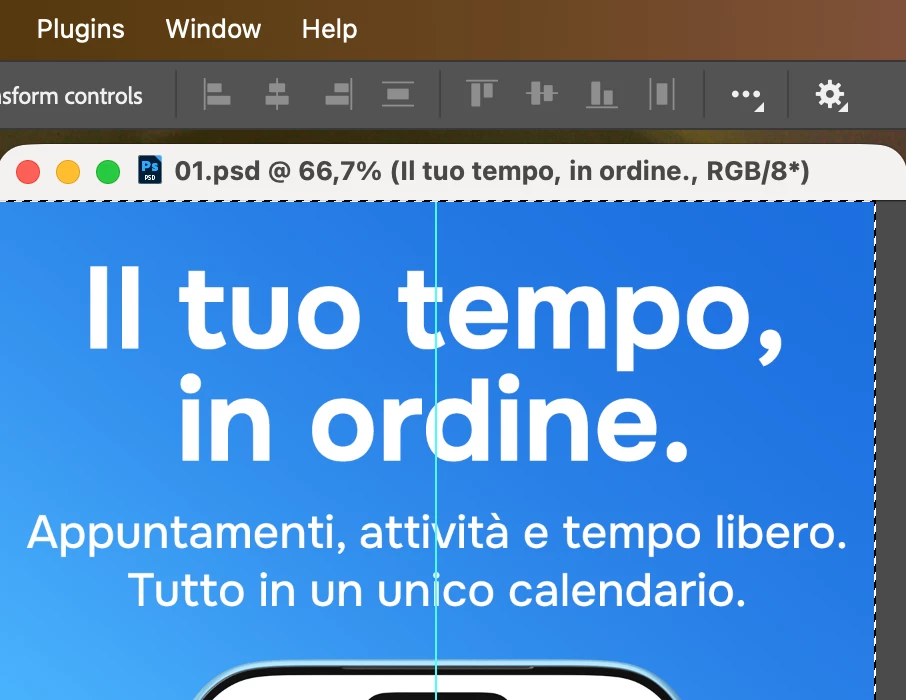
P: PS 28.0 Align buttons in Move tool options bar stay disabled after Cmd+click layer selection + Select All

Environment
- Adobe Photoshop 2027, version 28.0.0 (20261027.r.20 3951c45), arm64
- macOS 27.2.0
- Apple M4 Max, 64 GB RAM
- GPU: Apple M4 Max (GPU and OpenCL enabled)
- Display: Studio Display 5K, HDR enabled
- No third-party plugins installed

Steps to reproduce
1. Open a document with several layers.
2. With the Move tool active (Auto-Select off), Cmd+click a layer on the canvas to select it.
3. Press Cmd+A to select the entire canvas.
4. Look at the align buttons in the Move tool options bar.

Expected result
The align buttons are enabled, so I can align the selected layer to the selection.

Actual result
The align buttons stay disabled (greyed out). They only become enabled after I click the same layer in the Layers panel, even though it is already the selected layer.

Notes
- This looks like an options bar refresh issue: the layer is correctly targeted, but the align controls don't update.
- Workaround: clicking the layer in the Layers panel, or using Layer > Align Layers to Selection.
- Reproducible: always
 

    Pinned Reply By Pete.Green

    ​@themarinacc 

    Thank you for reporting this and for writing it up so nicely!

    I’ve been able to reproduce on my system and have logged a bug for the team to follow up with. 

    Strangely sometimes I can reproduce and sometimes I’m not able, I think you’re right that it’s something to do with options bare refresh...The team will take a look. 


    Regards,

    PG

    15 replies

    Participant
    Nov 13, 2026 4:47 AM UTC

    Same error!

    Translate
    Diego356577205l6q
    Participant
    Nov 12, 2026 3:36 PM UTC

    To align content within a specific area of the canvas, I need to:

    1. Select the layer containing the content I want to align.

    2. Use the Selection Tool to select the specific area of the canvas that will serve as the alignment reference.

    However, as soon as I make the area selection while the layer is selected, the alignment properties become disabled in the Properties panel.

    To enable them again, I have to click the three-dot menu (More Options). Once I open it, the alignment properties become available again.

    This seems to be a UI bug. The alignment properties should remain accessible when a layer is selected and an area selection is active, allowing me to align the layer's content relative to the selected area.

    Is anyone else experiencing this issue?

    Translate
    BrandonBB
    Known Participant
    Nov 11, 2026 10:57 PM UTC

    I also am having this same issue. This is a bug. They need to fix it. 

    Translate
    Sameer K
    Community Manager
    Community Manager
    Nov 11, 2026 1:17 PM UTC

    Hey all! Thanks for the reports. Could you record and share a video of the issue you're running into? I will need details to recreate and escalate this.


    Thanks!
    Sameer K
    (Type '@' and type my name to mention me when you reply)

    Translate
    Participant
    Nov 11, 2026 12:51 PM UTC

    I am experiencing the same problem.

    Translate
    elegant_writer8c98
    Participant
    Nov 11, 2026 1:39 AM UTC

    Presento el mismo problema de alinacion, version reciente adobe photoshop 2027 v28.0

    Translate
    Participant
    Nov 10, 2026 7:42 PM UTC

    Photoshop 28.0 release - Command+A does not select the object or perform alignment.

    Translate
    Pete.Green
    Adobe Employee
    Nov 9, 2026 5:37 PM UTC

    ​@themarinacc 

    Thank you for reporting this and for writing it up so nicely!

    I’ve been able to reproduce on my system and have logged a bug for the team to follow up with. 

    Strangely sometimes I can reproduce and sometimes I’m not able, I think you’re right that it’s something to do with options bare refresh...The team will take a look. 


    Regards,

    PG

    Translate
    themarinacc
    Known Participant
    Nov 9, 2026 6:13 PM UTC

    Thanks Pete, glad you could reproduce it! Happy to test a fix when it's available.

    Translate
    Art Director & Developer · marinaccio.it
    jane-e
    Community Expert
    Community Expert
    Nov 8, 2026 11:32 PM UTC

    ​@themarinacc 

    Please show your Layers panel with 2 or more layers (or layer groups) selected in the panel.

    Jane

    Translate
    themarinacc
    Known Participant
    Nov 8, 2026 11:43 PM UTC

    Hi Jane, thanks for looking into this.

    To clarify: I'm not aligning multiple layers to each other. I'm aligning a single layer to the active selection (Cmd+A, Select All), which Photoshop supports with just one layer selected.

    The point is that the same single-layer state behaves differently depending on how the layer was selected:
    - Layer selected by Cmd+click on the canvas, then Cmd+A: align buttons stay disabled.
    - Same layer clicked in the Layers panel, then Cmd+A (or Cmd+A first): align buttons become enabled.

    Attached is the Layers panel in both states, with the same single layer selected.


    Translate
    Art Director & Developer · marinaccio.it
    themarinacc
    Known Participant
    Nov 8, 2026 11:45 PM UTC

    Update: I tested what you asked.

    - Cmd+click on 2 or more layers on the canvas, then Cmd+A: align buttons are enabled.
    - Cmd+click on a single layer on the canvas, then Cmd+A: align buttons stay disabled.
    - Same single layer clicked in the Layers panel, then Cmd+A: align buttons are enabled.

    So the issue only happens when a single layer is targeted via Cmd+click on the canvas. Aligning one layer to a selection works when the layer is targeted from the Layers panel, so it looks like the options bar isn't refreshing in that specific case.

    Translate
    Art Director & Developer · marinaccio.it