
P: PS 28.0 Gradient Editor: "Opacity" Label Is Vertically Misaligned
There is a UI alignment issue in Photoshop's Gradient Editor dialog.
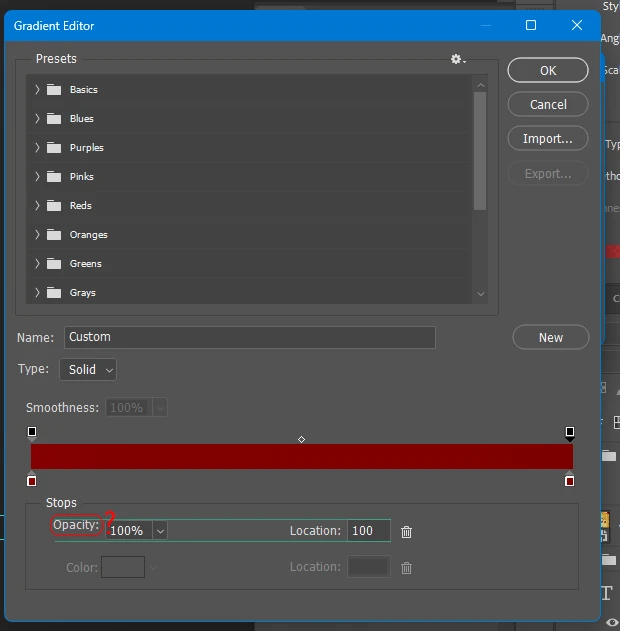
The "Opacity:" text label appears vertically shifted upward and is not properly aligned with the other controls in the same row.
As highlighted in the attached screenshot, the "Opacity:" label sits noticeably higher than the 100% input field and the "Location:" label.
Expected Behavior
The "Opacity:" label should be vertically centered and horizontally aligned with the corresponding input field and other labels in the same row.
Actual Behavior
The "Opacity:" label is incorrectly positioned above the intended alignment line, resulting in an inconsistent and visually unpolished interface.
Additional Information
Please refer to the attached screenshot, where the green horizontal line highlights the alignment issue.
This appears to be a UI layout or text-positioning issue rather than a functional problem with the Gradient Editor.
Please investigate and correct the vertical alignment of the "Opacity:" label.
Thank you.
 AdChoices