
Participant
August 4, 2024

P: PS v25.12 Tool menu appear behind image - a problem coming from Beta

  • August 4, 2024
  • 20 replies
  • 21715 views

Drop down pop up is UNDER the photo instead of behind it. I shouldn't have to move the photo to see the drop down box, right??
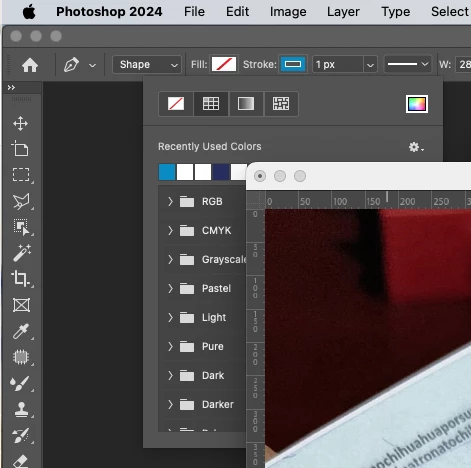


This problem is coming from Beta release, and ADOBE team did not fix it, insted now bring it to oficial release. See link below.

https://community.adobe.com/t5/photoshop-beta-bugs/p-ps-beta-v25-12-tool-menu-appear-behind-image/idc-p/14853842/page/2#M17493

20 replies

Inspiring
April 4, 2025

Maybe you could fix it on earlier versions as well? I'm on a Mac Pro with Intel Xeon processor, and I cant update my Photoshop anymore. This error totally ruins the workflow. 

Participant
November 4, 2024

my right click menus are showing up behind the app itself, and only poping up is if i show my desktop then go back to PS. any fix for this?

Participating Frequently
October 15, 2024

Thanks for replying, the problem was solved with the new version 2025. But I have been working 3 weeks with problems, I pay my subscription monthly and when I have had problems with my credit card, I get a warning notice from ADOBE. I expect some compensation from you, I have been a user for more than 15 years and it is an uncomfortable situation.

Mohit Goyal
Community Manager
Community Manager
October 15, 2024

Hi all,


We are happy to announce the MAX release of Photoshop version 26.0 (public version), which incorporates the resolution for this particular problem. To see the list of all fixed issues, click here


To update Photoshop to 26.0, click "Update" in the Creative Cloud desktop app next to Photoshop. More detailed instructions for updating


Let us know if the update resolves the problem for those affected, and share your feedback.


Thanks,

Mohit

Participant
October 15, 2024

I can confirm the problem has been fixed.

silk-m
Community Expert
Community Expert
October 14, 2024

Hi, all

This has been fixed in 2025, version 26.0.0 20240927.r.26. Please install the new version and try it.

--Susumu Iwasaki
Participant
October 10, 2024

Will this be fixed with the October update? Adobe tends to break things often.

Participating Frequently
October 10, 2024

I'm starting to have this same issue now on some of the panels. See example of the gradient options being hidden behind the window. Deleting preference folders and re-installing photoshop is not helping. 

Inspiring
October 9, 2024

Hello everyone,

for a few days now, the tool panels have been going behind the open images in Photoshop, making it impossible to work.


I have always used floating images, not tabbed, and this problem has never occurred before. I tried resetting the preferences, then uninstalling Photoshop and reinstalling it (choosing during installation to delete the preferences and not use those from older versions).
Unfortunately, nothing changed.

Using the tabbed view is not an option for the type of work I do, as I almost always need to have multiple documents open and visible at the same time.


In the image I’m attaching, you can see (or rather, "not" see) the eyedropper tool panel ending up behind one of the open windows.
But it’s even worse when using any tool and I right-click for options—the menu doesn’t appear at all (because it’s completely covered by the image window).
In this case, the only way to fix it is to switch to full screen (F key), choose the options, and then go back to the normal view.


Thank you, bye.

Photoshop version 25.12.0
macOS 12.2
Mac Studio M1 Max


Jeff Arola
Community Expert
Community Expert
October 9, 2024

Yes that seems to be a bug that carried over from the Photoshop Beta to the release 25.12 version of Photoshop.


Since your using Floating Document Windows you could turn off the Application Frame for a temp fix until Adobe fixes the issue.

Window>Application Frame


see this thread:

https://community.adobe.com/t5/photoshop-ecosystem-bugs/p-ps-v25-12-tool-menu-appear-behind-image-a-problem-coming-from-beta/idc-p/14860138/page/2#M111530

Participating Frequently
October 8, 2024

Having a similar issue, but my pop-ups are behind all other palettes. My images are all docked as tabs, not floating, but if, for example, I select the Tool Preset flyout, the flyout is under any nearby palettes. I've reset my preferences but that did no good.


Photoshop 25.12.0 on Mac M1, Ventura 13.2.1