


Known Participant
February 22, 2024

P: PS v25.5&25.6 Missing ALT keyboard shortcuts in panels

  • February 22, 2024
  • 40 replies
  • 5410 views

I updated from Photoshop 25.4 to 25.5 on my Windows 11 PC running the latest patches and I noticed that many keyboard shortcuts using the ALT-key are now gone in editing panels, for instance Image Resize and Image Canvas.


ALT keyboard shortcuts have become something of a hidden feature in Photoshop, because they're only visibile when hold the ALT key pressed down. But when you know this trick it becomes possible to use the keyboard to access options in the PS pull-down menu and change numerical values; it can really speed up your workflow compared to using a mouse.  I only need three key presses to change any option in amy PS panel. Memorize those and you can speed through PS using just the keyboard.


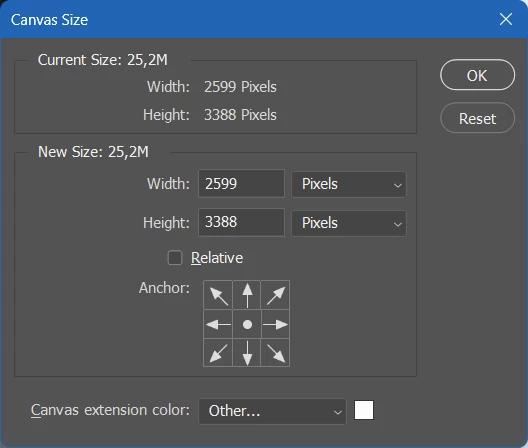
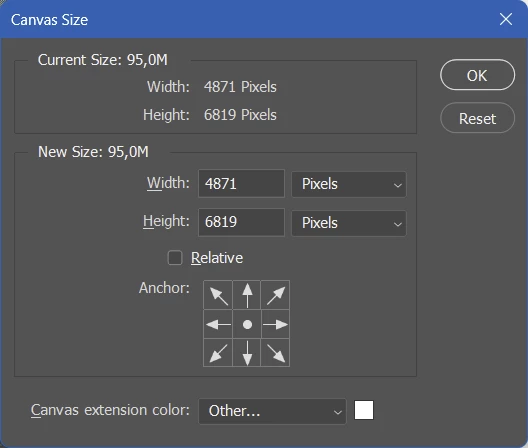
The problem is that the ALT hotkeys that have numerical input fields (like Width and Height in the Canvas Size panel), are gone in Photoshop 25.5 and 25.5.1. Needless to say it worked fine in 25.4 and every other Photoshop version released in the past 20 years.


Take these two screenshot of the Canvas Size panel (image top = PS 25.5, image bottom = PS 25.4). If you hold the ALT key you should not just see the Cancel button change to Reset, but the first letters of options like Width, Height, Relative and Canvas Extension color should now be underlined to indicate that you can press ALT plus an underlined letter to move the keyboard focus to those options.


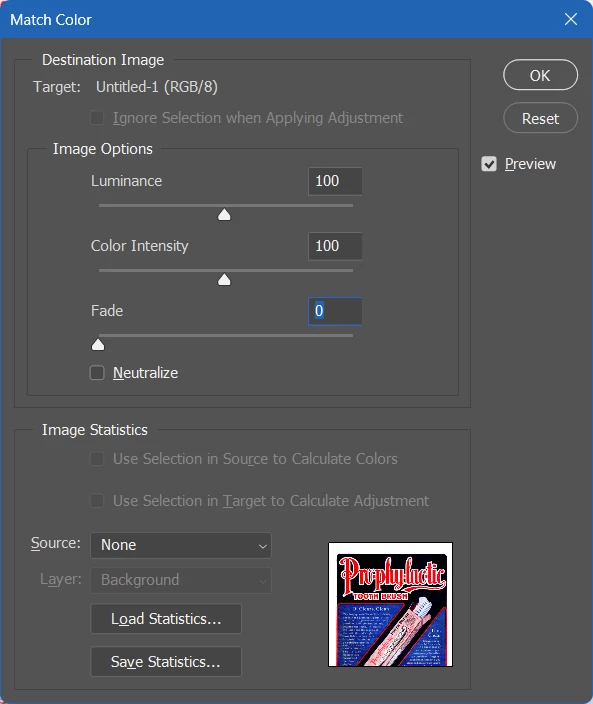
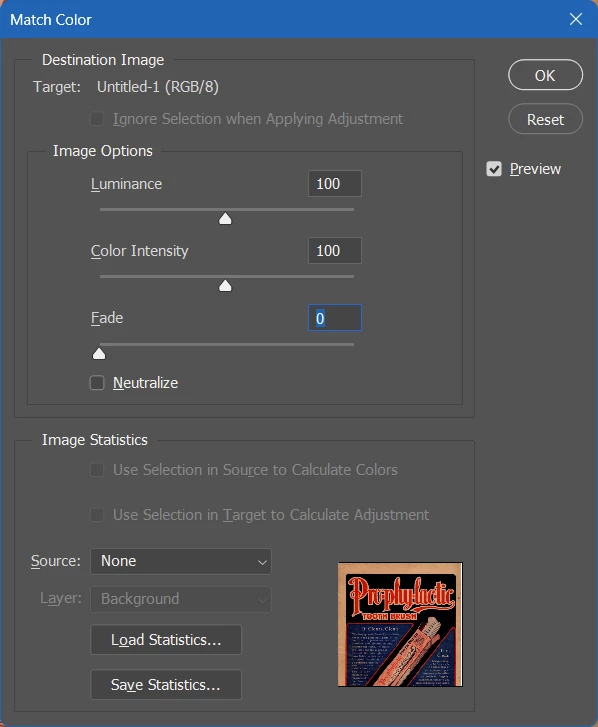
The same thing is happening in the Image Size panel. (image top = PS 25.5, image bottom = PS 25.4). In the latest PS version the ALT keyboard shortcuts for Luminance, Color Intensity and Fade don't work anymore.


Only a few people have acknowledged this issue in my previous posting. I'm trying again with a better structured post hoping that others can confirm this buy so that this bug will reach the Adobe devs. I rely a lot on ALT keyboard shortcuts in my Photoshop workflow and I'm really unhappy about this bug. The good news is that's incredibly easy to reproduce, the bad news is that probably not that many people even know these ALT keyboard shortcuts exist in the Windows version of Photoshop.

This topic has been closed for replies.

40 replies

michaljanata
Inspiring
September 24, 2024

After some time of using 25.12 I have to say PS behaves still very bad.


The most problem that drives me craze is sticky tool after moving canvas with spacebar while having cursor in value box of any panels. Spacebar clears value in box and causes sticky cursor, which can be eliminated by clicking anywhere.


Why it can behave like before in 25.4 version?

michaljanata
Inspiring
September 12, 2024

Thx Mohit,

finaly there is a ALT bug fixed stable version.


Unfortunately I have to say, overall performance of this version is much worse then 25.4, which I used until this update.

All kinds of brush based tools, canvas movement with hand tool or zooming and brush size changes based on HUD movement (with mouse and pen) are rather laggy and choppy then smooth, altough my PC specs are higher than reccomended.

Mohit Goyal
Community Manager
Community Manager
September 11, 2024

Hi all,


We are happy to announce the release of Photoshop version 25.12 (public version), which incorporates the resolution for this particular problem. To see the list of all fixed issues, click here


To update Photoshop to 25.12, click "Update" in the Creative Cloud desktop app next to Photoshop. More detailed instructions for updating


Let us know if the update resolves the problem for those affected, and share your feedback.


Thanks,

Mohit

Known Participant
September 10, 2024

I just updated to the non beta 25.12 and the bug has finally been squashed.


Thanks!

michaljanata
Inspiring
August 9, 2024

@Sameer K Yes, it seems to be fixed in beta 25.12. Hopefuly it won't breake any other basic feature in final version.

Sawiro Takoni
Known Participant
August 8, 2024

Totally unrelated, but since you are "the shortcut guy" I'll drop it here.


In older Photoshop (like before CS started) one could enter all mainmenu items by pressing something like ALT + S (open selection dropdownmenu from the mainmenu).


This still works, but not in trully fullscreen (tap double F to enter it).


Somehow the mainmenu is only accesible by keyboard, when in sight.


When Photoshop CS cameout (like 15 years ago?) this handy feature (access the mainmenu by shotcuts, even when in fullscreen) was killed... and I want it back to hard!

Sameer K
Community Manager
Community Manager
August 8, 2024

Hi all! We recently released a fix for this behavior with Photoshop (beta). (In Creative Cloud, go to Apps > Beta Apps > Install Photoshop (beta).

The fix will be applied to Photoshop (non-beta) soon.


Please try it and let us know how it goes.

Thanks!

Sameer K

michaljanata
Inspiring
August 8, 2024

@Sameer K Are we getting fix for this bug in this century? We are still paying subscription for software, that is unusable and therefore we cannot update it. 

Sawiro Takoni
Known Participant
July 24, 2024

@Saskia5CBF 


I stand corrected, but it's the only one (for me) without bugs.


I made a list of the version, and the bugs they contain (for me)


# 25.3.1

none


# 25.4.0

color picker error


# 25.5.0

no shortcuts


# 25.7.0

no shortcuts


# all others (above)

no shortcuts

dublove
Legend
July 24, 2024

The same bug still exists in version 25.12.
What's wrong with Adobe, it seems to be intentional.