


Participant
July 2, 2025

P: PS v26.8.1 Info panel doesn't show "before" values, only "after" using Image > Adjustments

  • July 2, 2025
  • 14 replies
  • 1878 views

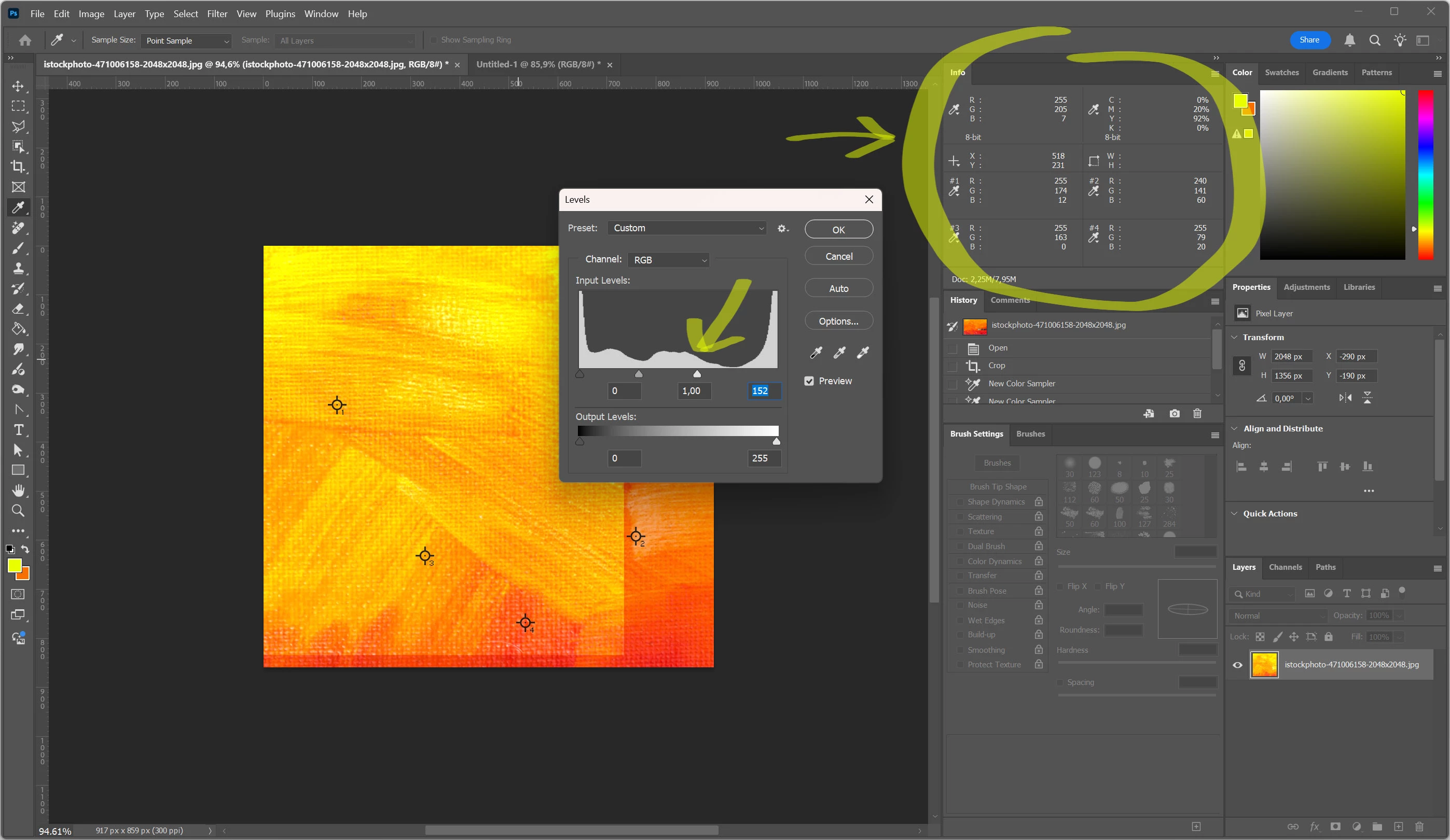
Info panel doesn't show "before" values, only "after". (Photoshop release 26.8.1). 

Every section of the panel show only one value, even for custom sample points, check screenshot attached.

Is it a bug?
 

14 replies

Participating Frequently
September 25, 2025

This has been a long wait for such a basic function that should never have slipped through the net on a full release.


However, its working now, thanks

Participant
September 24, 2025

This works now with version 26.11

Srishti Bali
Community Manager
Community Manager
September 24, 2025

We’ve addressed this in our latest release, version 26.11. You can check out the full list of new features, bug fixes and improvements here: Whats new in Photoshop 26.11


Please install the latest release (26.11) and let us know how it goes, whether the issue is resolved or still persists.

Inspiring
September 8, 2025

Sameer, this was documented in July. Any idea when this might be addresses with a new update?

Sameer K
Community Manager
Community Manager
September 8, 2025

Hey, @ParkAve. I understand it has been a while. A fix was merged for this issue very recently in the Photoshop (beta) m.3208. 

Please feel free to try it. I'll update this thread once the fix is merged and released for Photoshop (non-beta).


Thanks!
Sameer K
(Type '@' and type my name to mention me when you reply)

Inspiring
September 8, 2025
Thank you. I will be on the lookout, for your update, in the non-beta fix.


Amy Jones
Park Ave Design
parkavedesign@comcast.net
901-482-0727
Participant
September 8, 2025

Here's a screenshot of the same image on 25.12.4 (left) and 26.10 (right) with exaggerated Magenta curve adjustment. 26.10 only shows the current magenta value as opposed to the before and after magenta values on 25.12.4.

No one likes a surprise like this especially on a Monday morning.

Inspiring
September 5, 2025

Please see my previous posts for this issue. It is Mac only I assume. Right now the only way around this is to downgrade to version 26.7

Participant
September 5, 2025

I encountered a problem where when using the color sampling tool, the information panel displays the final adjusted colors.

However, my friend's computer is Windows, and using the adjustment layer on her computer, she wants to display the contrast before and after the adjustment. Is this the difference between Mac and Windows? Or is it a problem with my settings?
If it's a system issue, I hope Adobe can solve it.

Inspiring
August 20, 2025

Is there an issue with the Info panel displaying before-and-after color values in real time adjustments

Participant
August 7, 2025

I am currently having the exact same issue as @TriChas has described. has there been a fix for this yet?

Its imprative we have this back as I also work in print and need to see my before and after values before they're applied. any help will be greatly appreciated.


Participating Frequently
August 5, 2025

I just upgraded to Photoshop 26.9.0 (mac OS 13.5) and the Eyedropper is no longer showing before and after when you have a tool like curves open on the image. I tried the fixes of making sure all layers is checked, makeing sure Show Sampling Ring is checked, use Graphic Processor is checked. Nothing works. Is this a bug?

Inspiring
August 5, 2025

Correct. Just checked for that in the current beta and it is not fixed there either.

Install version 26.7 to restore the proper behavior.