


Inspiring
February 20, 2026

P: PS v27.4 Remove Tool (GenAI: On) is not working and producing artifacts

  • February 20, 2026
  • 303 replies
  • 4248 views

The AI ​​repair brush is not working in version 27.4. An error message appears when I set it to AI ON. When AI is set to AI AUTO, a pattern appears where the brush is supposed to repair.

Please fix this bug.
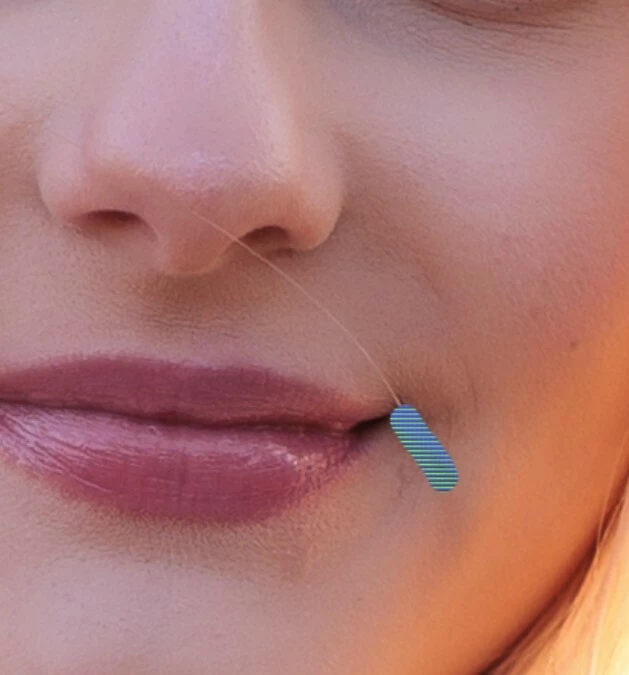
 

    Pinned Reply By Yukie Takahashi

    Hi all, The issue where the Remove Tool and Select Subject Classifier models failed to load on Windows systems with usernames containing non-ASCII (Unicode) characters is expected to be fixed in the current Beta release.

    For those who previously reported or experienced this issue, could you please test it again using the latest Beta build and let us know whether the problem has been resolved on your end?
    Your feedback will help us confirm that the fix is working correctly in real-world scenarios. Thank you!

    303 replies

    Community Expert
    February 21, 2026

    An error message appears when I set it to AI ON


    ​@AJ1969vsx What’s the error message? Please post the message word-by-word.

    We need also more informations about your system. Please provide a copy of your 'System Info'. This can be get from the Photoshop menu item Help > System Info. There's a copy button in the System Info dialog. Press this button and paste the info into your next forum post.


    In the meantime you can try to reset the Photoshop preferences. somtetimes it may help.

    .https://helpx.adobe.com/ie/photoshop/using/preferences.html#Manually

    Remember to back up your settings before doing the preference reset: https://helpx.adobe.com/ie/photoshop/using/preset-migration.html

    My System: Intel i7-8700K - 64GB RAM - NVidia Geforce RTX 3060 - Windows 11 Pro 25H2 -- LR-Classic 15 - Photoshop 27 - Nik Collection 9 - PureRAW 6 - Topaz Photo AI
    AJ1969vsxAuthor
    Inspiring
    February 21, 2026