


Participant
June 2, 2026

P: Relative Canvas Size can't be 0

  • June 2, 2026
  • 5 replies
  • 141 views

In the Canvas Size dialog, with “Relative to current dimension” checked, the width nor height can be set to 0. This is a big problem if you only want to change one dimension.
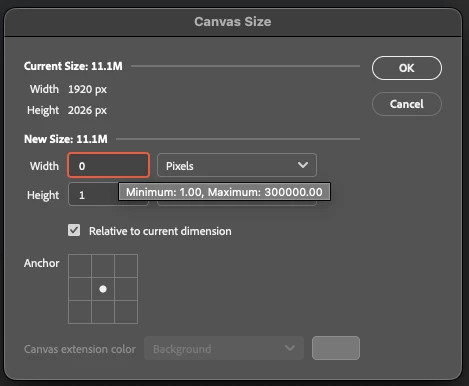
Also, I will say that it is very annoying that the up and down arrow keys no longer increase and decrease the value by a whole number.

    Pinned Reply By Srishti Bali

    Hi All,

    We have addressed this issue in our latest release. Please update Photoshop to version 27.9.1 and check if the issue is resolved on your end.

    If you still experience the problem after updating, please let us know and share any relevant details so we can investigate further.

    5 replies

    Srishti Bali
    Community Manager
    Community Manager
    August 4, 2026

    Hi All,

    We have addressed this issue in our latest release. Please update Photoshop to version 27.9.1 and check if the issue is resolved on your end.

    If you still experience the problem after updating, please let us know and share any relevant details so we can investigate further.

    Thanks, Srishti Bali | Community & Engagement Strategist, Digital Imaging | Adobe
    D Fosse
    Community Expert
    Community Expert
    June 2, 2026

    Yes, this is wrong and clearly a bug. I seem to remember there’s been a thread or two about this before, but I normally never use Relative, so I haven’t paid attention until I tested it now.


    • If you set 1, even with the anchor to a side so that it should add a full pixel row, nothing changes. In other words, 1 = 0.
    • But 2 still = 2.
    • So the net result is that you cannot add one pixel row. It has to be two. 


    If you uncheck “modern user interface” in preferences, it works correctly.

    Participant
    June 2, 2026

    I think for this and many other reasons, I will be very excited when a few projects are wrapped up and I can leave Adobe products behind for the better, cheaper competitors 😁

    D Fosse
    Community Expert
    Community Expert
    June 2, 2026

    Well, good luck finding complex software that has no bugs ;-)


    I have to say that of all the software I have ever used, Photoshop has been the most stable and consistently reliable. New code is often buggy, but usually in Photoshop a legacy option is kept around - as it is here.


    The most serious one for me so far is the Export module - but as long as Save For Web is still around, I’m fine.