Today’s update to Photoshop V27.10 still leaves the On Device remove tool unusable on Windows 11 with an RTX 5080 with 16GB VRAM and using the latest driver. Version 29.0 worked perfectly and quickly months ago, but since updating to the current version, the tool fails. It stalls for minutes, forcing the CPU to handle object removal instead of using the GPU. Subsequent removals have the same long delays. Happens on both my workstation and laptop (RTX 4090) Switching to Cloud-based processing works, but what happens when using Photoshop somewhere without Wi-Fi or hotspot access? The same issue applies to the current Beta version to which I have reinstalled Beta 29.0 on my laptop to be able to use the On Device remove tool in isolated signal areas.
If your system meets these requirements but the issue persists in Photoshop v28, please share the following:
Photoshop System Info: Go to Help > System Info, copy the full details, and share them.
Error screenshot: Capture the exact GPU/VRAM error message.
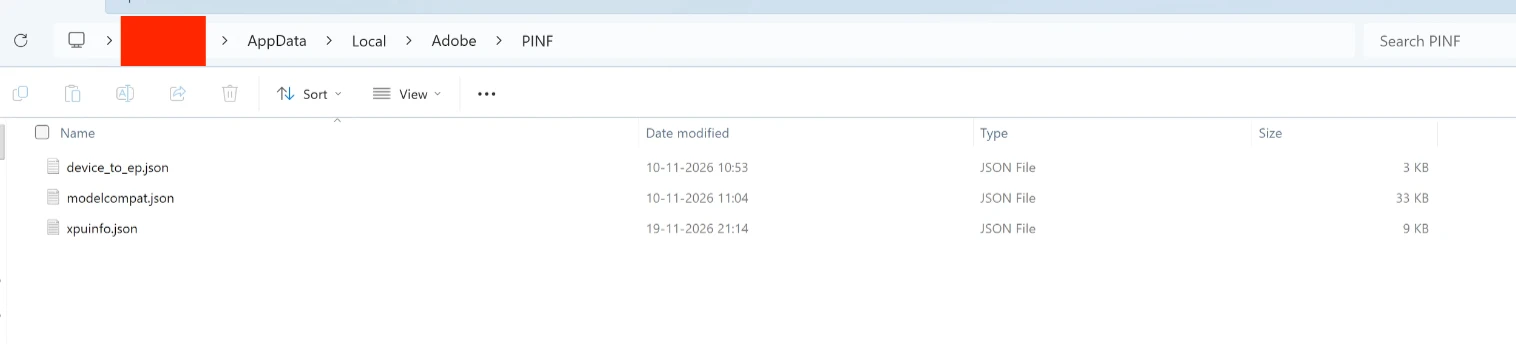
Diagnostic files: Press Windows + R, paste the following path, and press Enter:
%LOCALAPPDATA%\Adobe\PINF
Please send me these three files:
device_to_ep.json
modelcompat.json
xpuinfo.json
Important: Please copy these files rather than moving or deleting them.
Upload the 3 JSON files, System Info, and the error screenshot to Google Drive, Dropbox, or a similar service, then send me the link via private message (click my profile > Send Message).
These details will help us compare affected configurations and provide the product team with the information needed to investigate why the tool is still failing on supported hardware.
Still no luck here either with an NVIDIA GeForce RTX 5080 with 16 MB of VRAM. Have sent all the requested files to Anshul Saini (EXCEPT for the xpuinfo.json file which does not exist on my machine anywhere). Hoping we can finally get this issue resolved as it was the main reason I upgraded to this very expensive card!
If your system meets these requirements but the issue persists in Photoshop v28, please share the following:
Photoshop System Info: Go to Help > System Info, copy the full details, and share them.
Error screenshot: Capture the exact GPU/VRAM error message.
Diagnostic files: Press Windows + R, paste the following path, and press Enter:
%LOCALAPPDATA%\Adobe\PINF
Please send me these three files:
device_to_ep.json
modelcompat.json
xpuinfo.json
Important: Please copy these files rather than moving or deleting them.
Upload the 3 JSON files, System Info, and the error screenshot to Google Drive, Dropbox, or a similar service, then send me the link via private message (click my profile > Send Message).
These details will help us compare affected configurations and provide the product team with the information needed to investigate why the tool is still failing on supported hardware.
@Dmitrii35956449d9tl I would not expect you to see a change, unless your installed GPU now has more than 14GB VRAM. (see the link from Sameer). Shared memory is not dedicated VRAM.
@Dmitrii35956449d9tl wrote: I cannot attach image with screenshot into the post
Instead of Attach (the paper clip), try Insert Image (the mountain and sun). If that doesn’t work, try copying, then paste your image into a Reply window.
Hey, @JGZ45 & @ShowLowAZ. Thanks for the post & the comment. There could be left over logs from the versions where we had the issue first reported on. As you're using Photoshop 27.11, please make sure there are no stale preferences in your Photoshop. Go to the location of the preference folder below and rename it to backup.
Windows 10/11: Users/[user name]/AppData/Roaming/Adobe/Adobe Photoshop [version]/Adobe Photoshop [version] Settings
You can press Press the Windows key > Enter 'Run' > Enter %APPDATA%\Adobe
Rename the Adobe Photoshop folder by adding a .old at the end. (Adobe Photoshop 2026 > Rename > Adobe Photoshop 2026. old), You can restore these preferences later if needed.(https://adobe.ly/4860qM9)
Restart the computer.
These changes will provide a fresh start to Photoshop, much like a new installation.
Let me know how it goes.
Thanks!
Sameer K
(Type '@' and type my name to mention me when you reply)
@Sameer K I tried renaming the preferences folder for ver. 28.0.0 since someone above said it worked in that version. Still no support for the 5060 Ti.


 AdChoices