Known Participant
June 18, 2013

P: Resizing a document only scales selected vector shapes

  • June 18, 2013
  • 6 replies
  • 342 views

Here's how to reproduce this problem:

1) Draw any vector shape
2) Add another path to the same layer (e.g with "Path Operations" set to "Combine Shapes")
3) Resize the document

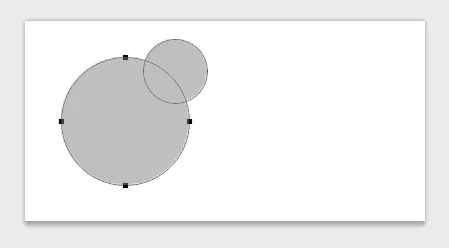
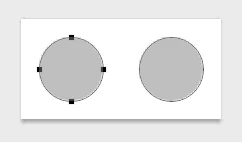
Notice how all the paths besides the one you drew last (i.e the one that's been selected) stay in the same place. And this doesn't just affect the current layer since Photoshop remembers path selections.

This is obviously not expected behavior and has already stopped me from using CC the day after it got released, so a fix would be great.

Also, again, in pictures — before and after resizing:


This topic has been closed for replies.

6 replies

Legend
February 4, 2015
Correct. Fixed in Photoshop CC (14.1.1) or later.
Participating Frequently
September 12, 2013
This looks to be fixed in 14.1.1 http://blogs.adobe.com/crawlspace/201...
zvuc
Participant
June 26, 2013
This same problem also appears when resizing the layer or group the layer is contained in with free transform. please fix asap...
Timur C
Known Participant
June 24, 2013
After cropping canvas, some vector shapes are changing their position. I made a small screencast http://d.pr/v/nxAb

Known Participant
June 18, 2013
Thanks for the reply; looking forward to the update.
Adobe Employee
June 18, 2013
This is a known issue that we already have logged. The best workaround for the time being is to drag select everything with the Path Selection tool before resizing (or rotating).