



Jeff Arola
Community Expert
Community Expert
October 21, 2020

P: Save for Web - File name and extension highlighted on macOS

  • October 21, 2020
  • 20 replies
  • 1455 views

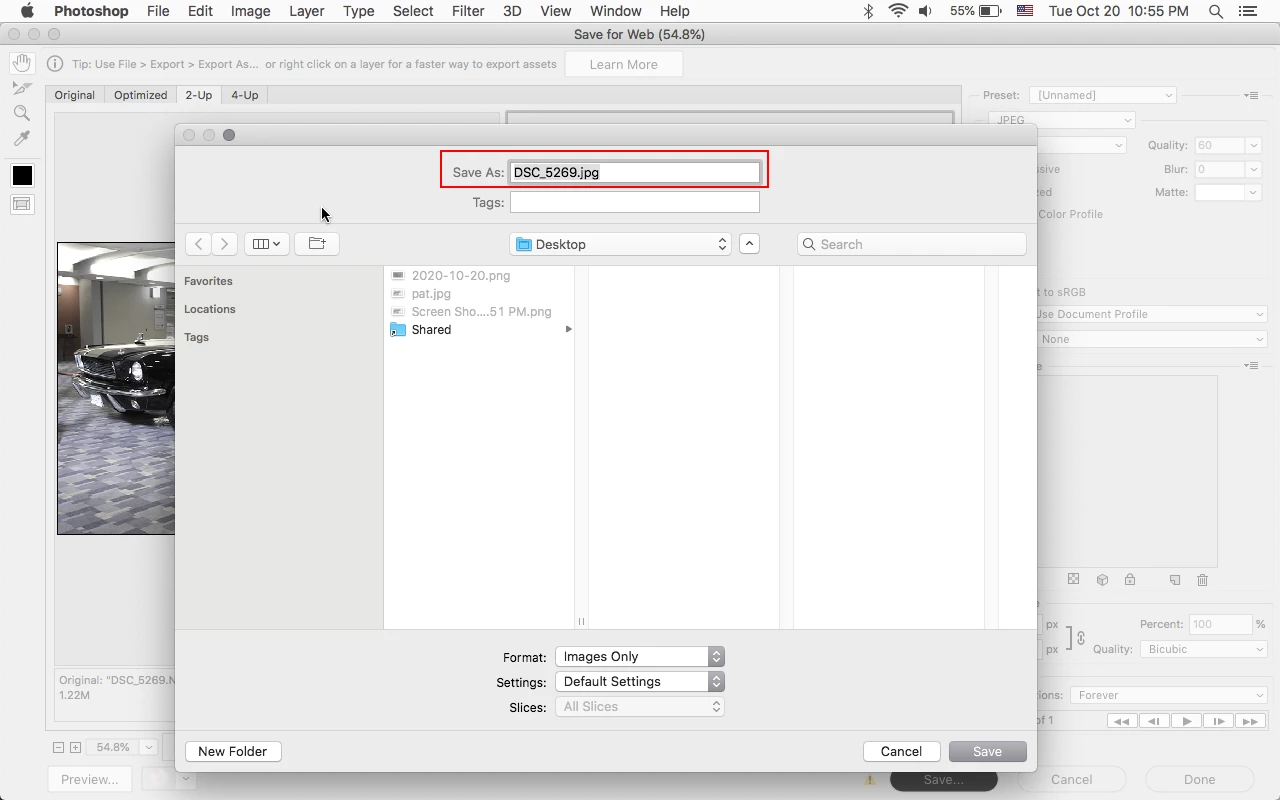
As has been reported previously, a problem confined only to macOS Catalina, where Save for Web highlights the whole file name plus extension in the save for web dialog is now an issue on macOS Mojave as well with the new photoshop 2020 (ps ver 22.0).


https://feedback.photoshop.com/conversations/photoshop/photoshop-file-name-and-extension-highlight-when-saving-on-macos-1015-catalina/5f5f460f4b561a3d427139dd


The save for web dialog is only supposed to highlight the file name so when a user changes the name the extension stays the same. However, when the file name plus extension is highlighted, changing the file name deletes the extension rendering the file unusable in such places as this very forum.


20 replies

Participant
April 23, 2022

My new Mac comes with Monterey so am back to having this issue (I previously upgraded an older Mac and reverted because this issue bothered me so much!) When you go to "Save for Web" the entire file name AND extension is highlighted. This causes major disruption with my (and many others who have reported this) workflow. If you accidentally space to the right like you normally would to add to the file name and instead add to the entension by accident, it causes issues trying to use the file in other programs or on the web. Saving a file normally does not have this highlight issue, only Save for Web. I need to be able to quickly space to the right and add to the file name for many things. This is extremely frustrating and gone on long enough without being fixed. There were other threads but they keep being marked as solved- this is not solved!

TheDigitalDog
Inspiring
April 23, 2022

I see the same (with Legacy Save for Web). Considering a 'normal' save doesn't highlight the entire name and extension, I'd agree it looks like a bug. I also don't see this behavior with Quick Export as JPG. So indeed, it is a bug. I've upvoted but I'll report this 'internally'. 

Author “Color Management for Photographers" & "Photoshop CC Color Management/pluralsight"
Legend
February 15, 2022

@deborahjb1 Make sure macOS Monterey is up-to-date. The 12.1 update fixes the issue you describe.

deborahjb1
Participating Frequently
February 15, 2022

So it seems they are working on it but it hasn't been completely tested since at 23.1.1 (Mac) I did notice that the file extension will get inserted when you start typing over the entire highlighted line, except now it re-inserts the .png/.jpg after the first letter I type and if I'm not looking, I'll end up with "t.pngest", instead of "test.png".  Then, when I go to wipe it all out, when I get to the 'g' (in png) it puts another extension in again! So I still have to wipe it out and type again. It's worse now!
What is so hard about coding this? 

Participating Frequently
February 12, 2022

Monterey 12.2.1

PS 23.1.1

Still not fixed

Jeff Arola
Community Expert
Community Expert
August 17, 2021

While this appears to be fixed on macOS Catalina and Big Sur (thanks for that), sadly it is still not fixed on macOS Mojave 10.14.6.

Inspiring
August 4, 2021

macOS Big Sur V 11.2.3

+

Illustrator v25.4.1

Still not fixed.

Participating Frequently
June 2, 2021

OH HAI! Im appreciative that this is being tracked, but wonder if you can let us all know if any work is being done to resolve the issue. It may seem like a simple thing, but as someone that exports for web every day, it truly is maddening.

Thanks in advance for any info regarding a solution!!!

Participating Frequently
June 2, 2021

Are admins deleting my posts without even responding? I have posted several times about this, but only two of them show up in my profile. 

When I "Save For Web" the filename and extension are both highlighted, so when I type the filename, it erases the extension. I use this everyday for my work and it drives me absolutely bonkers. At this point, its not only the time it takes to add the extension manually, but the frustration that you have known about this for at least two years and have not fixed it. 


So, Im going full Shawshank and  am writing to let you know that I will be posting every weekday about this bug until it is fixed. I have used your products since version 2 and have spent countless thousands of dollars on your software. I do not feel that this is a big ask. Thank you in advance for your consideration.


Mac Version: 10.14.6

Photoshop Version: 22.3.1

Participating Frequently
May 27, 2021

When I "Save For Web" the filename and extension are both highlighted, so when I type the filename, it erases the extension. I use this everyday for my work and it drives me absolutely bonkers. At this point, its not only the time it takes to add the extension manually, but the frustration that you have known about this for at least two years and have not fixed it. 


So, Im going full Shawshank and  am writing to let you know that I will be posting every weekday about this bug until it is fixed. I have used your products since version 2 and have spent countless thousands of dollars on your software. I do not feel that this is a big ask. Thank you in advance for your consideration.


Mac Version: 10.14.6

Photoshop Version: 22.3.1