


Participating Frequently
January 22, 2020

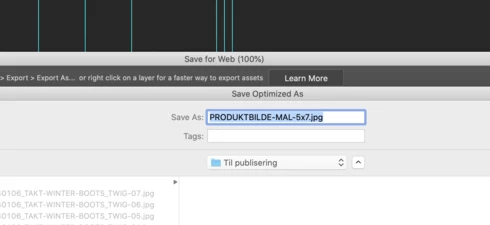
P: Save for web, unable to paste file name

  • January 22, 2020
  • 26 replies
  • 1221 views

This issue was originally posted months ago, but nothing has happened. My post was moved into a 5 year old issue and forgotten all about, so I'm gonna keep posting a new one every few weeks until it has been fixed. 


CMD+V does not work in the naming input field in Save for Web / Save Optimized As dialogue box. In order to paste a name I now have to manually select the standard file name using the cursor, being careful not to select the file extension, right click and select Paste. Only then does it work. When you're resizing and saving hundreds of files this way it takes A LOT of extra time.
26 replies

Fine Art P
Inspiring
June 30, 2021

@dmohr 

It's been a problem for some time. See this post from 2014: https://feedback.photoshop.com/conversations/photoshop/photoshop-save-for-web-unable-to-use-short-cuts-in-save-dialog-copycutpaste-file-name/5f5f456b4b561a3d424ae449

I've paid $600 a year to Adobe. I've never asked for a new feature. All I ask is that you go back to all the bugs and mistakes you've coded and fix them. I realize you have a monopoly but somewhere deep inside do you have some professional pride? Any embarrassment that the software isn't up to standards established long long ago?

Participant
October 2, 2020

In Photoshop CC 2019 on macOS Catalina all of those issues don't exist!
It seems to be onlyin Photoshop CC 2020 onmacOS Catalina.
so a "fix" is to downgrade PS to the old 2019 (20.1 version) again. 
such a shame!


Participant
October 2, 2020

same problem here – it is extremely annoying.
there are quite a couple of issues with the save for web file dialog box:
1. this issue: not being able to paste into the filename box
2. the whole filename is preselected including the (e.g.) ".jpg" extension, it used to be only the filename, which is far more convenient so you can just start typing.
see https://feedback.photoshop.com/conversations/photoshop/photoshop-file-name-and-extension-highlight-when-saving-on-macos-1015-catalina/5f5f460f4b561a3d427139dd

3. if the file already exists, the are now to confirmation dialogs asking to overwrite, seemingly one form the finder, and one from photoshop, BOTH have to be manually confirmed.... d'oh....
see https://feedback.photoshop.com/conversations/photoshop/photoshop-overwrite-confirmation-prompt-generated-twice-by-system-and-by-photoshop-macos-1015-catalina/5f5f46114b561a3d4271f63e

my guess is that all this strange behaviour, which conflics with years of muscle memory, and probably Apples design guidelines
is somehow interconnecte

Inspiring
September 18, 2020

Same problem here.


os 10.15.6

PS 21.2.3.


I mean to remember that in earlier versions of Photoshop the

Save for web Dialog was an extra Programm with extra Preferences, ill try to find it and delete it - maybe that works.

David Mohr
Participating Frequently
September 1, 2020
I've passed your message on to the decision makers.
Thanks,David
Participant
August 29, 2020
I am sorry David, but your response if of no help.

Some notes and thoughts regarding this incredibly frustrating, and inexcusable, issue:

Right clicking, and then choosing Paste, works. But the method that we professionals need to use is Command-V. The right-clicking method is way, way too slow.

Adobe: Catalina has been out for virtually one whole year. Would you care to get off the lawn chair and fix this very rudimentary function (albeit one we professionals rely on virtually every hour of every day)? What are we paying for with our monthly subscription fees?

Stepping back to Photoshop CC 2019 is not the answer (as some have suggested), as software is often updated to patch security vulnerabilities. Security experts recommend that users should run up-to-date apps to stay safe.

Furthermore, Adobe... as you know, there are alternative software titles out there which are fully capable of doing much of what Photoshop (and other Adobe titles) are capable of — but without the monthly fees. I have already been able to replace InDesign. If essential productivity functions — such as Command-V — continue to disappear from Photoshop, I will happily leave that title in the dust, too (after being a dedicated customer for almost 30 years).

My system:
Photoshop 21.2.2
OS X Catalina 10.15.8
iMac 27" 2019

Participant
August 29, 2020
Which Adobe should have accommodated a year ago.

Inspiring
August 25, 2020
Btw: In Photoshop CC 2019 everything works fine with Catalina 10.15.6 on my MBP (mid 2015, fully equipped). I like to forego the new "useful" features of PS CC 2020 and prefer to use the better working previous version.

Inspiring
August 18, 2020
Same issue here! MBP mid 2015 fully equiped, Catalina 10.15.6. Just updated yesterday from Mojave. Why did I suspect that this was not a good idea... I'm working with Adobe and Mac since 1998 but it was never as annoying as in the last few years.

Edit: In Photoshop CC 2019 everything works fine with Catalina 10.15.6 on my MBP (mid 2015, fully equipped). I like to forego the new "useful" features of PS CC 2020 and prefer to use the better working previous version.