Participant
May 11, 2015

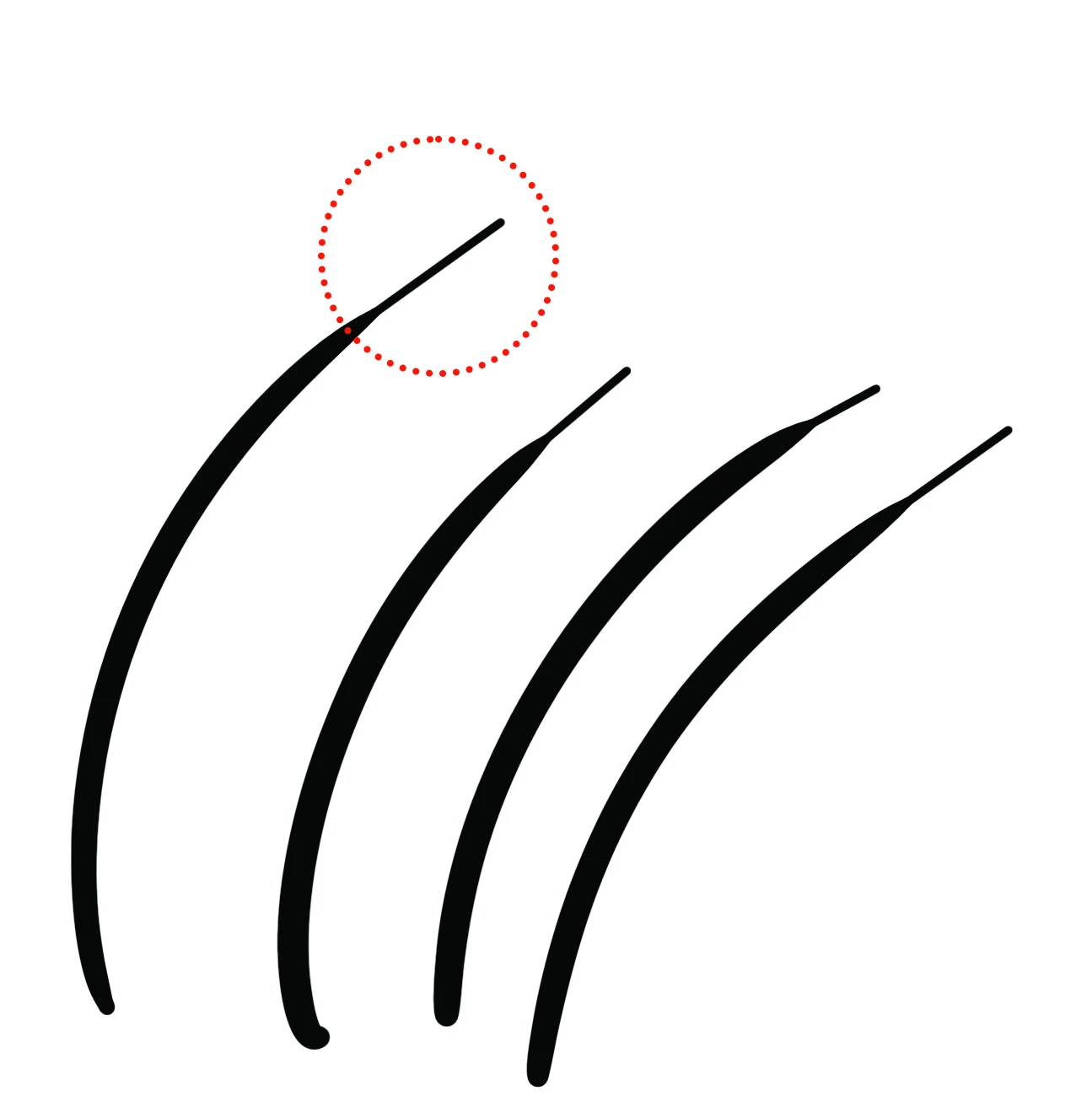
P: Shoelace shaped brush stroke with Wacom and smoothing on macOS

  • May 11, 2015
  • 22 replies
  • 16981 views

I'm getting fed up with you Adobe

This is a recurring issue with smoothing creating a "shoelace" effect. I'm on a brand new mac, and a brand new Cintiq. I've tried reinstalling drivers, installing older versions of photoshop, and toying with smoothing settings. As far as I can tell, if I want to use smoothing, it generates these artifacts at the end of my strokes. 


I've used photoshop for a couple of decades professionally, but I'm at a crossroads with whether I will bite the bullet, cancel my Adobe subscribtions and switch to Pro Create or another product. Fix this.


22 replies

Trevor.Dennis
Community Expert
Community Expert
March 8, 2025
quote

Im in this same boat and idk what I did to fix it but now its back and I cant remember how did you find any solution to it. Ive tried every other thing imaginable and I don't wanna pay 30$ for a plugin just to help fix this


By @LavaScoop31904923qmai 


Are you using Mac or Windows?

What tablet are you using?

Are you using WinTab or Windows Ink?


quote

I don't wanna pay 30$ for a plugin just to help fix this


By @Stephen220014570tvf


If you are using Windows then Lazy Nezumi Pro does so much more than fix the shoelace artifacts.  It has dozens of useful presets, has better smoothing than Photoshop and is the best value Photoshop plugin by a decent margin.  Its worth does depend on the way you use Photoshop to be fair.  If you are only optimising photographs then it is not so useful, but I have always thought that Photoshop is wasted on Photographers.  If, on the other hand, you do any sort of illustration, photo manipulation or digital art, then LNP is a total no brainer.   Blimey.  I just checked and it is now US$60!  That's twice what I paid for it, but still represents good value.

Participant
March 8, 2025

Im in this same boat and idk what I did to fix it but now its back and I cant remember how did you find any solution to it. Ive tried every other thing imagniable and I don't wanna pay 30$ for a plugin just to help fix this

Participant
September 4, 2024

I have fixed this problem in the past, but I can't remember how. Now, after not saving my preferences last night, I am encountering the same problem again! I have tried everything on this thread and even re-installed my wacom driver (I don't have the option to edit the pressure curve), but nothing gets me back to the beautifully tapered, natural looking lines I had yesterday. This is especially frustrating in the middle of a book project since not only have I lost time, but my lines wil now not look consistent. I really hope someone fixes this or remembers how they fixed it.

Participant
September 26, 2023

you are really the god of  photoshop!!


Participant
March 6, 2023

I think I just figured it out - turning off the "smoothing" option in brush settings totally eliminated this effect for me. Seems it does just the oposite of what it says. 

zenginejulia
Participating Frequently
July 8, 2022

A Mac Alternative to the here-mentioned "Lazy Nezumi" App is Hej Stylus. https://hejstylus.com/

FEATURES:

  • Position Pull
  • Exchangeable presets
  • Shortcuts
  • Pressure smoothing and buffering
  • Two position smoothing methods
  • Instant pressure mapping
  • Tilt and rotation smoothing
  • Works with any graphics software running on the Mac
  • Works with a mouse, trackpad, stylus, or graphics tablet
gabdar22
Participant
May 3, 2022

Whenever I use a pressure size brush, my strokes leave this weird extra nubbin on the end of them. If I install an external program like lazy nezumi it works no problem, but I'd like to not have to rely on that. Any ideas what might be happening?


I'm using photoshop cc 2022 and this is happening consistently using different wacom tablets

melissapiccone
Community Expert
Community Expert
May 3, 2022

How fast are you painting? If you go slow, it will leave the tail. I would try playing with the brush settings and make quick, deliberate strokes. 

Melissa Piccone | Adobe Trainer | Online Courses Author | Fine Artist
gabdar22
Participant
May 3, 2022

this example photo was done while making quick deliberate strokes ^


thanks for the help anyway!

Participant
March 31, 2022

That's how my graphic tablet works in Paint Tool SAI

And that's how it works in Phoroshop?

Any thoughts on fixing it?

Legend
January 14, 2022

Wacom tablet has a control panel.  The pen's pressure profile can be adjusted to reduce (possibly eliminate) the shoelace tail.  The profile can be customized on a per device tool and per application basis.


Here's a rough profile that will reduce the shoelace effect:


davescm
Community Expert
Community Expert
January 14, 2022

I find a small amount of smoothing and stroke catch up and catch up on stroke end ON work best for me. It might be different on different users though - depending on how they use their pen.

Example below both left and right have similar strokes at 10% smoothing, but those on the left are full of shoestrings but in those on the right the issue is less evident.


Dave