


P: Single path points aren't displayed properly with 'Use GPU' turned on
Deselected single path points are supposed to be displayed as crosses. In my case the cross is drawn in the top-left of a document, the actual points stay invisible until I select them. If I disable GPU, path points are displayed properly, but I use GPU features a lot.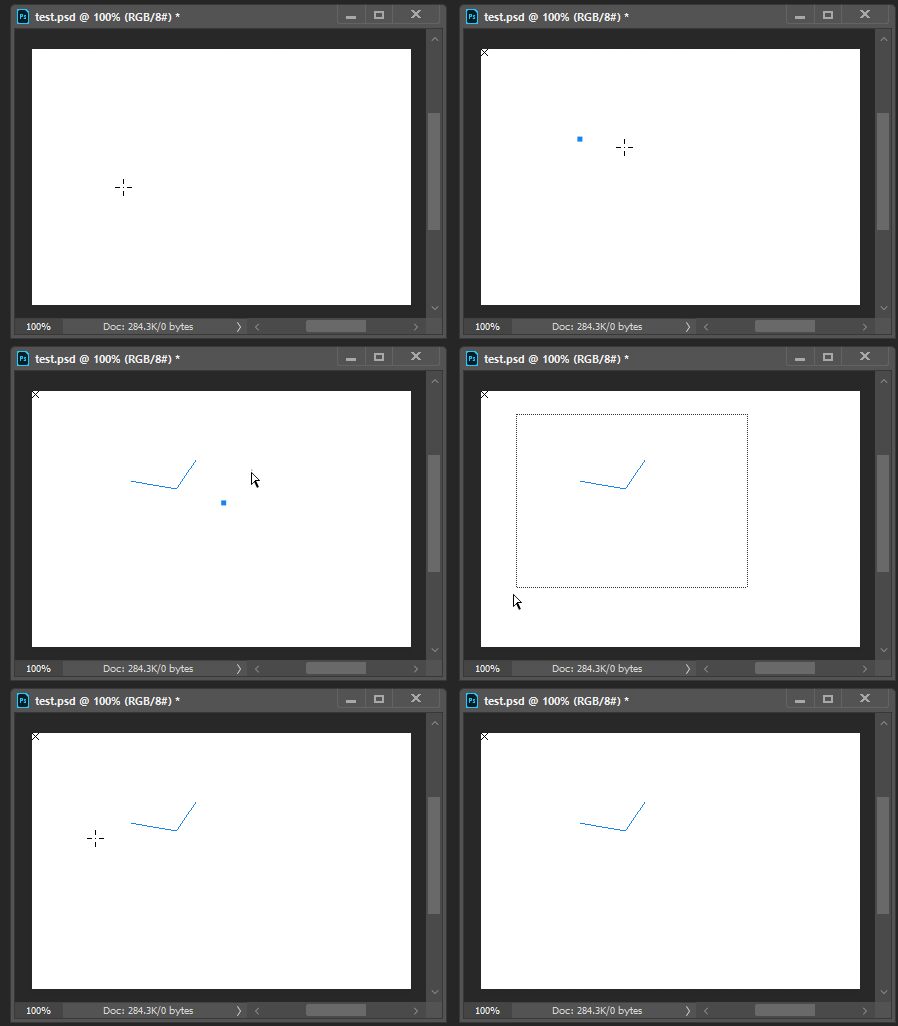
CC2018 and previous versions don't have this issue. Using different GPU options, compositing engine doesn't seem to give any result.
Some PS and system Info:
Adobe Photoshop Version: 20.0.1 20181029.r.41 2018/010/29: 1197484 x64
Operating System: Windows 10 64-bit
glgpu[0].GLVersion="4.1"
glgpu[0].IsIntegratedGLGPU=0
glgpu[0].GLMemoryMB=6144
glgpu[0].GLName="NVIDIA GeForce GTX 1060 6GB"
glgpu[0].GLVendor="NVIDIA Corporation"
glgpu[0].GLVendorID=4318
glgpu[0].GLDriverVersion="25.21.14.1722"
glgpu[0].GLRectTextureSize=32768
glgpu[0].GLRenderer="GeForce GTX 1060 6GB/PCIe/SSE2"
glgpu[0].GLRendererID=7171
full system info: https://pastebin.com/Y7imjL70
 AdChoices