
P: Smart Object icon often clipped with Layer Bounds panel options
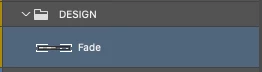
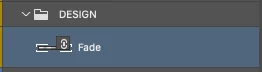
The Smart Object icon overlays in the Layers panel are often clipped. Issue when using small thumbnails in the Layers panel, layer bounds vs document bounds or a wide and narrow document. It can be impossible to see if it's a linked or embedded smart object and difficult to double click to edit. Very obvious UXfix is to overlay the icon on the thumbnail rather than clipping it within the Layer Thumbnail.
1. Current UI - Smart Object icon invisible
2. Needed UI - Smart Object icon visible


 AdChoices