


inetgrafx
Participating Frequently
November 22, 2014

P: Smudge tool issue (CS6 through CC 2014)

  • November 22, 2014
  • 21 replies
  • 1216 views

Hi there,
Since Photoshop CS6 the functionality of the smudge tool seem to have been altered. I am still on Photoshop CS5 at work, because of that exact issue. I don't know why this problem has been ignored by Adobe and carried on even to the latest CC 2014 subscription.
Apparently not many people use the smudge tool at 100% pressure. As a concept artist at Warner Bros I have several concept artists in my team that report similar issues and we tried it out on different wacom devices on Windows 7 platforms (cintiq 24 HD, intuos 5 touch medium and large) showing the same behaviours. On my side I practically use this feature almost on a daily base and I find it extremely useful - feel free to visit my portfolio: www.inetgrafx.com to see the smudge tool in action 🙂

It would be very much appreciated if a developer could fix this tool as shown here:
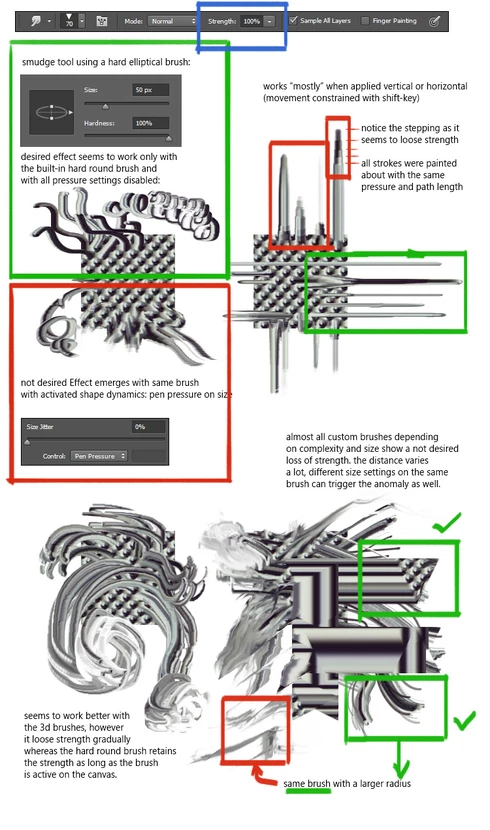
in short: it works perfectly fine in CS5 and I wished I had exactly the same functionality back again for a future version of Photoshop,
For right now my work around is the use of a hard round brush and all settings disabled - maybe that would help someone who experiences the same.
Thanks a lot and best regards,

-dan

Daniel Kvasznicza
www.inetgrafx.com

P.S.: looking through the topics following points correspond to the same problem:
http://feedback.photoshop.com/photoshop_family/topics/serious_bug_in_cs6_and_cc_smudge_tool


Image is not available


Image is not available

This topic has been closed for replies.

21 replies

Inspiring
August 19, 2015
I've been ranting on twitter several times about this and several Adobe employees promised to look into this thing in a course of 2 years, but I guess this issue is too hard to fix :D
What I found is that you can use Mixer Brush with Wet: 0%; Load: 100%; Flow: 100% and turned off option 'Load Solid Colors', it basically looks the same as old smudge.

http://take.ms/VaAPc

The downside is that you have to sample the colors from the region you want to smudge every time.
inetgrafx
inetgrafxAuthor
Participating Frequently
August 18, 2015
Nope, nobody from Adobe seems to bother, although it's a clear bug.
As for now my workaround is not to use any custom brushes.
The functionality works properly only with the hard round brush with all brushdynamic settings switched off. However you can rotate and squeeze the brush shape - so if you need a sort of palette knife you could put the roundness to e.g. 10%. Also note in case you want to rotate the canvas - if you don't snap it to any of the 90 degrees it will break the functionality too - .... 😕😕
Inspiring
August 17, 2015
This still hasn't been fixed in 15.0.1
Inspiring
June 29, 2015
Hello Jeffrey,
I've just updated to CC 2015 and the bug still persists 😞 . Is there any possibility to have the smudge tool fixed in a near future update??

Someone mentioned to me a possible work around this issue is by simply converting the document to 32bit. It's quite a drastic solutions, since working in 32 bit can be a lot more costly on the performance, however it matches the correct behaviour the closest as the edge quality doesn't deteriorate as with your suggested workaround.

Let me know what you think,

Thanks,

Daniel Kvasznicza
www.inetgrafx.com
inetgrafx
inetgrafxAuthor
Participating Frequently
December 4, 2014
Hello Jeff,
thanks a lot for checking this out. I'm aware of this workaround, but it drastically affects its performance. THAT was the reason why I liked using it, because for some reason at 100% the tool moves as fluid as any standard brush tool.
As soon as its on penpressure and below 100% strength the tool lags and it's rendered useless.
This image here is half the size of the original (quarter resolution): http://meduzarts.com/wp_test/wp-conte... ... most of the hair is painted with the smudge tool, not the brush - as it allowed me to drag paint, rather than constantly color picking and painting. That's just one of countless examples how I would use this feature.
It would be awesome if we could see an upate where this is fixed, so I can push a software update request at work. For now I'm sticking with CS5.
Thanks a lot again,
cheers,

Daniel Kvasznicza
www.inetgrafx.com
Participant
December 4, 2014
Thanks for getting back Jeff, I've been using a 99 percent tool preset in the meantime. but losing functionality of swapping between 90% and 100% with the num keys.

(maybe you know a way to set custom increments for keys 1-10? so I can set 10 to 100% 9 to 99% 8 to 95% etc?)

also note, it hasn't been mentioned, but it seems the smudge tool now produces chromatic aberrations when used? another odd effect. (saturated color shifts on fringes)

Thanks for checking it out for us!
Legend
December 3, 2014
He was able to repro. He suggested a possible workaround would be to save a preset with Transfer enabled, Strength set to Pressure with minimum cranked up to 99%
Participant
December 1, 2014
Hi all, also running into the issues Daniel is talking about, I would love to update to CC but the change in behavior is making that transition difficult.

I use the smudge tool professionally as at 100% it makes quick edits to finished work possible. It let's you manipulate a dense area of pixels and maintain detail. It also let's you matte photo and 3D work with painted elements and is useful for compositing.

I know "painting" in photoshop has never been your core audience, but we've worked hard to build a digital art community and helped make photoshop industry standard for 2d commercial art.

Please take the feedback seriously.

It can't be working as intended now the behavior is just inconsistent.
inetgrafx
inetgrafxAuthor
Participating Frequently
December 1, 2014
Thanks a lot for looking into this.
Let me know if you have any questions and if you need more information,
Cheers,

Daniel Kvasznicza
www.inetgrafx.com
Legend
November 30, 2014
Our painting QE is investigating.