

Inspiring
August 21, 2020

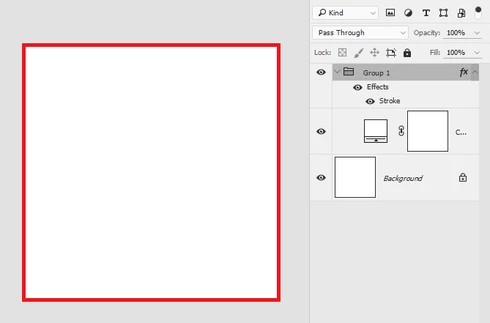
P: Stroke effect not working on folder. Fill Layer doesn't work correctly.

  • August 21, 2020
  • 5 replies
  • 619 views

In older versions, I used this combination (see image).
Beginning from version 2020, stroke and shadow effects on a folder with Fill Layer do not work.
This topic has been closed for replies.

5 replies

Legend
December 8, 2020

This should be fixed in 21.1 that was released last night.

Participating Frequently
September 25, 2020

Glad to hear it!  We'll have a fix for this next release.

September 19, 2020

Andrew, you are my savior. I checked this box and the stroke appeared!

I'll go and make my colleagues happy.

September 19, 2020

Andrew, you are my savior. I checked this box and the stroke appeared!

I'll go and make my colleagues happy.

Participating Frequently
August 24, 2020
Hi,
Thank you for finding this discrepancy.  If you enable Preferences -> Performance -> Legacy Compositing, do the layer effects work again?  You mentioned this is an issue for the drop shadow effect.  Can you please share a screenshot, similar to your stroke screenshot, of this scenario?  I’m not sure how a drop shadow would bee seen on the canvas when the canvas is entirely filled.

Sincerely,
Andrew
