


leds2097726
Inspiring
February 22, 2020

P: Swatches name glitch (macOS)

  • February 22, 2020
  • 14 replies
  • 1180 views

Latest Photoshop, Mac. Clicking on the name of a colour swatch does this:
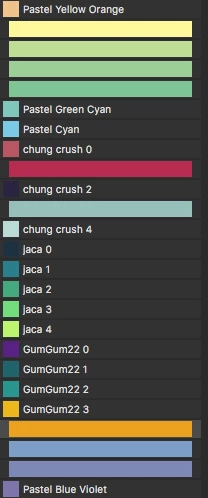


I can't figure out a way of reinstating the name of the swatch once this has happened.

I assume that's not intentional behaviour?

14 replies

Adobe Employee
March 24, 2020
Hello Led, could you let me know what is the file extension for the swatches shown in the list? Is it .act by any chance? Thanks!
Legend
March 18, 2020
Hi Led, I am not able to repro this either macOS 10.15.3.  I have the panel set to "Large List" - you? Any other things that you can think of that might be unique to your set up? 
leds2097726
Inspiring
March 18, 2020
Still having this problem with the new version that went out today.
Inspiring
February 22, 2020
What OS are you on? I'm not seeing this happen on Mac running Mojave. Is it possible something in Preferences has become corrupt that's corrupting your panel?