


Sean H [Seattle branch]
Known Participant
January 16, 2019

P: Switching tabs doesn't show the correct image

  • January 16, 2019
  • 64 replies
  • 3439 views

I keep running into render issues in the new PS 2020. Here's the most recent example. I loaded a large pano into the first tab then opened a PSD file into the second tab. This second tab should show me a couch and kitchen as indicated by the view in the layers, yet it's showing me the pano from the first tab. This has happened to me dozens of times in past few days.
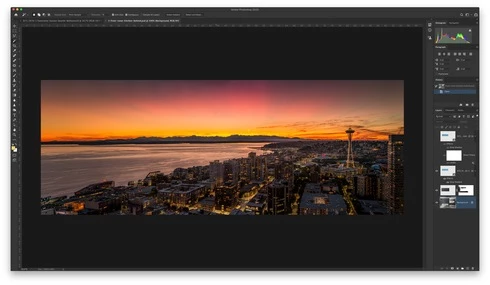

When I pull the tab out, it then renders the PSD correctly:
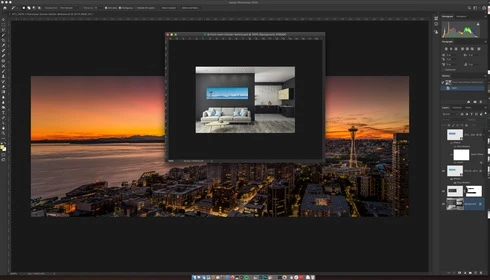

Another issue was when I went to restart the computer and had a dozen files open in PS that weren't saved. PS 2020 just closed it all out and skipped the "Do you want to save?" dialog. Just trashed the file progress.

This topic has been closed for replies.

64 replies

Participating Frequently
June 26, 2020
I hate to say this, but unfortunately it's still happening for me with 21.2. Only had it a few days and it's happened more than once. Not quite out of the woods yet! (Though I will say, this is more of just an annoyance than anything)
Legend
June 18, 2020
Yep. That issue is abated by unchecking "Legacy Compositing" under preferences > performance... https://feedback.photoshop.com/photoshop_family/topics/photoshop-21-2-moving-layer-leaves-shadow-ima...
Participant
June 16, 2020
I updated, however this causes a new issues of when moving layers.
When I move a layer it moves fine but leaves an imprint of the previous position. This happens with all layers moved, and sometimes doesn't catch up with the movement and stays there. Because of this I went back to the previous release of Photoshop. 

Are you aware of this bug?
Legend
June 16, 2020
Can you please update to 21.2 which was released today? We've made a change on the Photoshop side which should fix this issue. Let us know if you're still having trouble.
Participating Frequently
June 9, 2020
Perfect; good to hear; thanks
Legend
June 8, 2020
I think the fix we have will help macOS in general, not just Catalina.
Participating Frequently
June 8, 2020
Question though: will those of us who don't have the latest OS just be out of luck? I have a rather loaded / expensive Apple machine, but I bought if a few years ago, and I've been advised not to update to the latest versions on this machine, as Apple doesn't support the newer OS's on the older machines. Basically just out of luck on this issue till I buy a new machine?
Legend
June 4, 2020
Thanks Janos, we have a change that we're planning for the next update which should help with this issue.
Participating Frequently
June 4, 2020
@jeff I can confirm that works as well. Just been working with the Photoshop and dragging the app window resolved the issue.
Legend
June 4, 2020
One last question, if you're in this state, does simply dragging the application window by the title bar cause it to update?