


Participant
September 5, 2016

P: Task bar shows in full screen mode after Windows 10 Anniversary update

  • September 5, 2016
  • 6 replies
  • 297 views

Hi,

using the latest Photoshop CC 2015.5.1 with the latest Windows 10 64bit (Build 14393), I noticed that the toolbar at the bottom no longer disappears in Photoshop's full screen mode. I tried all "flavours" of the full screen mode by toggling through them with the "F" key and.

The Windows toolbar seems to be overlaid at an opacity of around 50% on top of the image displayed in Photoshop. In other words, I can still see the image which I'm editing shine through, but it's not usable. Here's a screenshot:
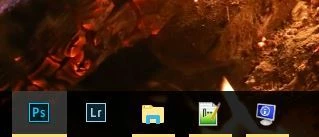


A work-around is to manually disable the Windows 10 toolbar prior to opening Photoshop and then enable it again once I'm done with Photoshop work. This is not ideal.

It would be great if someone from Adobe could create a bug report for this, or could let me know how I can do so myself. Happy to supply screenshots and system information.

Thanks
Chris

This topic has been closed for replies.

6 replies

Participant
November 3, 2016
Thanks Jeffrey - I can confirm it's resolved with the latest Photoshop update to 2017.0.0 20161012.r.53.
Legend
November 2, 2016
We've made a change to improve compatibility with the Windows 10 Anniversary update and the task bar in full screen mode: http://blogs.adobe.com/photoshop/2016/11/keep-creating-a-guided-tour-through-the-latest-photoshop-up...
Participant
October 20, 2016


Hi, I'm having trouble with full screen mode.

Previously by pressing 'F' fullscreen mode would activate where the task bar would disappear.

Now when i press 'F' full screen mode is activated except the task bar is still showing and is covering up the buttons on the bottom right of the layers tab.  This means i cant select any of these buttons such as new layer or adjustment layers etc.

Can this be fixed?

Iain
Legend
September 7, 2016
This is known issue introduce by the Windows 10 Anniversary edition update . We're looking into with our partners.
Jerry Syder
Inspiring
September 5, 2016
Same here - I think it was reported already and they're aware but still good to let them know that you're not satisfied.
Inspiring
September 5, 2016
Why not use hide Taskbar in Windows? Search web for how to do that.
RONC