


Participating Frequently
Nov 12, 2021 1:08 PM UTC
Released

P: Text on path not exported correctly to pdf PS 23.0.1

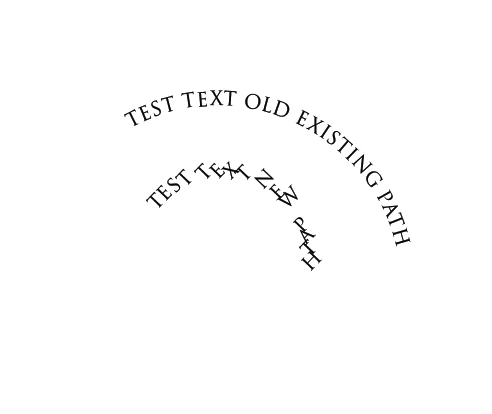
I opened an existing PSD file, created a new path for a text layer. Put text on the path.

Exported it to PDF.


Expected: Text shows as on edit.


Result: Text shows as attached and breaking the orientation.

Existing paths do not have this problem though.


I have attached a JPG export as well so you can see that it exports correctly to JPG.
 

This topic is closed to new replies. Start a new post to keep the conversation going.

9 replies

Mohit Goyal
Community Manager
Community Manager
Dec 14, 2021 4:51 AM UTC

Hi all,  


We're happy to announce the release of Photoshop 23.1. This update includes the fix for this issue. To see the list of all fixed issues, click here. 

To update Photoshop to 23.1, click "Update" in the Creative Cloud desktop app next to Photoshop. More detailed instructions for updating  


Let us know if the update resolves the problem for those affected and share your feedback with us.


Thanks,

Mohit

Translate
Adobe Employee
Nov 15, 2021 8:32 PM UTC
A caution to the workaround above: It can be applied if the script is Latin or CJK. If you are using Middle East or North African scripts, you cannot use this workaround. Rasterize type if that is the case.
Translate
Adobe Employee
Nov 15, 2021 7:38 PM UTC
Thank you for reporting the issue.
I was able to reproduce the issue. Dev will work on the fix.
 
In the meantime, as a workaround, please do the following steps.
  1. Select the type layer in Layers panel
  2. Open Paragraph panel and open the context menu
  3. Select "Latin and East Asian Layout"
Subsequent creation of PDF should show correct output.
 
Translate
Legend
Nov 15, 2021 4:18 PM UTC

Thanks. Running this by the engineering team.

Translate
Participating Frequently
Nov 15, 2021 10:24 AM UTC

Plus I am running on a Windows system. (Win 10 64bit, latest updates, PS 23.0.1 64bit, Acrobat DC Pro for viewing - but same result when viewed with crome for example).

Translate
Participating Frequently
Nov 15, 2021 9:58 AM UTC

Sorry for the flattened PSD - my fault.


I use Save As and PDF/X-3:2002 but also tried others.


Enclosed a new PSD File, same result: https://shared-assets.adobe.com/link/c0dff00b-e9aa-48a7-69fb-3cb3a9a211d8 

Translate
Legend
Nov 12, 2021 4:21 PM UTC

Sorry, looked at your PSD and it's been rasterized. Can you post the PSD that has the text layers in it?

Translate
Legend
Nov 12, 2021 4:19 PM UTC

Seems to work for me. I used the default PDF settings from Save a Copy > PDF. Anything special about your PDF export options?


Translate
Participating Frequently
Nov 12, 2021 1:12 PM UTC

Screenshot from expected result (from the export as JPG):


Translate