


Participant
January 29, 2019

P: Text tool Problem: A bunch of small text is all over my screen

  • January 29, 2019
  • 38 replies
  • 9223 views

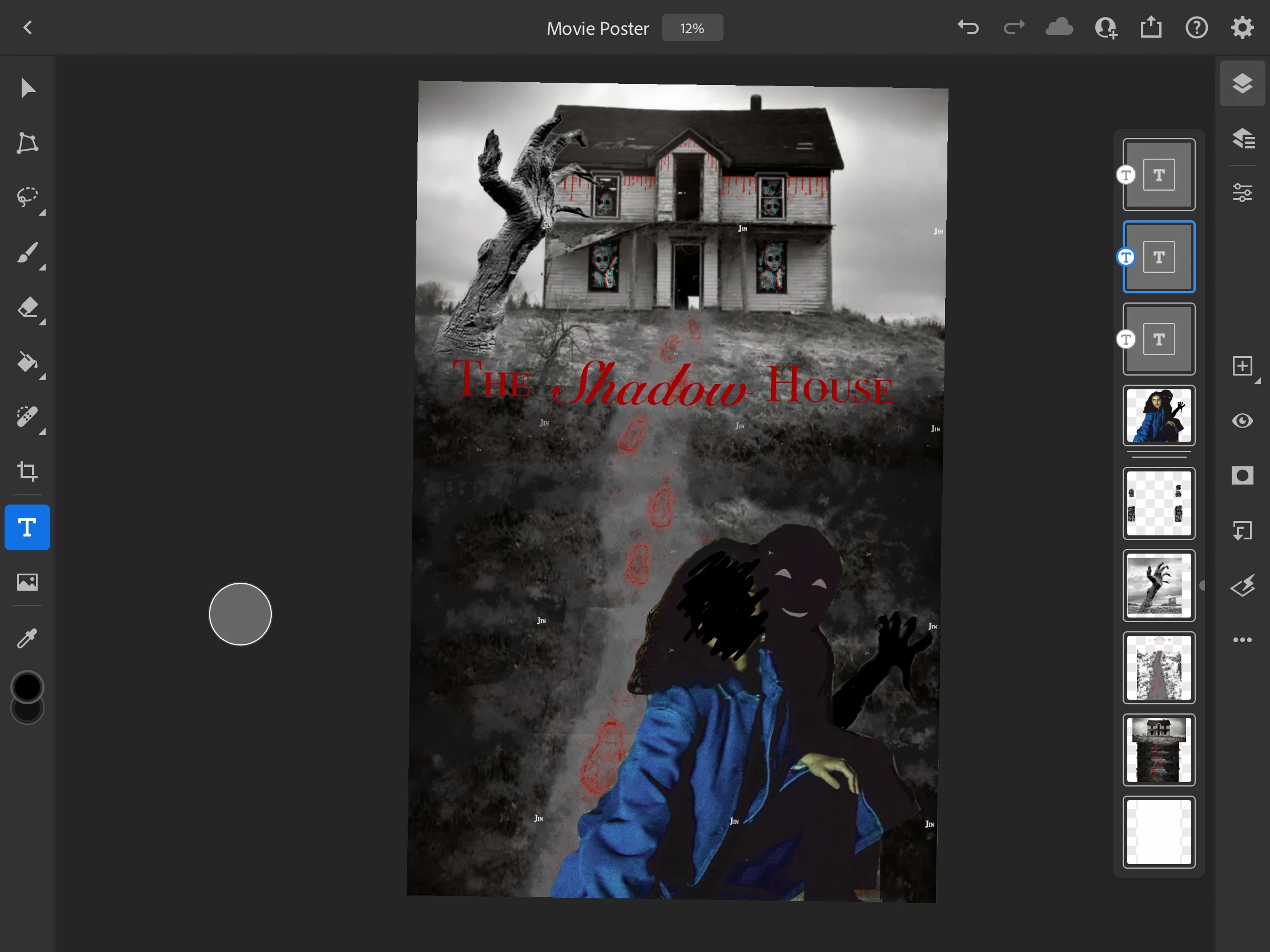
So like usual, I made a text box to start typing but I don't know what happened because now there is the same word in various small fonts all over my work. I have no idea where it came from. If you look at the photo, there is the word "Jin" in white everywhere and I can't seem to remove it.
38 replies

Participant
September 4, 2024

Neither of these worked for me. Are you finding these fixes on iPad or a desktop because it seems none of the resolves work for those using iPad

Participant
September 4, 2024

It sucks to lose all my progress to revert to the oldest state of my doc. Having this issue now and losing 40 minutes plus of progress. Not sure it's even worth having ps on my iPad at this rate 

Participant
April 25, 2024

Tap the Home button in the upper left corner. On the file you were just working on, tap the "..." and select View Version History. Choose the version just before the text craziness happens. Then tap the "..." and choose Revert to This Version. After it opens, restart Photoshop.


That's the only fix I've found. Hope that helps.

Participant
April 25, 2024

Hi Benjamin, your work arounds don't work. I did a paragraph text box and when I touch out of it I get the random letters everywhere. Sure, they disappear when I touch back into it, but I can't save it and print it like that so it's useless. It's 2024 and you STILL haven't fixed this yet?

Participant
November 8, 2023
Participant
October 25, 2023

This occurs for me on iPad 

Community Manager
October 24, 2023
Participant
October 24, 2023

Also looking for a fix. Super frustrating in a high school classroom full of students!

Participant
October 24, 2023

Is there a fix by now? Because I have this problem as well and it is driving me incredibly MAD! Been trying to wrap my mind around this now for hours and there is just no solution whatever I try?????

ThoughtNozzle
Participating Frequently
January 22, 2023

An intermittent bug – or similar – previously reported in community posts like this one:
https://community.adobe.com/t5/photoshop-ecosystem-discussions/repeating-text-pattern-bug/td-p/10372269

...seems to be present in Photoshop 24.1.1 for Mac. Running Ventura 13.1, on Mac Studio M1 Ultra with 128 GB RAM.

Once type is composed – either point type or area – and the Enter key is hit, all or part of the text may appear repeated in various locations across the screen. The point size of the repeats does not necessarily match the original, seems to always be smaller, and can be as small as 2 pixels.

I found that some of the repeated text instances on a layer can take on the Layer Style of a completely separate type layer – for example, a stroke.

The repeated text – or string of pixels if really small – can appear on totally different layers, and sometimes (not always) be plocked by a layer mask on that layer.

At other times, the repeats act like a masking element themselves, and knock out the bitmap art on the affected layer (not the original text layer). This can happen even if there is no mask on the layer.

It seems as though the rendering of certain kinds of shadow effects my be involved; when I rasterized a field blur on one smart object layer, saved, and returned to the parent document, the glitch in that layer had cleared. Same with a drop shadow in another smart layer.

The fonts involved are of various kinds and origins, including SkyFonts or other SAAS type services, although not Type 1.

Rasterizing text layers can allow the glitched to me banually cleared, but my solid fix was to roll back to 24.1.0. Haven't seen the issue since. Re-opening the glitched document, then re-rendering each affected layer by making small changes can clear that layer's repeats.

I can temporarily reinstall 24.1.1 if you need screen grabs.

Thanks.

Kevin Stohlmeyer
Community Expert
Community Expert
February 22, 2023

Hi @ThoughtNozzle have you gone into Preferences/Technology Preview and checked "Disable Native Canvas"?

ThoughtNozzle
Participating Frequently
February 22, 2023

Hi, Kevin…

Thanks for the tip…


I have not. Is this a confirmed fix? I'm hesitant to to reinstall and then roll back again if it doesn't work. (Just now getting my workspace back to normal.)