

Known Participant
September 29, 2016

P: There's no way to load saved keyboard shortcuts

  • September 29, 2016
  • 15 replies
  • 823 views

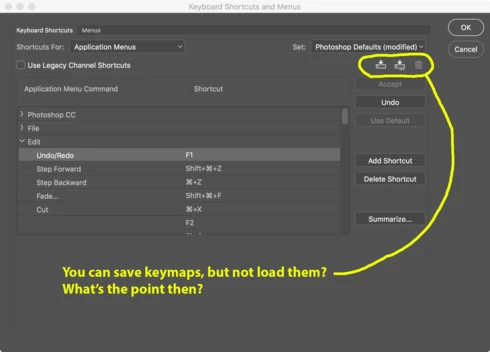
If you change keyboard shortcuts, you can save the changed layout to a file. But there's no way to LOAD a saved file.

What's the point, then? Look at this UI.

15 replies

Known Participant
September 18, 2024

i solved this problem on my own machine. the most important thing was to make hidden and system files visible. then search for ALL keyboard command shortcuts under C:\Users\YOUR USER NAME\AppData\Roaming\Adobe and put a saved copy of my keyboard shortcuts in each "keyboard shortcut" folder then, when photoshop forgets again it still appears in the dropdown. the process should be much easier and shame on adobe for not bothering to even address it

Inspiring
November 10, 2020

Thank you. I keep mine on a thumbdrive, but the point is that users expect to be able to load them in the same application that created them... like any other file created by an application.

If the application itself doesn't even present a way to load the file, I wouldn't bounce out to Explorer or Finder and expect that the app set up a system-level association for this obscure file type. It's even more incredible that it does, in fact do this but still doesn't have a Load button in the obvious place. At this point we have to conclude that Adobe is just being petulant.

Someone at Adobe needs to put on his big-boy pants and fix this asinine defect... then get cracking on a few more.

David Mohr
Participating Frequently
November 9, 2020

That's one way to solve the problem.  But there's a FAR simpler way.  Save out your .KYS file to WHEREVER you want.  Now, treating it like any other file, send it to the new machine.  There, double-click it.  ALL of your shortcuts are now live on the new machine.  You can save them or not, but you do NOT need to remember any paths.

Hope that helps,

David

Inspiring
October 31, 2020

I found the solution

I think "Stokestack" was asking what if I have to copy my shortcut to another pc, or I did install new version of windows or mac, how can I move my keyboard shortcuts there, the answer is:

You need to copy your previously saved keyboard shortcut to this path:

C:\Users\user\AppData\Roaming\Adobe\Adobe Photoshop CC 2018\Presets\Keyboard Shortcuts

(Don't forget to change your username and photoshop version)

Then you will find the .kys file in the dropdown menu inside photoshop (after restarting photoshop)

Hope that helps.

David Mohr
Participating Frequently
April 6, 2018
Check out these screenshots and workflow...

Here I'm intentionally saving to an odd location.  
You'll notice it makes no difference to Photoshop...
David Mohr
Participating Frequently
April 6, 2018
Could you please explain why this doesn't work for you?  That would be very helpful in understanding the issue that you're facing.

Thanks,
David
David Mohr
Participating Frequently
April 6, 2018
Wait a second.  On both Windows and Mac, I've always been able to save and load keyboard shortcuts.  Let me share a series of screenshots...

 Adding a new shortcut... click the Save button... Choose my location We save the shortcuts and inform the user which is in useOpen shortcuts via this dropdown...
 ...and load an existing KYS file.
David Mohr
Participating Frequently
April 6, 2018
You're not seeing this dialog when you click?
Inspiring
April 6, 2018
after creating you set it will show up in the drop down box. If for some reason your backup didn't save it it will be under your presets folder:

As a rule, Always copy your presets  and workplace folder to a safe place!!


C:\Users\user\AppData\Roaming\Adobe\Adobe Photoshop CC 2018\Presets\Keyboard Shortcuts

You can double click it there to load it!!!
April 6, 2018
Most of us have waited nearly 15 years and counting for that, since photoshop cs 2003 introduced Key Board Shortcuts.

Could not understand then why there was no way to load the KYS files and still even more mystified why it's still not implemented in 2018.