

Participant
December 13, 2016

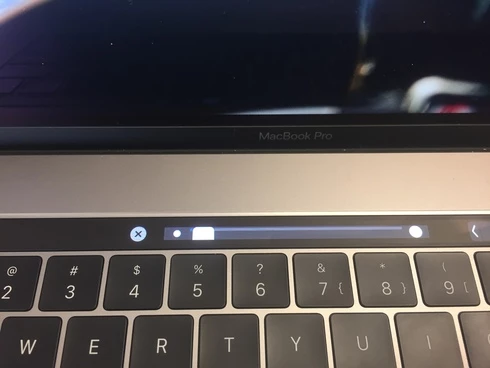
P: Touch Bar sliders are too big

  • December 13, 2016
  • 6 respuestas
  • 240 visualizaciones

Hi,

Thanks for adding Touch Bar support. However, the sliders seems to be too big and if I try to use the slider, it only can only be put at 0 or 100%. Using macOS 10.2.2.


Thanks

Este tema ha sido cerrado para respuestas.

6 respuestas

Pete.Green
Community Manager
April 6, 2017
This issue is fixed in the Photoshop CC 2017.1 update

Please update Photoshop by clicking "Update" in the Creative Cloud desktop application next to Photoshop. 
Participant
December 14, 2016
Hi, 

I'm on the final version of 10.12.2.

When I reconnected my display this morning. The slider was the right size. However, I could only slide to 0 or 100%. 

After entering this command: defaults write com.adobe.Photoshop AdobePhotoshopDisableContextWorkaround -bool YES

I got this.
 
(I don't why the image is upside down. On my computer, it's ok)

And after entering: defaults delete com.adobe.Photoshop AdobePhotoshopDisableContextWorkaround

I got this.


The first command seems to be fixing the issue. I'll retype the first command.

Let me know, if you need anything else.
Legend
December 13, 2016
Also, can you confirm you're running the final release of 10.12.2 (an not a beta)?
Jesper Storm Bache
Adobe Employee
Adobe Employee
December 13, 2016
Hi Jean-Samuel,
Thank you for reporting this issue (with screen shot).
Could you try to do the following from the terminal:
defaults write com.adobe.Photoshop AdobePhotoshopDisableContextWorkaround -bool YES
Then restart Photoshop and retry.
Once you are done, you can say:
defaults delete com.adobe.Photoshop AdobePhotoshopDisableContextWorkaround
Jesper
Adobe Employee
December 13, 2016
thanks for the note, we're checking it out.  
Participant
December 13, 2016
Oh, I just notice that it's only when I'm connected to my external display through the Apple VGA adapter.