



PECourtejoie
Community Expert
Community Expert
March 23, 2022

P: Truncated Layer Comps panel

  • March 23, 2022
  • 3 replies
  • 428 views

I just noticed that, on the first launch (and subsequent if no user intervention), the layer comps panel opens with the first button partially hidden, PS 23.2.1, Win 10 20H2.

I tried resetting the Workspace, and when I add layer comps, it opens like this:
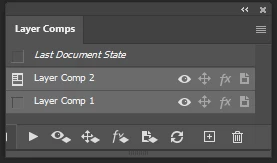
BTW, if I float the panel, it opens in front of the home page, I thought this was fixed.

This topic has been closed for replies.

3 replies

Legend
March 23, 2022

Thanks guys. I'll have engineering take a look.

Earth Oliver
Legend
March 23, 2022

@PECourtejoie PS-47825, btw

c.pfaffenbichler
Community Expert
Community Expert
March 23, 2022

I can reproduce it (23.2.2 on MacOS) – or at least I can reduce the Panel until the first icon is occluded. 

Earth Oliver
Legend
March 23, 2022

Yeah, i bugged this a few years ago and they don't seem interested in fixing...

PECourtejoie
Community Expert
Community Expert
March 23, 2022

Thank you for the confirmation. Please vote.