
jakubp66048398
Participating Frequently
August 30, 2013

P: Type tool - When I hit space bar cursor go to beginning of line

  • August 30, 2013
  • 16 replies
  • 6668 views

When I'm on line end and hit space bar cursor go to beginning of line but hen if I start type some letters it goes back to end. This is in paragraph text.

In point text when text is align to left (screen)
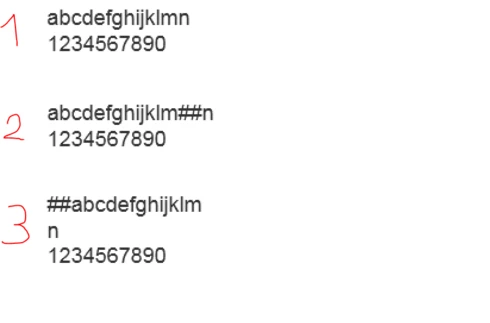
1. Point text with two lines of text
2. With text tool I clicked between "m" and "n" and wrote "##"
3. This happened after I hit enter
This topic has been closed for replies.

16 replies

David Mohr
Participating Frequently
November 22, 2013
There are controls for text directionality in the paragraph panel. You're absolutely NOT the first person to do it; that's why I recognized the problem so quickly. It's easy to do.
jakubp66048398
Participating Frequently
November 22, 2013
Ok. But really I've this option set to "East Asian"
And as I see this setting work for all documents in PS - not for one.

EDIT:
You were right :)
But I turn on "Middle Estern and South Asian" for the first time ever. Then I switch "language option" so the features on paragraph panel shows up.
And indeed flow was set to "right to left".
BUT - how this happened? Is there some keyboard shortcut for this feature? I never turn this option on.
David Mohr
Participating Frequently
September 3, 2013
Good Morning,

In a right-to-left context, numbers are still always written left-to-right...well, at least in Arabic and Hebrew, which is what we support. It REALLY sounds like you have the text flow set R2L; not the alignment. Those are two separate things. If you want I can set up a web-mediated connect session and walk through this issue with you. Just let me know.

Thanks,
David
jakubp66048398
Participating Frequently
September 2, 2013
Hi,
I've already check those settings - it is not a case. I event switch between right-to-left and left-to-right to see how that change type behaving and it does not make "##" to go to the left. (point no 3 on screen)
David Mohr
Participating Frequently
August 30, 2013
Good morning,

Have you played with Arabic or Hebrew text at all? It sounds like you've set your composer to right-to-left and are stuck in that state. You can find full details at https://www.youtube.com/watch?v=gfuw7m... .

If you are using legacy type which must look a certain way or Japanese or Chinese text, then I would suggest using the East Asian engine for all your needs. If you are not, then I would recommend always using the Middle Eastern engine, but make sure you've set your flow of text and justification correctly.

If you still have questions, please let me know.

Thanks,
David
jakubp66048398
Participating Frequently
August 30, 2013
BTW: It depends on file. When its once broke it stay broken in that file. If U want I can send that broken file.
I have this kind of bug since CS6 (now CC)