



P: Typing in values for 3D material properties auto validates after the first keypress
In CC 2014 latest version (2014.2.1 as of today), if I try to type in some value for a mesh material property (shine or whatever), weird things happen. For instance: I create a cube wrap mesh (or any other 3d object) then I click on the material, then I double click any value in the properties panel (or just click and drag to select the whole value), and when I start typing something like "53", the first keystroke is registered (5) and the box ends editing mode automatically, so the value is set at 5 and I have to click again to add the other number.
Some times, the value is entered okay (first keystroke is not auto-validated) but after pressing intro, it just goes back to the old value, ignoring what I just entered. Sometimes it does work, but problems are more prone to happen if I try to set several values in a row using numerical values (as opposed to just dragging the slider).
I am not sure when this started happening, but for sure it didn't in CC pre-2014 (I still have it installed and just checked, typing in material values works okay there).
Maybe it's just me experiencing this but it's really annoying... if you are able to reproduce this issue, please fix it! Thanks a lot. 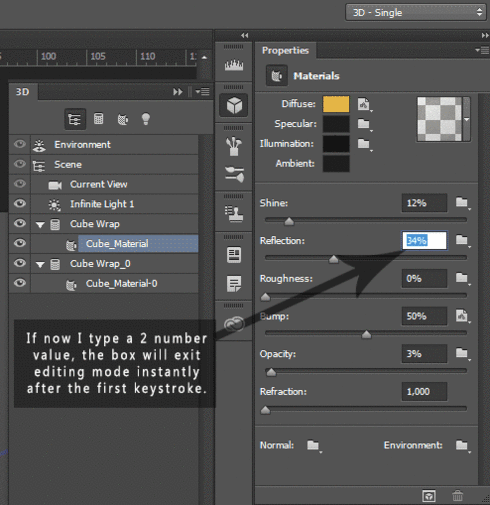
 AdChoices