


Participating Frequently
September 21, 2016

P: UI artifacts scrolling on Sierra

  • September 21, 2016
  • 8 replies
  • 403 views

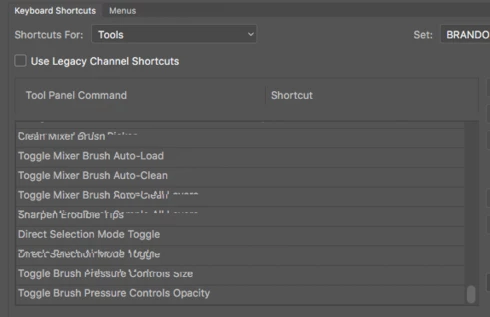
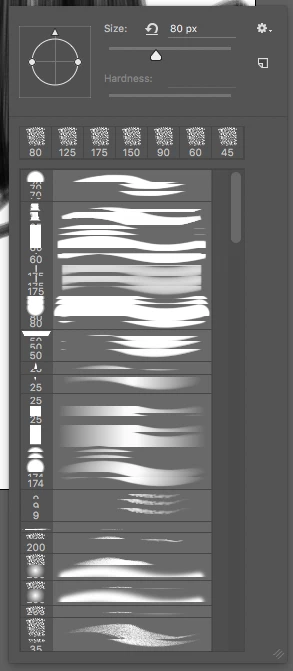
I am seeing UI artifacts in macOS Sierra on a Mac Pro 2013 and MacBook Pro 15 retina 2012. It occurs in scrolling in brush presets or other menus with a mouse or Wacom pen. Only when dragging a scroll bar, not with the mouse wheel. Occurs in all photoshop versions
This topic has been closed for replies.

8 replies

Inspiring
February 10, 2017


I am getting a some graphic issues when scrolling in the brush menu.  A screenshot of my issue is attached.  Any fix or known cause for this?  This happens with both the stylus and mouse.

-Select Brush tool
-Right click (hover>right click with pen) to view Brush menu
-Scroll through brush choices to get mixed up stroke thumbnails for brush choices

No additional third party apps are installed.

Thanks!

MacBook Pro Retina Sierra 10.12.3
2.8 GHz Intel Core i7 
16 GB 
Graphics Intel Pro 1536

Cintiq 22HD
Photoshop CC (2015.1.2)
Legend
November 2, 2016
veron0Author
Participating Frequently
September 28, 2016
my MBP has the Nvidia card, and it persists whether it's in automatic graphics switching or not.  
veron0Author
Participating Frequently
September 28, 2016
Thanks for the response, looking forward to the fix in the next update.
Participating Frequently
September 28, 2016
Thanks for suggestion Jeffrey!
Participating Frequently
September 28, 2016


Please see attached image.
After updating to macOS Sierra; when scrolling through the Tool Presets Panel, the Tool names become jumbled together in a big mess. So it's impossible to pick which tool to use.

Checklist
  • This is a fresh update from El Capitan. 
  • Nvidia Drivers up to date on Mac pro system. (Titan X  GPU)
  • Photoshop prefs and tools reset.
Legend
September 21, 2016
Thanks Brandon, this is on our known issue list: Known issues – Running Photoshop CC on macOS 10.12 Sierra

Our engineers are looking into a fix.

The workaround is to hover over the scrollable area and use the mousewheel or trackpad gesture to scroll the panel instead of clicking on the scroll bar and dragging it up and down.
Known Participant
September 21, 2016
Does your MBP have the integrated Intel graphics or the discreet (probably nvidia) graphics card? Does it persist if you go to Photoshop > Preferences > Performance and turn off "Use Graphics Processor?"