



Trevor.Dennis
Community Expert
Community Expert
June 24, 2023

P: Unable to OK New Document With Enter Key

  • June 24, 2023
  • 5 replies
  • 506 views

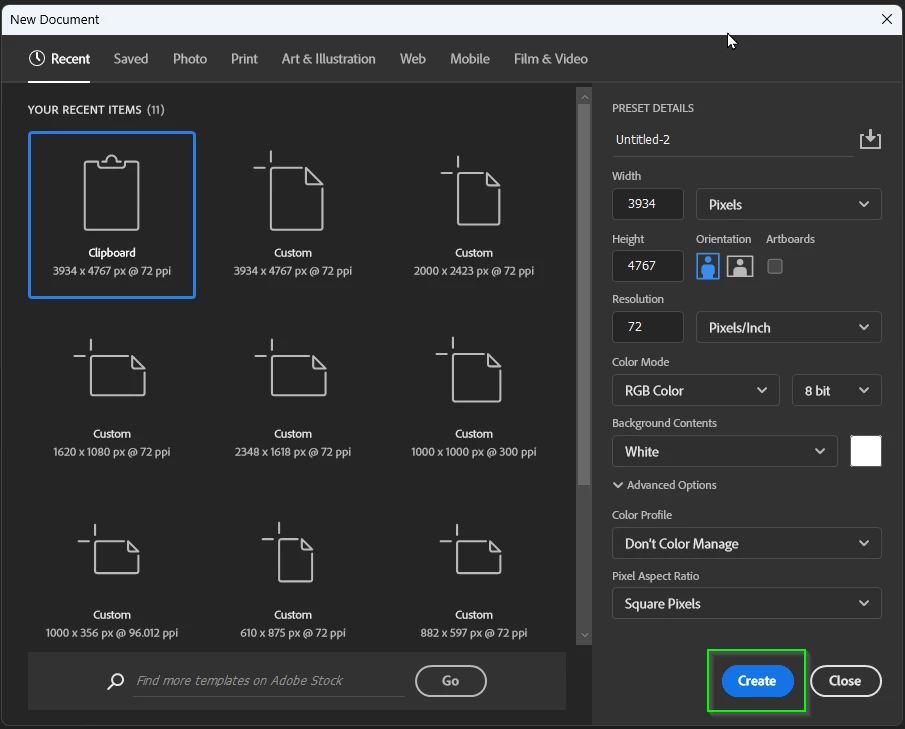
This is more annoying than life threatening, and maybe I am missing something.  Until recently we could open the New Document panel, which already have the pixel size of the image you had copied to the clipboard, and hit the enter key to OK it.  That doesn't work now.  Even though the Create button is blue, it is not active.  You can hover over Create with the mouse to make it active, but you might as well left click to OK it if you have done that.  You can hit the Tab key 20 times (yes, I actually counted).  You only need to hit Shift Tab three times to work backwards to the Create button, but It's still quicker to use the mouse.


It's a small thing, but it's annoying. This is happening with beta and full release versions, and with today's micro-updates.   If I am missing something, please tell me.  If it is also annoying you, please add to this thread to let the Development Team know.
This topic has been closed for replies.

5 replies

Semaphoric
Community Expert
Community Expert
July 8, 2023

Targle, it is found in Edit > Preferences >  General.

Inspiring
July 7, 2023

Where in preferences can I find "Legacy New Document Interface"?

CShubert
Community Manager
Community Manager
June 29, 2023

Thanks all, we see this as well and will pass it on to the team to look into.

A workaround would be to selecte another file size/type, then back to the clipboard template and then hit enter, this seems to work.

Participant
June 29, 2023

Yes, sooo anoying. And it's the same when you EXPORT AS....you have to click on EXPORT, you can just press ENTER (GRRRRR!).

Semaphoric
Community Expert
Community Expert
June 24, 2023

It works as usual with Legacy New Document Interface.

Trevor.Dennis
Community Expert
Community Expert
June 24, 2023

Thanks John.  I think I am going to have to go that way then, because it is driving me crazy.  I bet most of us locate an image on the web, tab across to Photoshop, then Ctrl N > Enter Ctrl V.  It's hard coded into our muscle memory and you can't stop yourself trying it even knowing it no longer works.


Yes, that's much better.