


Inspiring
October 22, 2018

P: Undocked panels show on top of the Home screen

  • October 22, 2018
  • 15 replies
  • 766 views

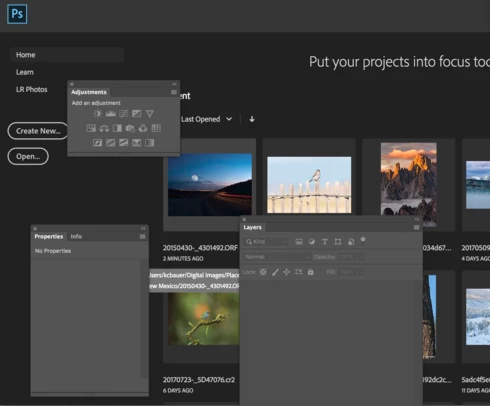
If you have any undocked panels in Photoshop, when you close all of the open documents and return to the Home screen, the panels are on top of the Home screen. It appears that if the panels are docked then don't behave like this.  Here's a screen shot.


I

15 replies

RosaPerry
Inspiring
October 23, 2018
You're so right Keith. I like the Home Screen but not when I have my floating panels covering the content. 
Rosa
Inspiring
October 22, 2018
Thanks for your reply.  The behavior can't possibly be desired by anyone using Photoshop.  Covering content with panels that don't function was introduced in this release.  
Adobe Employee
October 22, 2018
it may be a bug, in that the behavior is not desired by some people.  I'm just mentioning that what you are seeing is the intended behavior.  Hearing from you lets Photoshop team reevaluate that decision, so, thanks.
Inspiring
October 22, 2018
That makes no sense at all.  It also didn't behave that way in PS CC 2018.  Why would I want the floating panels covering the content of the Home screen.  The panels don't / can't do anything from the home screen (see my example with the Adjustment Panel, or the Layers Panel or the Properties panel for an adjustment layer).  I don't buy this is "as designed".  This is clearly a bug introduced in CC 2019.   I'm also not using the Home screen button to explicitly use it.  I'm closing the last open document from PS and as a result go back to the home screen.
Adobe Employee
October 22, 2018
thanks for the note.  this is as designed.  floating panels float, even over home screen.  floating docs will also float over home screen, if one uses the home screen button to explicitly choose it.