


Participant
January 24, 2023

P: Unique icons for each of the adjustment layers do not display correctly w/ default thumbnail size

  • January 24, 2023
  • 7 replies
  • 349 views

Bonjour,

lors de la création de calques, l'icone est toujours une demi lune. Le calque n'a plus son icone de type de calque.
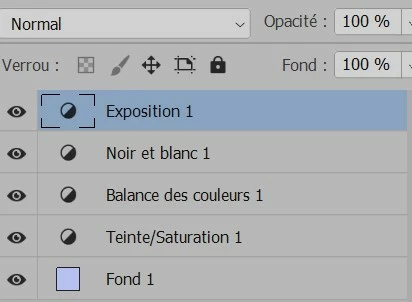
Merci pour votre retour.

This topic has been closed for replies.

7 replies

CShubert
Community Manager
Community Manager
January 25, 2023

Thank you @JPV60330 the team was able to trace this as a bug and will start to investigate.


Cory

CShubert
Community Manager
Community Manager
January 25, 2023

Thank you @JPV60330.


Let's make sure we're in a default state and there are no stale settings somewhere: 

Restore your preferences using this manual method:  

https://helpx.adobe.com/photoshop/using/preferences.html#Manually 

Does it work correctly? 

If that doesn't solve it, you can quit Photoshop and put the Settings folder back. 


It may help if we could see your Photoshop System Info. Launch Photoshop, and select Help >System Info...and copy/paste the text in a reply.  


Thank you,

Cory

JPV60330Author
Participant
January 25, 2023

Hi @CShubert ,

quand j'ouvre un psd créé avec la version 24.1, les icones des masque de réglages sont affichés avec le choix Petites vignettes.

En version 24.1.1, en Petites vignettes on a la demi-lune. 

CShubert
Community Manager
Community Manager
January 25, 2023

Thank you for the update @JPV60330. You say this might be regression, have you rolled back to a version of Ps that it works as you expect?


Let's make sure we're in a default state and there are no stale settings somewhere: 

Restore your preferences using this manual method:  

https://helpx.adobe.com/photoshop/using/preferences.html#Manually 

Does it work correctly? 

If that doesn't solve it, you can quit Photoshop and put the Settings folder back. 


It may help if we could see your Photoshop System Info. Launch Photoshop, and select Help >System Info...and copy/paste the text in a reply.  


Thank you,

Cory

JPV60330Author
Participant
January 25, 2023

Merci Cory pour votre solution.


Les icônes des calques de réglages sont visibles mais elles sont plus grandes. 

Mon avis est que l'on est en présence d'une regression : Sans vignette ou en Petites vignettes, les icones des calques de réglage sont les mêmes 


1 - Sans vignette


2 - Petites vignettes


3 - Vignettes moyennes (avec les icones des calques de réglage)


CShubert
Community Manager
Community Manager
January 24, 2023

Hi @JPV60330 thanks for the question.  You can see the icons vs the half moon by selecting the "larger" icon in the Panels options.  Click on the hamburger menu, then Panel Options, then the next size icon:


Thank you,

Cory

Anne Marie Jourdain
Participant
January 24, 2023

Il s'agit de calques de réglages. Vous n'avez pas  cliqué sur le bon bouton pour créer un calque. C'est toujours celui qui sera à gauche de la poubelle