


Participating Frequently
October 19, 2014
Released

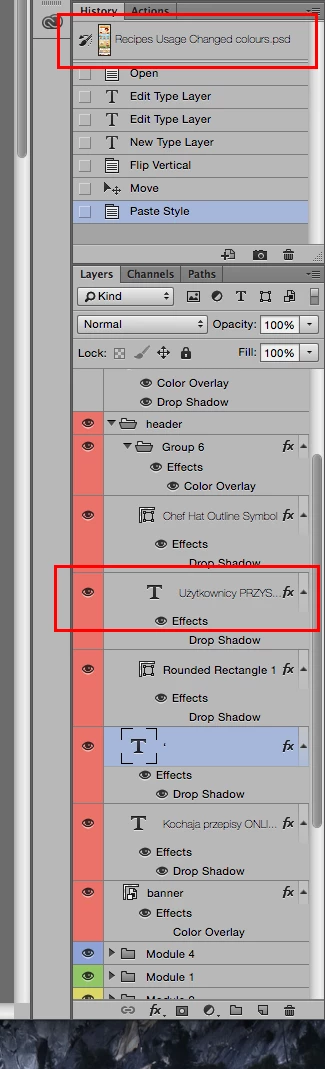
P: Unreadble font for layer and document names OSX Yosemite

The font for document and layer names is too thin and almost invisible in OS X Yosemite. Is there a way to make the font more readable? I guess this bug is due to the move to Helvetica, but using so thin font for such a small text is never a good idea. I hope it will get fixed soon.
This topic is closed to new replies. Start a new post to keep the conversation going.

10 replies

Legend
June 16, 2015
This should be fixed in the Photoshop CC (2015) update.
Translate
Inspiring
June 5, 2015
Getting the same issue with Adobe Bridge's Output panel
Translate
Inspiring
May 6, 2015
Got the same problem here. You can fix it by using a patch that replaces Yosemite's UI font Helvetica Neue with the Lucida Grande.

You can download the patch here:
https://github.com/schreiberstein/luc...
Translate
saintluuAuthor
Participating Frequently
January 16, 2015
I hope it gets fixed soon by Apple, the "save as" window is buggy too, it always takes the whole screen height, on 27" iMac it looks ridiculous...
Translate
Inspiring
January 15, 2015
As far as I know, we haven't received any workarounds.
Translate
Participant
January 15, 2015
Still frustrated by this— have you found any work arounds? I get the feeling Apple won't be very responsive about it
Translate
saintluuAuthor
Participating Frequently
December 8, 2014
Yes, the update haven't fixed it yet, it was working fine for a while and after that it was the same, thank you for your replay!
Translate
Inspiring
December 8, 2014
We are working with Apple to figure out how to work around this MacOS 10.10 change in the way strings are drawn by the OS.
Translate
Inspiring
December 7, 2014
No it wasn't.

Translate
saintluuAuthor
Participating Frequently
October 21, 2014
The issue was fixed by the latest CC update, thanks Adobe!
Translate