


Open for Voting
P: "Use Graphics Processor" results in blurry images at 100% zoom
When using a Windows DPI scaling of 125%, images of 232px high become blurry even when viewed at 100% zoom. Turning off "Use Graphics Processor" fixes the problem. Also, setting Windows DPI scaling to 100% fixes the problem.
Here's a comparison of the problem: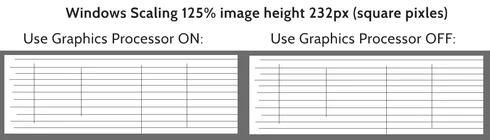
Here's the problem image (any image that's 232px high):
Here is a full copy of my system information: https://justpaste.it/2o7ht
 AdChoices