Inspiring
June 22, 2014

P: Various issues (Focus Area Selection)

  • June 22, 2014
  • 66 replies
  • 1148 views

Since downloading Photoshop 2014 yesterday, I've noticed a variety of issues that make the program almost unable to use.

1) Selection issues. All selection tools *seem* to work normally until I attempt to use the new focus-range selection tool. After doing so, any selection tool I use (lasso, rectangular marquee, etc) result in me getting selections such as these:
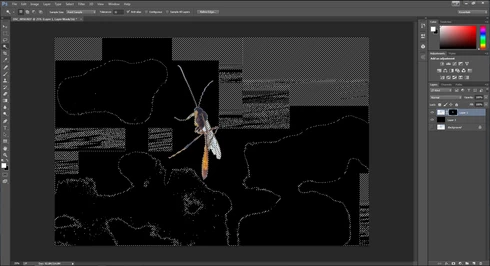


They consistently show up as selected rectangles of various sizes, spread out throughout the canvas. Any additional selections made from this point only amplify the errors.

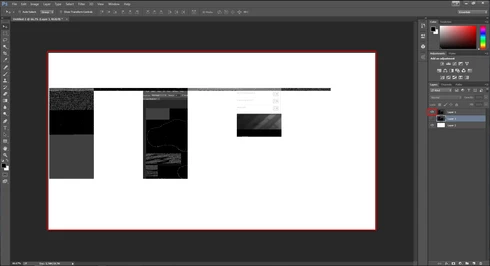
2) Also possibly caused by the same tool, I started to develop other issues like layers disappearing from the canvas, despite being visible in the layer panel and visible glitches/artifacts on the screen when opening separate windows (such as the save window).

(Artifacts and visibility issues after taking a screenshot, pasting into a new window, and cropping)

I'm currently using Windows 7 on an NVIDIA gtx 670. I have all of the latest drivers, and have no problems with the regular CC version of photoshop.

I have also tried re-installing twice, along with disabling the GPU. No luck.

Rather humorously and ironically, I've had to use the previous Photoshop CC just to make these screenshots at all.

If I notice any other issues, I'll be sure to post them here, unless directed otherwise.

This topic has been closed for replies.

66 replies

Adam Jerugim
Inspiring
July 15, 2014
We've been able to reproduce the issue in-house and are working on getting a fix out to customers asap.

Thanks,
Adam
Participating Frequently
July 12, 2014
Mine was located at: C\Users\xx\AppData\Roamnig\Adobe\Adobe Photoshop CC 2014\Adobe Photoshop CC 2014 Settings\Adobe Photoshop CC 2014.psp. It seems to have worked for me.
Natureimmortal
Participating Frequently
July 12, 2014
I have had no problems with dozens of shots since deleting the above file. Resetting did not work.
Participating Frequently
July 12, 2014
If you have the complete path please post it, but I don't find the file you mention, so it is either not present or I deleted it.
Inspiring
July 12, 2014
Just to be sure, you deleted the "Adobe Photoshop CC 2014 Prefs.psp" file?
Participating Frequently
July 12, 2014
Ah, I see it now, thanks!
Inspiring
July 12, 2014
Adobe Photoshop CC 2014 Prefs.psp
Participating Frequently
July 12, 2014
Can you tell me which .psp file you deleted? I'm finding about 6 associated with the 2014 install. Thanks.
Participating Frequently
July 12, 2014
I'm finding about 6 .psp files associated with the PS CC 2014 installation. Can you tell me which one you deleted and if it affected anything else? THanks.
Participating Frequently
July 11, 2014
Well it worked for one image then went back to creating strange artifacts even on the first image I used when I made my last observation above. Hopefully there will be a real fix soon.