Inspiring
June 22, 2014

P: Various issues (Focus Area Selection)

  • June 22, 2014
  • 66 replies
  • 1108 views

Since downloading Photoshop 2014 yesterday, I've noticed a variety of issues that make the program almost unable to use.

1) Selection issues. All selection tools *seem* to work normally until I attempt to use the new focus-range selection tool. After doing so, any selection tool I use (lasso, rectangular marquee, etc) result in me getting selections such as these:
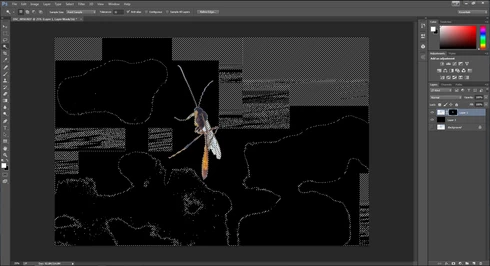


They consistently show up as selected rectangles of various sizes, spread out throughout the canvas. Any additional selections made from this point only amplify the errors.

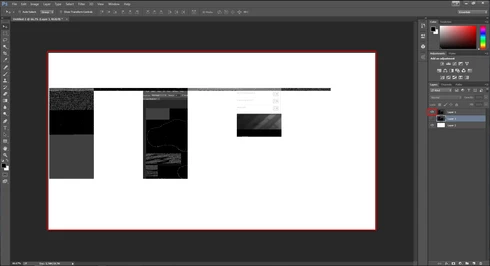
2) Also possibly caused by the same tool, I started to develop other issues like layers disappearing from the canvas, despite being visible in the layer panel and visible glitches/artifacts on the screen when opening separate windows (such as the save window).

(Artifacts and visibility issues after taking a screenshot, pasting into a new window, and cropping)

I'm currently using Windows 7 on an NVIDIA gtx 670. I have all of the latest drivers, and have no problems with the regular CC version of photoshop.

I have also tried re-installing twice, along with disabling the GPU. No luck.

Rather humorously and ironically, I've had to use the previous Photoshop CC just to make these screenshots at all.

If I notice any other issues, I'll be sure to post them here, unless directed otherwise.

This topic has been closed for replies.

66 replies

Inspiring
June 24, 2014
Same issue here for me: iMac running 10.9.3.
Participant
June 24, 2014
I have had the same issues over the last couple of days. The root cause is the focus area tool! great concept but I have not been able to use it at all
Participating Frequently
June 23, 2014
That is exactly what happened. I tried to use the focus area tool and I got all kinds of artifacting happening. Then I tried to use the quick select tool and quick mask and got all kinds of weird artifacting that could not be deleted. Today everything works fine. I will not use the focus area tool untill they fix it. ITs not my video card as all is well today and I am able to use the quick select and quick mask tools. The focus area tool is a good idea but looks like it need to be debugged.
Inspiring
June 23, 2014
I got the same problem, and on my case if I use photoshop only all the selection tools looks fine but when I have the lightroom to export to photoshop, all the selection tool are fail, and the select looks different even zoom in and out.

I have uninstall the Photoshop CC and 2014m and re install the Photoshop 2014 only, the problem still exists, and I have try to re install the video driver 2 two time and with Nvidia clean install option. The problem still there
Inspiring
June 23, 2014
That's what i do. I even checked the website yesterday to make sure i had the current version....which i do.

I can, however try reinstalling it....so i'll report back when i do so.
Inspiring
June 22, 2014
Update your video card driver from Nvidia's website, not Microsoft.