



Sawiro Takoni
Known Participant
December 7, 2025
Open for Voting

P: Vibrance panel doesn't support "zero" when sliding
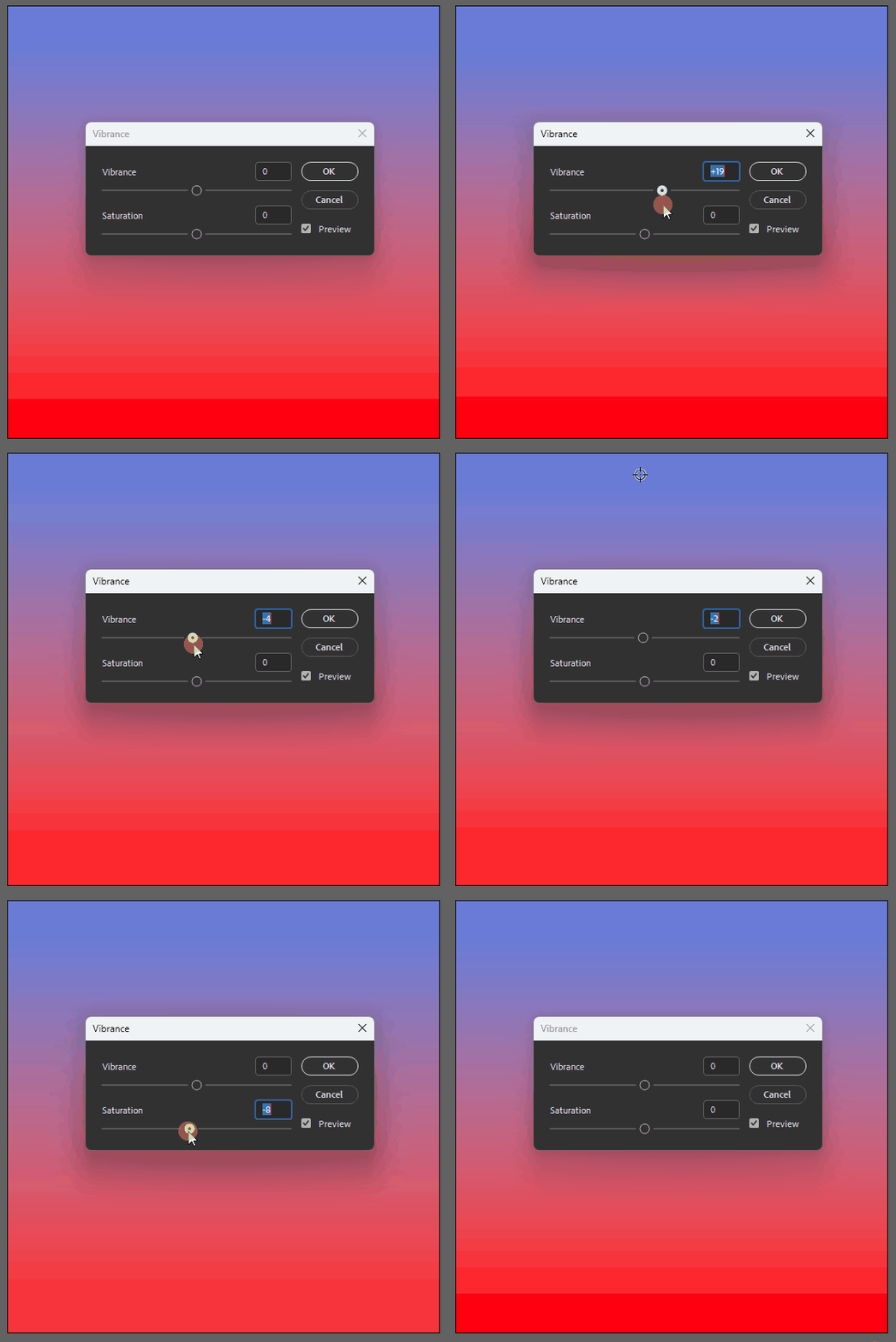
868211i81BE2AF643174235.gif


Just updated to Photoshop 27.1.0 because I wanted to see the "modern GUI panels" as stated in the release notes.


First thing I noticed was (besides the GUI drag-icon inconsistentcy between panels like, vibrance and levels), that "0" is not selectable when using the vibrance panel.


When you slide from left to right - and vice versa - zero is not an option; it's skipped.


Other panels, like levels, do support 0 as a valid value (as does the keyboard), but when using the mouse to quickly slide to a + or - integer, 0 is simply skipped.


I checked in Photoshop 26.x.x and there "0" was an option in the exact same panel.


See screenrecording, where I try to set the value to 0 by mouse. It's only possible by keyboard (arrow up and down).

13 replies

Anshul_Saini
Community Manager
Community Manager
January 6, 2026

Updating status.

Translate
Sawiro Takoni
Known Participant
December 24, 2025

Well, for me it's still not working.


871445i8E4C63EFFCC9A411.gif


To be clear: I can't select 0 when purely using the mouse in both the vibrance or saturation slider.


I can do using the numeric keyboard or the up/down arrows, but not when only using the mouse.


When I fiddle around with the keyboard (entering 0 manually, using the arrowkeys to adjust the parameter) I can get -0 (negative zero) and after a while (when 0 is set by the keyboard) also using the mouse.

Translate
davescm
Community Expert
Community Expert
December 24, 2025

It works fine here in Windows 11, but if you are having that problem a shortcut to return the slider to 0 is to double click the slider with with the mouse.
Dave

Translate
Sawiro Takoni
Known Participant
December 24, 2025

Thanks for the headsup!

I know about the "shortcut" to restore all parameters to the integer /  numeric defaults.


But I also think it's odd that you are not able (in my case) to "select" 0 when sliding, where -0 is available (which should trigger a stack overflow, I think).

Translate
Sawiro Takoni
Known Participant
December 7, 2025

Will try, thanks!


I started with Photoshop 2.0 in 1993 I think. So my preferences are all chained to eachother since then 🙂

Translate
Ged_Traynor
Community Expert
Community Expert
December 7, 2025

@Sawiro Takoni I just tested on my system, and it's working fine for me with Photoshop version 27.1 on Windows 11, try manually resetting your Photoshop preferences
https://helpx.adobe.com/ie/photoshop/using/preferences.html#Manually
Remember to back up your settings before doing the preference reset
https://helpx.adobe.com/ie/photoshop/using/preset-migration.html

Translate