



Released
P: When a layer is locked the Convert to smart object option disappears from the Layer actions menu
Background
When a layer is locked, a number of Layer actions become unavailable. This is visually indicated to the user by those Layer actions being grayed-out in the Layer actions menu.
Description of issue
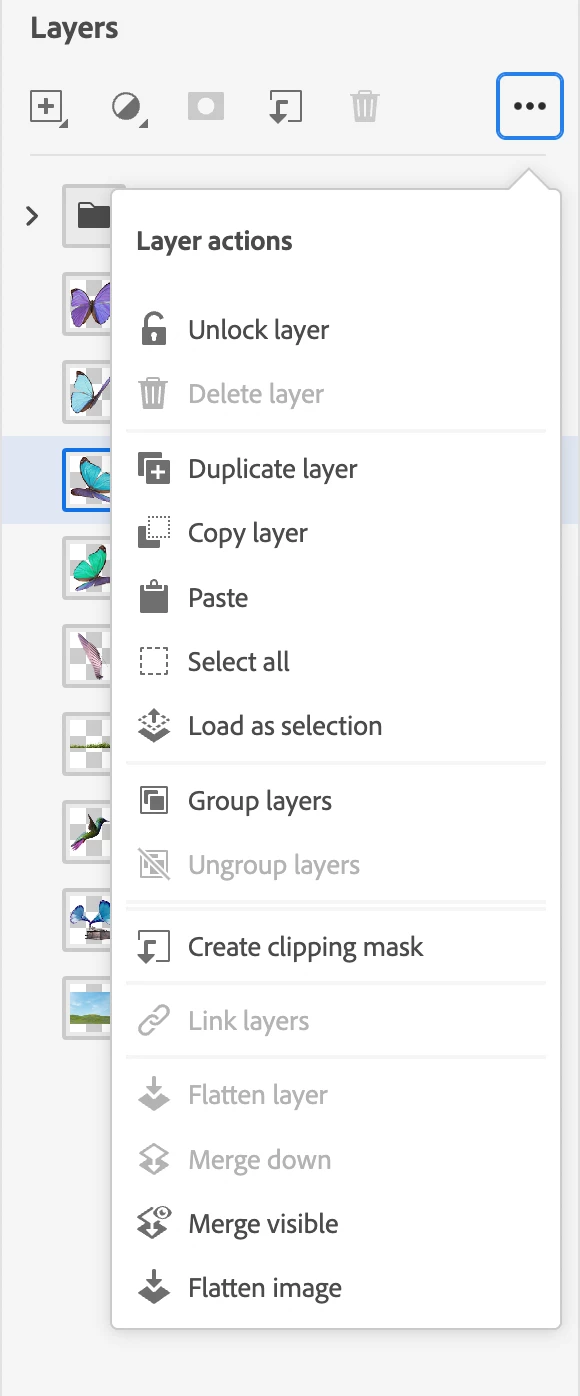
When a layer is locked, the Convert to smart object menu option disappears from the Layer actions menu, leaving 2 dividers, one above the other.
Steps to reproduce
- Open an existing Photoshop on the web (Beta) document, or create a new one.
- Lock one of the layers using the keyboard shortcut ⌘ + / or via the Layer actions menu.
- Open the Layer actions menu to confirm that the Convert to smart object menu option has now disappeared.
Image
Setup
- Photoshop on the web (Beta) version 202206.12.0
- macOS Monterey 12.4 (MacBook Air M1, 2020)
- Microsoft Edge version 103.0.1264.44 (Official Build) (arm64)
- Google Chrome version 103.0.5060.53 (Official Build) (arm64)
 AdChoices