


DanielKay2012
Participating Frequently
April 28, 2026
Released

P: (Win/MacOS) Photoshop 27.5 & later: Transform tool bounding box off center on warped text

The bounding box of the transform tool is in the wrong location and not properly scaled when used on warped text. It does snap back to correct scale and location when a corner of it is selected but reverts once the transform is deselected again.

Photoshop version is 27.5
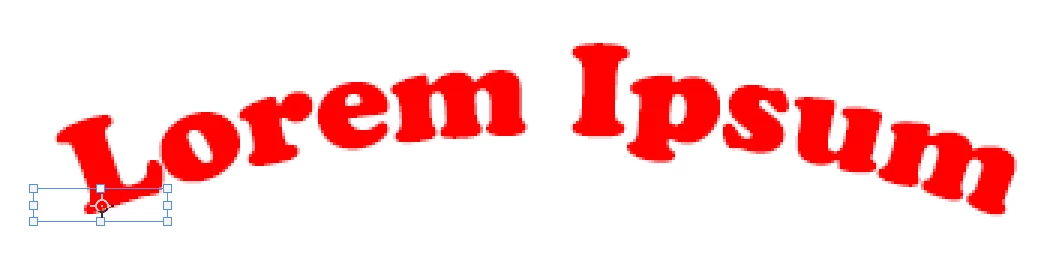
Off center and wrong scale bounding box on warped text


    Pinned Reply By DanielKay2012

    OK on version 27.10.0 and it does seem to have fixed the issue.

    29 replies

    DanielKay2012
    Participating Frequently
    April 28, 2026

    Correction, thought it was fixed in 27.6 but it still has issues

    Translate
    Trevor.Dennis
    Community Expert
    Community Expert
    April 28, 2026

    What do you see when you first use Transform on the entire Type layer?

    Can you show us a screen shot of the state?  Make it the entire workspace at full res, and the Type layer selected and Free Transform invoked.

    Translate
    DanielKay2012
    Participating Frequently
    April 28, 2026

    Attached how the steps of it are looking from first select to what it looks like after warping the text and then selecting the corner of the transform box again.

    Translate