


Known Participant
December 18, 2024

P: Wrong Location of Candidate Box When Using Chinese Input Method

  • December 18, 2024
  • 10 replies
  • 1141 views

Chinese users generally have this error problem, and it has existed for many years and has not been solved yet.

When inputting text, it is always fixed in the lower right corner or the upper left corner.

I have this problem whether I use photoshop or illustrator.
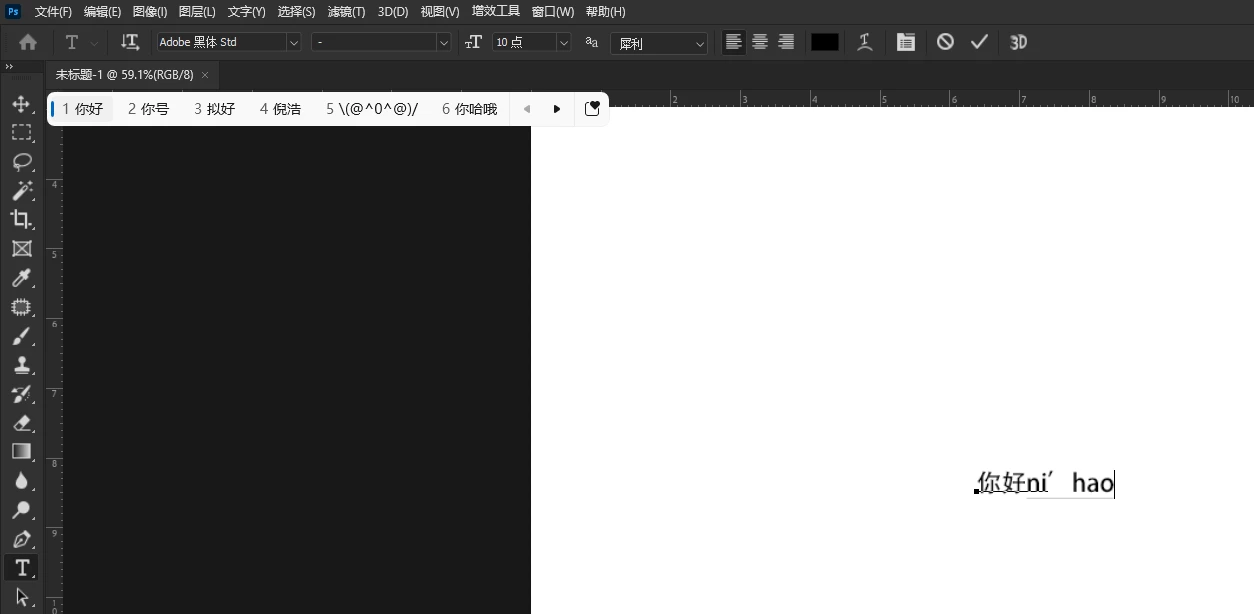
 

When inputting text, it is always fixed in the lower right corner or the upper left corner.
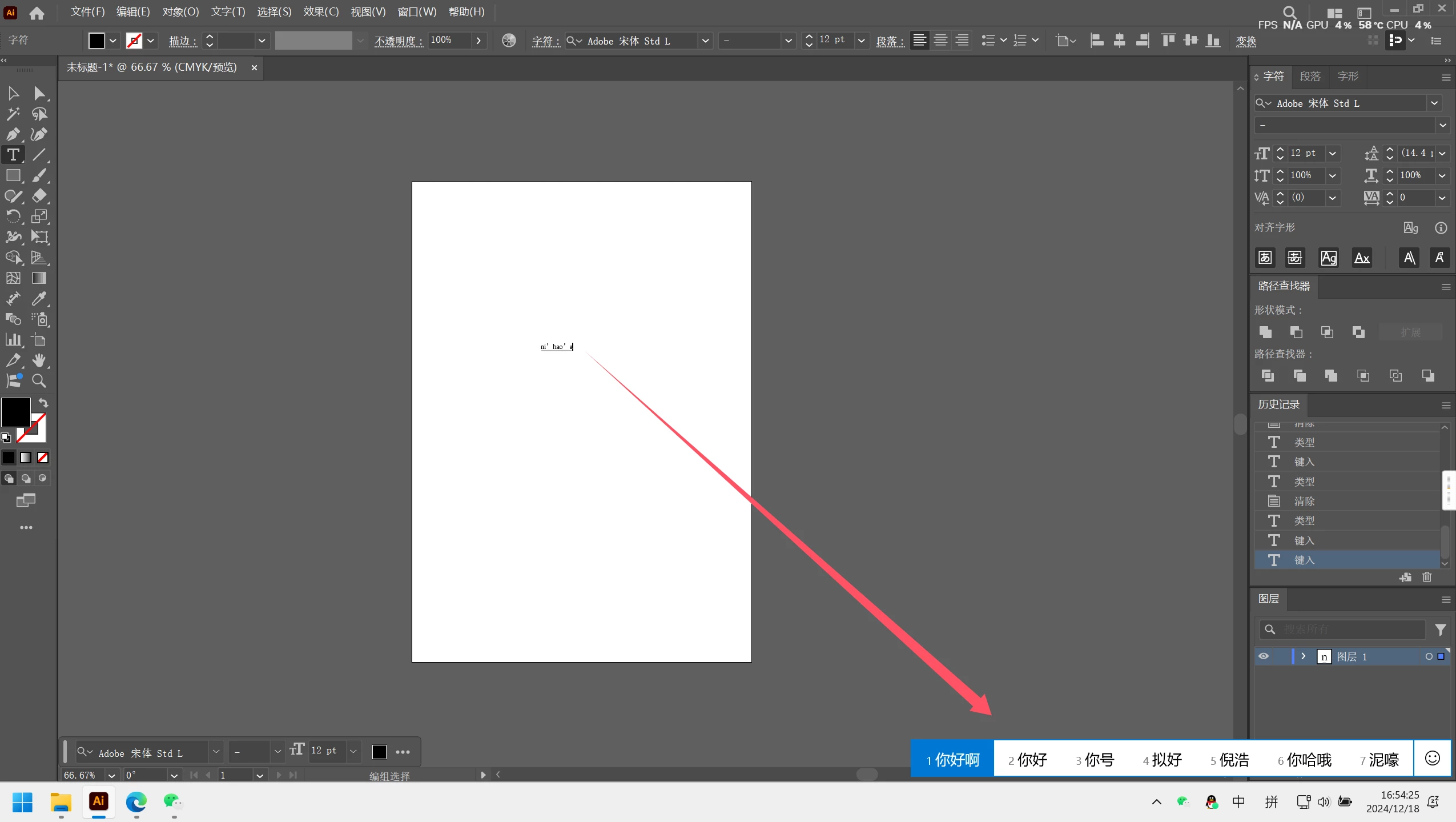
10 replies

Known Participant
June 5, 2025

@Aleke Hi Aleke, it has been 5 months since I last responded to this question. I have updated the app to PS2025 26.8 and the issue still occurs. When will it be fixed?

Sameer K
Community Manager
Community Manager
July 18, 2025

We've shared it with the team for review and comment. Thanks for your patience. 

Sameer K

Known Participant
January 17, 2025

@Aleke When I upgraded to the latest version of Photoshop 26.2, the problem still occurred. Illustrator v29.1.0 also had the same problem

Known Participant
January 10, 2025

@Aleke This should be the correct cursor position when entering text.

Community Manager
January 13, 2025

Hi @奇睿295428958rs0! Thanks for sharing that info!

Could you update the app to version 26.2 and let me know if the issue still persists in the latest version?

Thanks!
Alek

*(If you mention me with an @, like @Aleke, I’ll get a notification and can respond faster.)*
Known Participant
January 10, 2025

@Aleke The candidate box is always fixed in the corner when I type. When I try to solve it by turning off the compatibility option in the computer language settings, the candidate box moves to the upper left corner. This is a weird bug

Known Participant
January 9, 2025

@Aleke Thank you, I have copied the system information in the answer. But I suggest you add the Microsoft Pinyin input method in Windows and try it.

Community Manager
January 9, 2025

Hey @奇睿295428958rs0,

Thanks for sharing your System Info!

I've been testing this by running Photoshop 26.2 on Windows 10 with the Chinese Simplified Microsoft Pinyin keyboard. I'm getting mixed results. The first letter I type places the candidate box in the corners, but after typing the second letter, the candidate box moves closer to the text box (as shown in the attached image). Is this the same behavior you're encountering?


Thank you!
Alek

*(If you mention me with an @, like @Aleke, I’ll get a notification and can respond faster.)*
Known Participant
January 9, 2025
Adobe Photoshop 版本: 26.0.0 20240927.r.26 a733fda  x64
启动次数: 60
操作系统:Windows 11 64 位
版本: 11 或更高版本 10.0.26100.2161
系统结构: Intel CPU 系列: 6,型号: 14,分级: 12 使用 MMX、SSE Integer、SSE FP、SSE2、SSE3、SSE4.1、SSE4.2, AVX, AVX2,超线程
物理处理器数: 8
逻辑处理器数: 16
处理器速度: 3600 MHz
内建内存: 32713 MB
空闲内存:20970 MB
Photoshop 可用的内存: 25146 MB
Photoshop 占用的内存: 70 %
崩溃处理程序:Adobe
DCX Version: 7.24.8
SAM SDK Version: 9.1.0.1-fio
ACP.local Status:
 - SDK Version: 4.0.0.5
 - Core Sync Status: Unknown
 - Core Sync Running: Unavailable
 - Min Core Sync Required: 4.3.4.2
实时编辑客户端 SDK 版本: 4.0.4
OpenColorIO 版本:2.3.2
Content Credentials 不可用
NGL 版本:1.38.0.10
黑板:停用。
黑板文档创建:停用。
D3D12 变形渲染器:停用。
别名图层: 停用。
远光灯: 启用。
图像拼贴大小: 1024K
图像高速缓存级别: 6
字体预览: 禁用
HarfBuzz 版本: 7.3.0
TextEngine: 统一文本引擎
 ======= GPU
本机 API 稳定: True
OpenGL API 稳定: True
OpenCL API 稳定: True
GPUDeny:               0
GPUForce:              0
useGPU:                1
useOpenCL:             1
isGPUCapable:          1
isGPUAllowed:          1
GPUName:               NVIDIA GeForce RTX 2070
GPUVendor:             NVIDIA
NVIDIA GeForce RTX 2070  NVIDIA_GEFORCE_RTX_2070, NVIDIA
IsNativeGPUCapable:    1
IsOpenGLGPUCapable:    1
IsOpenCLGPUCapable:    1
HasSufficientRAM:      1
  GPU accessible RAM:                 8,006 MB
  Required GPU accessible RAM:        1,500 MB
UseGraphicsProcessorChecked:   1
UseOpenCLChecked:              1
Windows remote desktop:  0
Windows available feature level:     12.2
Windows required feature level:      12.0
Windows has required feature level:  1
显示器: 1
  显示边界:(0, 0) -> (1920, 1080)
  显示缩放:1.25
  主显示器
  显示类型:SDR
  显示配置文件:sRGB IEC61966-2.1
 ------- Sniffer output
[0 ms]
  Launch GPUSnifferThread
 
[1 ms]
  Start RunAllAPIs
 
[1 ms]
  "F:\\Adobe Photoshop 2025\\sniffer.exe" -baseTimeMS=30649876 -comment=Photoshop Version: Adobe Photoshop 26.0.0 20240927.r.26 a733fda x64
 
[1 ms]
  Start GetSnifferResult
 
[616 ms]
  Start sniffer 2025-01-09 20:24:54
  # Photoshop Version: Adobe Photoshop 26.0.0 20240927.r.26 a733fda x64
  F:\Adobe Photoshop 2025\sniffer.exe -baseTimeMS=30649876 -comment=Photoshop Version: Adobe Photoshop 26.0.0 20240927.r.26 a733fda x64
  
  {71 ms}
  Start platform native
    # displays:                   1
    Display 0
      Display:                      \\.\DISPLAY1
      Main:                         TRUE
      Built in:                     FALSE
      Stereo:                       FALSE
      Bounds:                       (0, 0) -> (1,920, 1,080)
      Dimensions:                   (1,920 1,080)
      Display scale:                1.25
      Physical size:                (0 0)
      Pixel size:                   (0 0)
      Dynamic range:                (0 1)
      Attached Device:              (DeviceID name=NVIDIA GeForce RTX 2070 index=0)
    
    # devices:                    1
    Device 0
      Name:                         NVIDIA GeForce RTX 2070
      Preferred:                    TRUE
      Power Envelope:               UNKNOWN
      Attachment:                   UNKNOWN
      # attached displays:          1
        \\.\DISPLAY1
      GPU accessible RAM:                8,006 MB
      VRAM:                              8,006 MB
      Dedicated System RAM:                  0 MB
      Shared System RAM:                17,150 MB
      API version:                  12.2 (12.2)
      Device version:               12.0 (12.0)
      Vendor name:                  NVIDIA
      Model:                        NVIDIA_GEFORCE_RTX_2070
      Driver date:                  2024-12-03  000000.000000-000
      Driver age:                   1 month
      Driver version:               32.0.15.6636
      Supports UMA:                 UNSUPPORTED
      D3D-ID:                       8016
  End platform native
  {268 ms}
  
  {268 ms}
  Start platform OpenCL
    # displays:                   0
    
    # devices:                    1
    Device 0
      Name:                         NVIDIA GeForce RTX 2070
      Preferred:                    TRUE
      Power Envelope:               DISCRETE
      Attachment:                   UNKNOWN
      # attached displays:          0
      GPU accessible RAM:                8,589 MB
      VRAM:                              8,589 MB
      Dedicated System RAM:                  0 MB
      Shared System RAM:                     0 MB
      API version:                  3.0 (OpenCL 3.0 CUDA)
      Device version:               3.0 (OpenCL 3.0 CUDA)
      Vendor name:                  NVIDIA
      Model:                        NVIDIA_GEFORCE_RTX_2070
      Driver date:                  UNKNOWN
      Driver age:                   UNKNOWN
      Driver version:               UNKNOWN
      Bandwidth:                    380 GB / s
      Compute score:                2,100.96
      Device name string:           NVIDIA GeForce RTX 2070
      Device vendor string:         NVIDIA Corporation
      Platform name string:         NVIDIA CUDA 
      Platform vendor string:       NVIDIA Corporation
  End platform OpenCL
  {540 ms}
  
  Exit code kExitNormal
  End sniffer 2025-01-09 20:24:54
[kStatusNormal, kExitNormal]
 
[617 ms]
  Finish RunAllAPIs
 
[618 ms]
  Finish GetSnifferResult
 
 ------- Sniffer output
 ======= GPU
许可证类型: 订阅
序列号: 
GUIDBucket: 
Composite Core GPU (comp_core_gpu): on 
Composite Core Threads (MultithreadedCompositing): on 
Composite Core UI (CompositingDocumentTabUI): off 
Composite Core Feature Prefs (CompCoreFeaturePrefs): off 
 
应用程序文件夹: F:\Adobe Photoshop 2025\
临时文件路径: C:\Users\ADMINI~1\AppData\Local\Temp\
Photoshop 暂存盘具有异步 I/O 已启用
暂存卷:
  F:\,276.7G,252.1G 可用
必需的增效工具文件夹: F:\Adobe Photoshop 2025\Required\Plug-ins\
主要增效工具文件夹: F:\Adobe Photoshop 2025\Plug-ins\
 
安装的组件:
   ACE.dll   ACE 2024/09/03-10:20:40   79.b57869a   79.b57869a
   act_tracing.dll   Copyright (c) 2021 Adobe. All Rights Reserved   1.0.58   
   AdobeLinguistic.dll   Adobe Linguistic Library   1d87f11   
   AdobeOwl.dll   Adobe Owl   5.5.0   
   AdobePDFL.dll   PDFL 2024/07/16-07:59:40   79.ffbeabe   79.ffbeabe
   AdobePIP.dll   Adobe Product Improvement Program   8.2.0.16   
   AdobeSVGAGM.dll   AdobeSVGAGM   79.6336193   79.6336193
   AdobeXMP.dll   Adobe XMP Core 2024/07/16-07:59:40   79.b7c64cc   79.b7c64cc
   AdobeXMPFiles.dll   Adobe XMP Files 2024/07/16-07:59:40   79.b7c64cc   79.b7c64cc
   AdobeXMPScript.dll   Adobe XMP Script 2024/07/16-07:59:40   79.b7c64cc   79.b7c64cc
   AGM.dll   AGM 2024/09/03-10:20:40   79.b57869a   79.b57869a
   AID.dll   AID DLL   1.0.0.58   
   AIDE.dll   AIDE 2024/08/15-06:27:58   79.4e19081   79.4e19081
   aifm.dll   AIFM   1.0   23.68434
   AILib.dll   Adobe Illustrator 2024   29.0.0   
   aiport.dll   AIPort   1.0   23.68434
   ARE.dll   ARE 2024/09/03-10:20:40   79.b57869a   79.b57869a
   AXE8SharedExpat.dll   AXE8SharedExpat 2024/05/17-16:39:40   79.c6ae425   79.c6ae425
   AXEDOMCore.dll   AXEDOMCore 2024/05/17-16:39:40   79.c6ae425   79.c6ae425
   BIB.dll   BIB 2024/09/03-10:20:40   79.b57869a   79.b57869a
   BIBUtils.dll   BIBUtils 2024/09/03-10:20:40   79.b57869a   79.b57869a
   CoolType.dll   CoolType 2024/09/03-10:20:40   79.b57869a   79.b57869a
   CRClient.dll   Adobe Crash Reporter Client DLL   16.7.0.202408221003_c7c60a5   
   DirectML.dll   DirectML Redistributable Library   1.13.1+240111-2204.1.dml-1.13.9b0890f   
   dnssd.dll   Bonjour   3,0,0,2   
   dvaaccelerate.dll   Adobe DVA 2024   24.2.0   
   dvaadameve.dll   Adobe DVA 2024   24.2.0   
   dvaappsupport.dll   Adobe DVA 2024   24.2.0   
   dvaaudiodevice.dll   Adobe DVA 2024   24.2.0   
   dvaaudiodsp.dll   Adobe DVA 2024   24.2.0   
   dvacore.dll   Adobe DVA 2024   24.2.0   
   dvacrashhandler.dll   Adobe DVA 2024   24.2.0   
   dvaeve.dll   Adobe DVA 2024   24.2.0   
   dvaevefactory.dll   Adobe DVA 2024   24.2.0   
   dvamarshal.dll   Adobe DVA 2024   24.2.0   
   dvamediatypes.dll   Adobe DVA 2024   24.2.0   
   dvametadata.dll   Adobe DVA 2024   24.2.0   
   dvametadataapi.dll   Adobe DVA 2024   24.2.0   
   dvametadataUI.dll   Adobe DVA 2024   24.2.0   
   dvanet.dll   Adobe DVA 2024   24.2.0   
   dvaplayer.dll   Adobe DVA 2024   24.2.0   
   dvascripting.dll   Adobe DVA 2024   24.2.0   
   dvatemporalxmp.dll   Adobe DVA 2024   24.2.0   
   dvatexteditor.dll   Adobe DVA 2024   24.2.0   
   dvatransport.dll   Adobe DVA 2024   24.2.0   
   dvaui.dll   Adobe DVA 2024   24.2.0   
   dvavulcansupport.dll   Adobe DVA 2024   24.2.0   
   dvaworkspace.dll   Adobe DVA 2024   24.2.0   
   dynamic-torqnative.dll   Unified Extensibility Platform   uxp-8.0.1-release   
   dynamiclink.dll   Adobe DVA 2024   24.2.0   
   ExtendScript.dll   ExtendScript 2022/08/18-12:50:45   82.4   82.4
   filterport.dll   FilterPort   1.1   O
   icucnv74.dll   International Components for Unicode    Build 14.0.1.04ee3a5   
   icuin74.dll   International Components for Unicode    Build 14.0.1.04ee3a5   
   icuuc74.dll   International Components for Unicode    Build 14.0.1.04ee3a5   
   ippcc.dll   ippCC. Intel(R) Integrated Performance Primitives. Color Conversion.   2021.6 (r0xbffe3c5b)   
   ippcck0.dll   ippCC. Intel(R) Integrated Performance Primitives. Color Conversion.   2021.6 (r0xbffe3c5b)   
   ippccl9.dll   ippCC. Intel(R) Integrated Performance Primitives. Color Conversion.   2021.6 (r0xbffe3c5b)   
   ippccy8.dll   ippCC. Intel(R) Integrated Performance Primitives. Color Conversion.   2021.6 (r0xbffe3c5b)   
   ippcore.dll   core. Intel(R) Integrated Performance Primitives. Core Library.   2021.6 (r0xbffe3c5b)   
   ippcv.dll   ippCV. Intel(R) Integrated Performance Primitives. Computer Vision.   2021.6 (r0xbffe3c5b)   
   ippcvk0.dll   ippCV. Intel(R) Integrated Performance Primitives. Computer Vision.   2021.6 (r0xbffe3c5b)   
   ippcvl9.dll   ippCV. Intel(R) Integrated Performance Primitives. Computer Vision.   2021.6 (r0xbffe3c5b)   
   ippcvy8.dll   ippCV. Intel(R) Integrated Performance Primitives. Computer Vision.   2021.6 (r0xbffe3c5b)   
   ippi.dll   ippIP. Intel(R) Integrated Performance Primitives. Image Processing.   2021.6 (r0xbffe3c5b)   
   ippik0.dll   ippIP. Intel(R) Integrated Performance Primitives. Image Processing.   2021.6 (r0xbffe3c5b)   
   ippil9.dll   ippIP. Intel(R) Integrated Performance Primitives. Image Processing.   2021.6 (r0xbffe3c5b)   
   ippiy8.dll   ippIP. Intel(R) Integrated Performance Primitives. Image Processing.   2021.6 (r0xbffe3c5b)   
   ipps.dll   ippSP. Intel(R) Integrated Performance Primitives. Signal Processing.   2021.6 (r0xbffe3c5b)   
   ippsk0.dll   ippSP. Intel(R) Integrated Performance Primitives. Signal Processing.   2021.6 (r0xbffe3c5b)   
   ippsl9.dll   ippSP. Intel(R) Integrated Performance Primitives. Signal Processing.   2021.6 (r0xbffe3c5b)   
   ippsy8.dll   ippSP. Intel(R) Integrated Performance Primitives. Signal Processing.   2021.6 (r0xbffe3c5b)   
   ippvm.dll   ippVM. Intel(R) Integrated Performance Primitives. Vector Math.   2021.6 (r0xbffe3c5b)   
   ippvmk0.dll   ippVM. Intel(R) Integrated Performance Primitives. Vector Math.   2021.6 (r0xbffe3c5b)   
   ippvml9.dll   ippVM. Intel(R) Integrated Performance Primitives. Vector Math.   2021.6 (r0xbffe3c5b)   
   ippvmy8.dll   ippVM. Intel(R) Integrated Performance Primitives. Vector Math.   2021.6 (r0xbffe3c5b)   
   JP2KLib.dll   JP2KLib 2024/07/15-15:19:39   79.f218fde   79.f218fde
   libeay32.dll   The OpenSSL Toolkit   1.0.2zg   
   libifcoremd.dll   Intel(r) Visual Fortran Compiler   10.0 (Update A)   
   libiomp5md.dll   Intel(R) OpenMP* Runtime Library   5.0   
   libmmd.dll   Intel(R) C/C++/Fortran Compiler   Mainline   
   LogSession.dll   LogSession   8.2.0.16   
   mediacoreif.dll   Adobe DVA 2024   24.2.0   
   Microsoft.AI.MachineLearning.dll   Microsoft® Windows® Operating System   1.17.20240223.4.8f5c79c   
   mkl_avx2.2.dll   Intel(R) oneAPI Math Kernel Library   2022.1   
   mkl_avx512.2.dll   Intel(R) oneAPI Math Kernel Library   2022.1   
   mkl_core.2.dll   Intel(R) oneAPI Math Kernel Library   2022.1   
   mkl_def.2.dll   Intel(R) oneAPI Math Kernel Library   2022.1   
   mkl_mc3.2.dll   Intel(R) oneAPI Math Kernel Library   2022.1   
   mkl_sequential.2.dll   Intel(R) oneAPI Math Kernel Library   2022.1   
   mkl_vml_avx2.2.dll   Intel(R) oneAPI Math Kernel Library   2022.1   
   mkl_vml_avx512.2.dll   Intel(R) oneAPI Math Kernel Library   2022.1   
   mkl_vml_def.2.dll   Intel(R) oneAPI Math Kernel Library   2022.1   
   mkl_vml_mc3.2.dll   Intel(R) oneAPI Math Kernel Library   2022.1   
   MPS.dll   MPS 2024/07/16-07:59:40   79.e1bf93f   79.e1bf93f
   onnxruntime.dll   Microsoft® Windows® Operating System   1.17.20240223.4.8f5c79c   
   opencv_world452.dll   OpenCV library   4.5.2   
   pdfport.dll   PDFPort 2020/11/19-11:34:27   79.625377   79.625377
   Plugin.dll   Adobe Photoshop 2025   26.0   
   PlugPlugExternalObject.dll   Adobe(R) CEP PlugPlugExternalObject Standard Dll (64 bit)   12.0.0   
   PlugPlugOwl.dll   Adobe(R) CSXS PlugPlugOwl Standard Dll (64 bit)   12.0.0.14   
   PSCloud.dll                                                   1.0.0.1   
   PSRes.dll   Adobe Photoshop 2025   26.0   
   PSViews.dll   Adobe Photoshop 2025   26.0   
   ScCore.dll   ScCore 2022/08/18-12:50:45   82.4   82.4
   ssleay32.dll   The OpenSSL Toolkit   1.0.2zg   
   SVGRE.dll   SVGRE   79.6ae16be   79.6ae16be
   svml_dispmd.dll   Intel(R) C/C++/Fortran Compiler   Mainline   
   VulcanControl.dll   Vulcan Application Control Library   7.2.0.34   
   VulcanMessage5.dll   Vulcan Message Library   7.2.0.34   
   WinRTSupport.dll   Adobe Photoshop Windows RT Support   1.0.1.0   
   WRServices.dll   WRServices    Build 19.0.0.229b8f9   19.0.0.229b8f9
   统一的可扩展性平台 uxp-8.0.1-release
   UPIC  2.6.0
 
 
必需的增效工具:
 
   “裁剪并拉直照片”滤镜 26.0 - 来自文件“Standard MultiPlugin.8bf”
   BMP 26.0 - 来自文件“Standard MultiPlugin.8bf”
   Camera Raw 17.0 - 来自文件“Camera Raw.8bi”
   Camera Raw 滤镜 17.0 - 来自文件“Camera Raw.8bi”
   Cineon 26.0 - 来自文件“Cineon.8bi”
   Dicom 26.0 - 来自文件“Dicom.8bi”
   Eye Candy 7 7.2.3 - 来自文件“Alien Skin Eye Candy 7 Photoshop x64.8bf”
   Eye Candy 7 Autolayer 7.2.3 - 来自文件“Alien Skin Eye Candy 7 Autolayer x64.8li”
   FastCore 例程 26.0 - 来自文件“FastCore.8bx”
   Halide Bottlenecks 26.0 - 来自文件“HalideBottlenecks.8bx”
   HDRMergeUI 26.0 - 来自文件“HDRMergeUI.8bf”
   HSB/HSL 26.0 - 来自文件“Standard MultiPlugin.8bf”
   IFF 格式 26.0 - 来自文件“Standard MultiPlugin.8bf”
   JPEG 2000 26.0 - 来自文件“JPEG2000.8bi”
   Matlab Operation 26.0 - 来自文件“ChannelPort.8bf”
   MeasurementCore 26.0 - 来自文件“MeasurementCore.8me”
   MMXCore 例程 26.0 - 来自文件“MMXCore.8bx”
   NTSC 颜色 26.0 - 来自文件“NTSC Colors.8bf”
   OpenEXR 26.0 - 来自文件“Standard MultiPlugin.8bf”
   Parametric Filter NO VERSION - 来自文件“MaterialFilter.8bf”
   PCX 26.0 - 来自文件“PCX.8bi”
   Pixar 26.0 - 来自文件“Pixar.8bi”
   Portable Bit Map 26.0 - 来自文件“PBM.8bi”
   Radiance 26.0 - 来自文件“Radiance.8bi”
   SP Substance Suite NO VERSION - 来自文件“MaterialSuite.8li”
   Targa 26.0 - 来自文件“Standard MultiPlugin.8bf”
   WIA 支持 26.0 - 来自文件“WIASupport.8li”
   中间值 26.0 - 来自文件“statistics.8ba”
   云彩 26.0 - 来自文件“Clouds.8bf”
   便条纸 26.0 - 来自文件“Filter Gallery.8bf”
   偏度 26.0 - 来自文件“statistics.8ba”
   凸出 26.0 - 来自文件“Standard MultiPlugin.8bf”
   分层云彩 26.0 - 来自文件“Clouds.8bf”
   切变 26.0 - 来自文件“Standard MultiPlugin.8bf”
   半调图案 26.0 - 来自文件“Filter Gallery.8bf”
   喷溅 26.0 - 来自文件“Filter Gallery.8bf”
   喷色描边 26.0 - 来自文件“Filter Gallery.8bf”
   图片包滤镜 26.0 - 来自文件“ChannelPort.8bf”
   图章 26.0 - 来自文件“Filter Gallery.8bf”
   基底凸现 26.0 - 来自文件“Filter Gallery.8bf”
   塑料包装 26.0 - 来自文件“Filter Gallery.8bf”
   墨水轮廓 26.0 - 来自文件“Filter Gallery.8bf”
   壁画 26.0 - 来自文件“Filter Gallery.8bf”
   多处理器支持 26.0 - 来自文件“MultiProcessor Support.8bx”
   存储为 Web 所用格式 26.0 - 来自文件“Save for Web.8be”
   导出颜色查找表 26.0 - 来自文件“Export3DLUT.8be”
   峰度 26.0 - 来自文件“statistics.8ba”
   干画笔 26.0 - 来自文件“Filter Gallery.8bf”
   平均 26.0 - 来自文件“Average.8bf”
   平均值 26.0 - 来自文件“statistics.8ba”
   底纹效果 26.0 - 来自文件“Filter Gallery.8bf”
   强化的边缘 26.0 - 来自文件“Filter Gallery.8bf”
   彩色半调 26.0 - 来自文件“Standard MultiPlugin.8bf”
   彩色铅笔 26.0 - 来自文件“Filter Gallery.8bf”
   影印 26.0 - 来自文件“Filter Gallery.8bf”
   径向模糊 26.0 - 来自文件“Standard MultiPlugin.8bf”
   总和 26.0 - 来自文件“statistics.8ba”
   成角的线条 26.0 - 来自文件“Filter Gallery.8bf”
   扩散亮光 26.0 - 来自文件“Filter Gallery.8bf”
   拼缀图 26.0 - 来自文件“Filter Gallery.8bf”
   拼贴 26.0 - 来自文件“Standard MultiPlugin.8bf”
   挤压 26.0 - 来自文件“Standard MultiPlugin.8bf”
   撕边 26.0 - 来自文件“Filter Gallery.8bf”
   方差 26.0 - 来自文件“statistics.8ba”
   旋转扭曲 26.0 - 来自文件“Standard MultiPlugin.8bf”
   无线位图 26.0 - 来自文件“WBMP.8bi”
   晶格化 26.0 - 来自文件“Standard MultiPlugin.8bf”
   曝光过度 26.0 - 来自文件“Solarize.8bf”
   最大值 26.0 - 来自文件“statistics.8ba”
   最小值 26.0 - 来自文件“statistics.8ba”
   木刻 26.0 - 来自文件“Filter Gallery.8bf”
   极坐标 26.0 - 来自文件“Standard MultiPlugin.8bf”
   染色玻璃 26.0 - 来自文件“Filter Gallery.8bf”
   标准偏差 26.0 - 来自文件“statistics.8ba”
   水彩 26.0 - 来自文件“Filter Gallery.8bf”
   水彩画纸 26.0 - 来自文件“Filter Gallery.8bf”
   水波 26.0 - 来自文件“Standard MultiPlugin.8bf”
   波浪 26.0 - 来自文件“Standard MultiPlugin.8bf”
   波纹 26.0 - 来自文件“Standard MultiPlugin.8bf”
   海报边缘 26.0 - 来自文件“Filter Gallery.8bf”
   海洋波纹 26.0 - 来自文件“Filter Gallery.8bf”
   海绵 26.0 - 来自文件“Filter Gallery.8bf”
   涂抹棒 26.0 - 来自文件“Filter Gallery.8bf”
   消失点 26.0 - 来自文件“VanishingPoint.8bf”
   液化 26.0 - 来自文件“Liquify.8bf”
   深色线条 26.0 - 来自文件“Filter Gallery.8bf”
   渲染颜色查找网格 26.0 - 来自文件“Export3DLUT.8be”
   滤镜库 26.0 - 来自文件“Filter Gallery.8bf”
   炭笔 26.0 - 来自文件“Filter Gallery.8bf”
   炭精笔 26.0 - 来自文件“Filter Gallery.8bf”
   点状化 26.0 - 来自文件“Standard MultiPlugin.8bf”
   烟灰墨 26.0 - 来自文件“Filter Gallery.8bf”
   照亮边缘 26.0 - 来自文件“Filter Gallery.8bf”
   熵 26.0 - 来自文件“statistics.8ba”
   特殊模糊 26.0 - 来自文件“Standard MultiPlugin.8bf”
   玻璃 26.0 - 来自文件“Filter Gallery.8bf”
   球面化 26.0 - 来自文件“Standard MultiPlugin.8bf”
   石膏效果 26.0 - 来自文件“Filter Gallery.8bf”
   粉笔和炭笔 26.0 - 来自文件“Filter Gallery.8bf”
   粗糙蜡笔 26.0 - 来自文件“Filter Gallery.8bf”
   纤维 26.0 - 来自文件“Standard MultiPlugin.8bf”
   纹理化 26.0 - 来自文件“Filter Gallery.8bf”
   绘图笔 26.0 - 来自文件“Filter Gallery.8bf”
   绘画涂抹 26.0 - 来自文件“Filter Gallery.8bf”
   网状 26.0 - 来自文件“Filter Gallery.8bf”
   置换 26.0 - 来自文件“Standard MultiPlugin.8bf”
   胶片颗粒 26.0 - 来自文件“Filter Gallery.8bf”
   脚本支持 26.0 - 来自文件“ScriptingSupport.8li”
   自适应广角 26.0 - 来自文件“Adaptive Wide Angle.8bf”
   范围 26.0 - 来自文件“statistics.8ba”
   裁剪并拉直照片 26.0 - 来自文件“CropPhotosAuto.8li”
   调色刀 26.0 - 来自文件“Filter Gallery.8bf”
   路径到 Illustrator 26.0 - 来自文件“Standard MultiPlugin.8bf”
   逐行 26.0 - 来自文件“Standard MultiPlugin.8bf”
   铜版雕刻 26.0 - 来自文件“Standard MultiPlugin.8bf”
   铬黄 26.0 - 来自文件“Filter Gallery.8bf”
   镜头光晕 26.0 - 来自文件“Standard MultiPlugin.8bf”
   镜头校正 26.0 - 来自文件“Lens Correction.8bf”
   镜头模糊 26.0 - 来自文件“Lens Blur.8bf”
   阴影线 26.0 - 来自文件“Filter Gallery.8bf”
   霓虹灯光 26.0 - 来自文件“Filter Gallery.8bf”
   颗粒 26.0 - 来自文件“Filter Gallery.8bf”
   风 26.0 - 来自文件“Standard MultiPlugin.8bf”
   马赛克拼贴 26.0 - 来自文件“Filter Gallery.8bf”
   龟裂缝 26.0 - 来自文件“Filter Gallery.8bf”
 
可选的和第三方增效工具:
 
   Alien Skin Blow Up 3 3.1.3 - 来自文件“F:\Adobe Photoshop 2025\Plug-ins\Alien Skin\Blow Up 3\Alien Skin Blow Up 3 Automation x64.8li”
   Blow Up 3.1.3 - 来自文件“F:\Adobe Photoshop 2025\Plug-ins\Alien Skin\Blow Up 3\Alien Skin Blow Up 3 Photoshop x64.8bf”
   Imagenomic Plug-in Console 2 2.3.0.0 - 来自文件“F:\Adobe Photoshop 2025\Plug-ins\Imagenomic\ImagenomicPluginConsole2.8li”
   Portraiture 4 4.1.0.3 - 来自文件“F:\Adobe Photoshop 2025\Plug-ins\Imagenomic\Portraiture4.8bf”
 
重复和禁用的增效工具: 无
 
 
未能载入的增效工具: 无
 
统一的可扩展性平台 - 扩展:
 
   Home Screen (已载入) 9.9.9.9 - 来自文件“所需文件夹”
   CmdN: 1.20.13
    UAB: 2.18.0-8
      加载时间: 145 毫秒 - 启动时间影响: 32 毫秒
   ccx-timeline (已准备) 3.1.12.0 - 来自文件“所需文件夹”
   CCX Commenting UXP Webview (已载入) 30.7.0.0 - 来自文件“所需文件夹”
      加载时间: 3953 毫秒 - 启动时间影响: 0 毫秒
   CCX Sharesheet UXP (已准备) 30.15.0.0 - 来自文件“所需文件夹”
   In app notifications (已载入) 2.0.25.0 - 来自文件“所需文件夹”
      加载时间: 169 毫秒 - 启动时间影响: 0 毫秒
   Content Credentials (已准备) 0.46.0.0 - 来自文件“所需文件夹”
   CC Libraries Panel (已准备) 4.6.80.0 - 来自文件“C:\Program Files\Common Files\Adobe/CEP/Extensions\CC_LIBRARIES_PANEL_EXTENSION_4_6_80\”
   CAPTURE: 2.0.41  STOCK: 4.2.4
   Neural Filters (已准备) 1.15.0.100 - 来自文件“所需文件夹”
   参数滤波器 (已载入) 0.1.8.0 - 来自文件“所需文件夹”
      加载时间: 3953 毫秒 - 启动时间影响: 0 毫秒
   Photoshop Adjustments Panel (已载入) 2.2.6.0 - 来自文件“所需文件夹”
      加载时间: 3954 毫秒 - 启动时间影响: 1 毫秒
   Photoshop UXP Export-As (已准备) 5.11.0.0 - 来自文件“所需文件夹”
   Photoshop In App Messaging (已载入) 4.4.27.0 - 来自文件“所需文件夹”
      加载时间: 3954 毫秒 - 启动时间影响: 0 毫秒
   Information Alert (已准备) 0.5.0.0 - 来自文件“所需文件夹”
   Photoshop Selection Feedback (已准备) 0.5.0.0 - 来自文件“所需文件夹”
   Plugins Panel (已准备) 1.6.9.0 - 来自文件“所需文件夹”
   IC popup message (已载入) 1.0.0.0
      加载时间: 3521 毫秒 - 启动时间影响: 0 毫秒
   Multilayer Protection (已载入) 1.0.0.0
      加载时间: 3522 毫秒 - 启动时间影响: 0 毫秒
   Discover Panel (已载入) 2409.107.0.19 - 来自文件“所需文件夹”
      加载时间: 3955 毫秒 - 启动时间影响: 0 毫秒
   扫描时间:0 毫秒 — 条目:26 
 
扩展功能:
 
   DR5高级版-素材集市   1.0.0 - 来自文件“F:\Adobe Photoshop 2025\Required\CEP\extensions\DR5加强版扩展插件\index.html”
   库  1.0.0 - 来自文件“C:\Program Files\Common Files\Adobe\CEP\extensions\CC_LIBRARIES_PANEL_EXTENSION_4_6_80\index.html”
   com.adobe.stock.panel.licensing-embedded  4.0.35 - 来自文件“C:\Program Files\Common Files\Adobe\CEP\extensions\CC_LIBRARIES_PANEL_EXTENSION_4_6_80\extensions\stock-panel-licensing\index.html”
   com.adobe.capture.extension  2.0.41 - 来自文件“C:\Program Files\Common Files\Adobe\CEP\extensions\CC_LIBRARIES_PANEL_EXTENSION_4_6_80\extensions\capture\capture.html”
   导出为  4.8.15 - 来自文件“F:\Adobe Photoshop 2025\Required\CEP\extensions\com.adobe.photoshop.crema\index.html”
   导出为  4.8.15 - 来自文件“F:\Adobe Photoshop 2025\Required\CEP\extensions\com.adobe.photoshop.crema\index.html”
com.adobe.cclibraries.manager 1.0.0 - 来自文件“C:\Program Files\Common Files\Adobe\CEP\extensions\CC_LIBRARIES_PANEL_EXTENSION_4_6_80\manager.html”
 
已安装的 TWAIN 设备: 无


Known Participant
January 7, 2025

@Aleke Thank you for your reply. This problem only occurs when using Adobe applications. This is caused by the incompatibility of the input method and the application.

Community Manager
January 7, 2025

Hey @奇睿295428958rs0!

Can you check if updating to the latest version, Photoshop 26.2, helps with this issue? Could you also share your System Info? You can find it under Help > System Info. Just copy the text into a file and attach it to your response.

Thanks a lot!
Alek

*(If you mention me with an @, like @Aleke, I’ll get a notification and can respond faster.)*
Known Participant
December 21, 2024

Why didn't any staff respond? I think this is a software development issue. Because Chinese users will encounter the same problem no matter which version they install when using PS, AI, ID and other software. You haven't fixed it for a long time.

Community Manager
January 2, 2025

Hi @奇睿295428958rs0!

Thanks for sharing the screenshots and links! I'm gathering info to pass on to the right team. Just to confirm, does this issue happen only with Adobe apps, or do you see it with other apps like your browser or notepad too?

Thanks for your patience!

Alek

*(If you mention me with an @, like @Aleke, I’ll get a notification and can respond faster.)*
Known Participant
December 18, 2024

I am using Windows 24H2 system.

illustrator29.0.1.Photoshop 26.0.0No matter which version of ps and ai I change, this problem still occurs 100%