


Participant
December 3, 2014

P: Yosemite Color Picker swatch problem

  • December 3, 2014
  • 9 replies
  • 241 views

Using Mac osX 10.10.1

Photoshop CS6

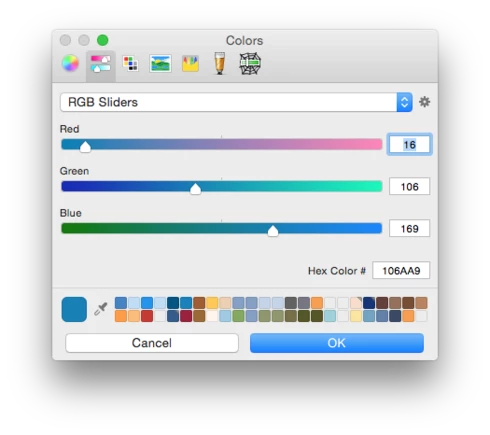
Color system color picker, the one where you select colors (with "Cancel" and "OK"). It has no way to display more than 2 rows (48) of color swatches at bottom of screen. Other versions of this gizmo have a dot that can be drawn down to expand the swatch area.

This may be an Apple problem, but wanted to report it.
This topic has been closed for replies.

9 replies

Legend
June 8, 2015
This was fixed by the OS X 10.10.3 update.
Inspiring
December 7, 2014
As Jeff already noted - Apple changed the color picker in MacOS 10.10, and we'll have to work with them to see if we can get it working again.
Inspiring
December 7, 2014


And yet all my swatches show up in After Effects (but with no resize option...)
jpbSCADAuthor
Participant
December 6, 2014
As seen below, yes, it's fixable.
jpbSCADAuthor
Participant
December 6, 2014
Thanks. I found a weird workaround, editing the plist, but not an easy, or reliable fix.
Legend
December 4, 2014
Looks like Apple changed the way the OK and Cancel Buttons are drawn for modal dialogs in Yosemite so they cover the resize thumb. We'll work with Apple to see what can be done.

Inspiring
December 4, 2014
Er, no. The application just asks the OS to put up a color picker and return a result. The application doesn't have too much control there.
jpbSCADAuthor
Participant
December 4, 2014
... and yet they do.

As developers, they can choose which interface items they use, and the problem lies with that one, which appears to me missing that magical dot which allows one to draw down the swatch section.

They're not entirely helpless, slaves to the OS. They can design their interfaces to work elegantly within the confines of any OS.

This is fixable.
Inspiring
December 3, 2014
That is the MacOS color picker, driver and drawn by the OS not Photoshop.
Photoshop has zero control over the MacOS color picker.